Most Manus AI video editing coverage blurs two different tools into one headline. Getting the split right is the difference between a workflow that saves your week and one that wastes an afternoon.
The first product is "Video" — generation. Inside the Manus agent, you choose Video and describe what you want: a sentence, a link to a video you like, a script, product images, or your own footage. The agent then researches the topic, writes the storyboard, generates shots with the Seedance 2.5 video model, records voiceover, picks music, adds sound effects, and edits the assembled cut.
Two details separate it from a standard text-to-video tool. When code produces a better result than pixels — charts, maps, motion graphics — Manus writes and renders code, then checks every render. And the output is "a project, not a flat file": shots, captions, graphics, voiceover, music, and effects each land on their own track, so nothing is baked in.
It can also pull brand context from the Notion, Slack, and docs you connect, and the official Video feature page gallery shows each example with a "view the prompt behind it" link worth mining.
The second product is the Manus AI video editor: the timeline. Shipped October 1, 2026 inside Manus Desktop for macOS and Windows, it opens a Manus video as a full layered project rather than a single MP4. You can change one caption without touching the rest of the edit, trim and rearrange clips, restyle titles, resize the canvas between vertical and widescreen, mix your own media with generated assets, and export.
Editing is hybrid: work the mouse or type in chat — "turn the music down" — and both routes update the same project, with Manus picking up from your edits instead of starting over.
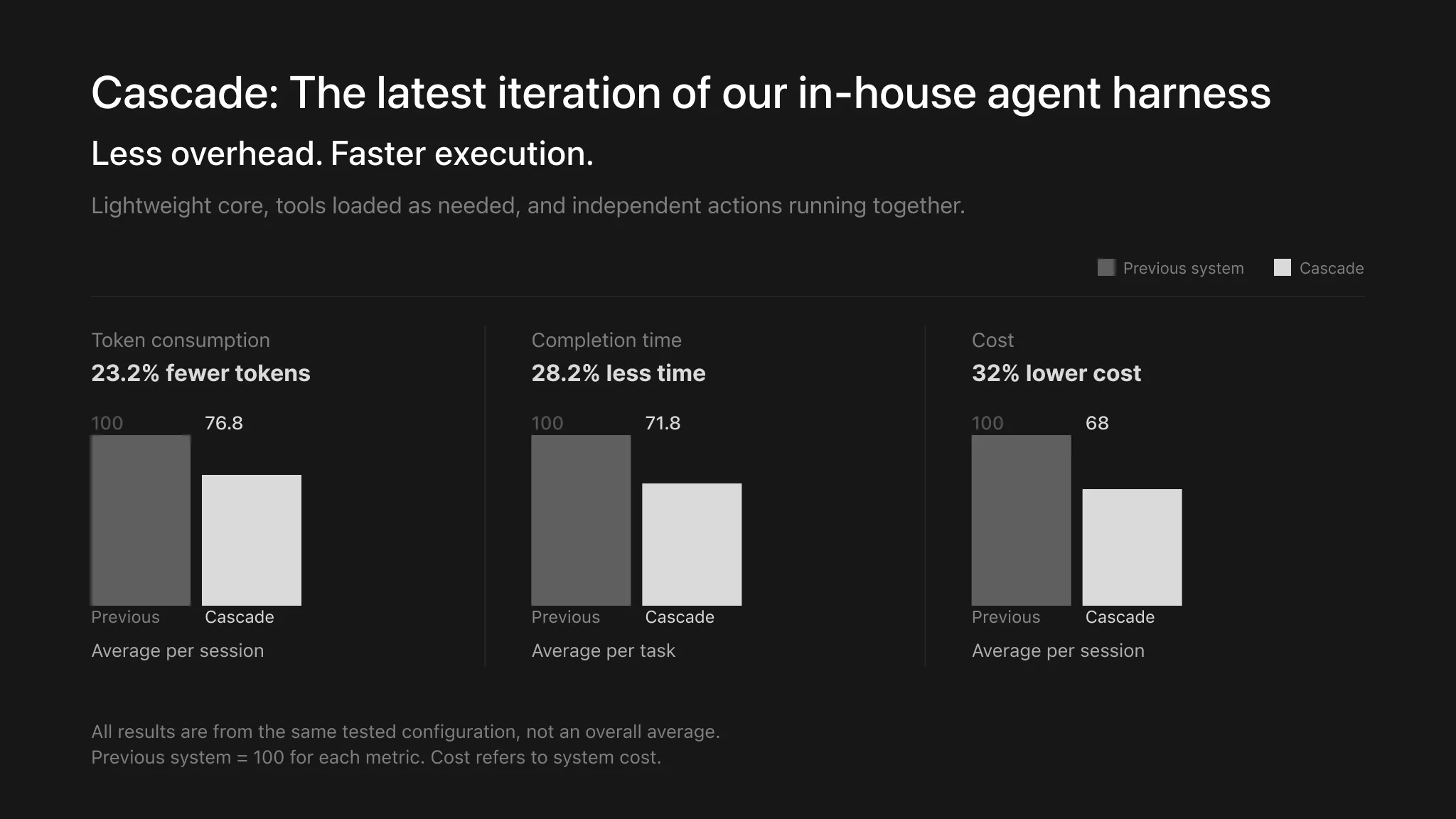
Manus 2.0 (September 28, 2026) rebuilt the agent on a harness called Cascade, quoting 23.2% fewer tokens, 28.2% faster task completion, and 32% lower run cost versus the previous system, and added Alchemy mode: the AI acts as creative director across video and code — one prompt, one polished video, still editable afterward.
The Numbers That Explain Why Marketers Are Paying Attention
Hype is cheap, so start with the cases Manus has documented itself.
The raw-footage benchmark: 125 camera clips, roughly 2 hours of travel footage across 3 days. Manus reconstructed the itinerary, delivered a first cut at 12:48, and finished at 10:50 with 195 cuts, 325 captions, 112 text effects and stickers, 7 mood-based music cues — ducked under speech — and 118 sound effects.
The speed benchmark: the launch film for Cue, Manus's standalone agent app, was briefed at 9 PM the night before launch. The agent read meeting notes, Notion, Slack, Figma, and repos, then proposed three storyboard directions in 76 minutes. The author replied "A. Make it." The finished film passed 1.7 million views on X, exported in 4K at 60 fps.
The craft runs deep: 5x slow motion via Python pixel-grid detection plus an FFmpeg conversion from 24 to 120 fps, and web research with on-screen citations — a 102-second Fat Bear Week explainer even flagged one vote count as unofficial.
The company's own framing: "Manus usually gets the first version 80 to 90 percent there" — the timeline exists for the last 10–20%. For small budgets, the team also shows a 20-second vertical UGC-style TikTok spot, the exact format performance marketers buy weekly.
The Verified 5-Step Manus Video Workflow
Here is the full Manus AI video editing workflow as documented on the official feature pages — the practical steps launch coverage skips.
1. Choose Video and write one sentence
The entry point is deliberately simple: choose Video in Manus — web or desktop — and describe the video you want in one sentence, or attach a link to a video you like, a script, product images, or your own footage. Writing that sentence well is the core skill; the prompt library below breaks down its anatomy.
2. Let the agent research and plan
Manus researches the topic, reads brand context from the Notion, Slack, and docs you connect, and writes the storyboard before generating anything — rendering charts and maps in code, verifying every render.
3. Generation and assembly
Shots are generated with Seedance 2.5; voiceover, music, and sound effects are layered on; then the agent edits the cut itself. Because every element stays on its own track, what lands in your account is a full editable project, not a flattened MP4.
4. Refine in chat
Review the first version and direct changes conversationally: swap the song, tighten the intro, insert your own footage, adjust the motion graphics. Manus 2.0's editor commands support exactly these edits, applied to the existing project instead of regenerating from zero.
5. Finish on the timeline, then export
Install Manus Desktop — macOS via the Setup 2.0.4 disk image, Windows via the Microsoft Store. Open the project in the timeline editor for the final 10–20%: frame-level trims, caption restyling, canvas resizing, export.
Editing Your Own Footage: The Raw-Footage Walkthrough
The most under-covered capability is also the most practical: Manus edits footage you already shot. The documented case expands into a repeatable pattern.
Import everything. Drop your camera or phone clips into a video task. The travel case worked from 125 unsorted clips; clean, sequential files still make review cheaper.
Brief the edit, not the footage. Describe the outcome: "review and transcribe every clip, reconstruct the storyline, cut a 3-minute highlight reel with chapter cards, burned-in captions, and music ducked under speech." The agent reviews the hours so you do not.
Review the first cut for story. The documented first pass landed at 12:48 before refinement. Check order and pacing here — those are the expensive changes once captions and effects pile up.
Direct refinements in chat. Swap music cues, fix captions, tune text effects. Single-element requests stay single-element; that is the point of layered output.
Finish and export. Final trims and title polish in the desktop timeline, then export. Cutting vertical for Shorts or Reels? Resize the canvas and check caption safe zones first — platform originality rules still apply to AI-assisted cuts.
Five Prompts You Can Copy Today
Every brief below follows the same one-sentence anatomy: goal + audience + length + aspect ratio + tone + production elements — captions, music, voiceover, language. Swap the bracketed slots and paste.
Product ad:
Make a 30-second vertical UGC-style TikTok ad for [product] targeting [audience]. Research what the top-performing TikTok ads in this niche look like right now, write a hook-first script, generate the shots with Seedance, add on-screen captions and music, and keep every element on its own layer so I can adjust the final cut.Raw footage to highlight reel:
I've attached ~2 hours of footage from my [trip/event]. Review and transcribe every clip, reconstruct the storyline, and cut a 3-minute highlight reel with chapter cards, burned-in captions, and music split into mood cues that duck under speech. Export in 4K.Webinar to short clips:
Here is a 45-minute webinar recording. Pull out the 4 strongest moments and turn each into a 60-second vertical clip for Reels/Shorts with a hook title card, captions, and a branded end frame.YouTube explainer:
Create a 5-minute YouTube explainer on [topic]. Research current sources and cite them on screen, write the script, generate the shots with Seedance 2.5, use code for any charts or maps, and add voiceover and subtitles in [language].Brand-context launch film:
Read my brand notes in the attached Notion doc, then propose 3 storyboard directions for a 45-second product launch film. Wait for my pick before generating the full video with voiceover and music — deliver 16:9 and 9:16 versions.The last prompt encodes the habit that separates good from great: gate expensive generation behind your approval of the storyboard — the same pattern as the Cue film's "A. Make it." moment. For the script stage that precedes all of this, see our rundown of AI video script generator tools.
Manus vs CapCut vs InVideo vs FLUX Video Edit vs Premiere
Agent editing and timeline editing solve different problems. Here is where each tool wins:
| Tool | Editing model | Best for | Weak spot | Pricing reality |
|---|---|---|---|---|
| Manus | Autonomous agent — researches, scripts, generates, edits; hybrid chat + timeline | First drafts, long-footage triage, batch social cutdowns, code-driven motion graphics | Frame-precise color, multicam, broadcast polish | Free: 1,000 signup + 300 daily credits; paid from $39/mo at launch pricing |
| CapCut | Timeline plus template AI (auto-captions, effects) | Fast mobile-first social edits | Template sameness; no research or scripting agent | Free tier; Pro subscription |
| InVideo | Prompt-to-video from stock and templates | Quick marketing videos | Stock-heavy look; shallow editing depth | Free tier; paid plans |
| FLUX Video Edit | Prompt-based edits inside existing clips | Changing objects or motion within a shot | Clip-level only — no story, no timeline project | Credit-based |
| Runway | Clip-level generative editing | Shot generation and style work | You assemble the story yourself | Free tier; subscription |
| Adobe Premiere Pro | Manual timeline | Color, multicam, audio post, broadcast | Hours of skilled labor per video | Subscription (single app) |
The pattern: CapCut and InVideo automate tasks inside templates; FLUX Video Edit and Runway operate at the clip level; Premiere is manual mastery. Manus is the only entry that researches, scripts, generates, and edits as one delegated job — the working definition of an AI agent video editor. Our FLUX Video Edit guide covers the clip-level school, and the Made on YouTube review covers Google's conversational take.
One layer the table skips is the words. ArWriter drafts video scripts, YouTube descriptions, and caption text in one workspace — plans start at $4.99/month, and it slots neatly in front of whichever editor you choose.
The Real Cost: Manus Credits vs. a Freelance Editor
Two truths up front. First, the only fully verified prices are launch prices: when Manus introduced subscriptions in March 2025, plans started at $39/month for 3,900 credits and 2 simultaneous tasks, up to $199/month for 19,900 credits, 5 tasks, and priority peak access (TechCrunch). Second, those are launch figures — the pricing page loads current numbers in your browser, so check it before budgeting, because prices and packaging may differ today.
The free tier is documented in the help center: 1,000 credits on signup, plus 300 daily credits and referral bonuses. Enough to keep testing short videos; not enough to run a channel.
No public per-video credit table exists — consumption varies with task complexity, length, and how many regeneration rounds your refinements trigger. Treat any exact per-video figure you read elsewhere as invented.
Two levers stretch a budget. Cascade cut run cost by a quoted 32%, and Manus Flex (September 2026) lets you plug in your own inference API key — OpenRouter, Fireworks, or Modal — so model inference bills at your provider's rate while Manus credits cover the rest of the stack.
Against a freelancer, the honest math is plan-level, not per-video. Typical freelance editors on major marketplaces run $25–$75/hour, and a polished 3–5 minute brand video commonly lands between $150 and $600. One month at the $39 launch tier cost less than a single mid-range gig. If the agent's 80–90% first draft meets your bar, human editing becomes an exception handler, not the production line. Agencies: the Team tier adds pooled credits, a 17% annual-billing discount, SSO, and SOC 2 Type II plus ISO 27001.
A Founder's Month With Agent Editing
Numbers from Manus tell you what happened in a demo; here is what adoption looks like in practice. Marcus, a Shopify founder in Austin selling modular desk setups, shared his eight-week tally — his figures, not the company's.
Before: a $1,150/month retainer bought six product videos plus a few TikTok cutdowns — and Marcus still spent 15-plus hours a month on briefs, assets, and reviews.
Now he briefs agent-edited videos on Sunday nights, one sentence plus a Notion link, and reviews first cuts on Monday mornings. Over eight weeks he shipped 47 agent-first videos, up from 22 in the prior two months, while hands-on time fell to about five hours a week. The retainer dropped to a $350 quarterly project for the flagship brand film, where he still wants a human colorist.
His rule after two months: agent editing owns volume and iteration; humans own the once-a-quarter assets where taste is the product. If you run faceless or camera-optional formats, the split tilts further — our guide to AI avatar videos without a camera maps that stack.
The Blocked Meta Deal, the $4B Raise, and Creator Trust
Ninety seconds of context, because "will my editor disappear?" is a fair question in 2026.
The arc, per TechCrunch: Benchmark led a $75 million round at roughly a $500 million valuation in April 2025. By December 2025, Manus had millions of users and over $100 million in ARR. Meta then moved to acquire the company for $2 billion — a deal that was blocked.
Independent again, Manus spent September 2026 raising $500 million at a $4 billion valuation (as reported by the WSJ), with a Hong Kong IPO under consideration. The investor list reportedly includes IDG, Boyu, CATL, Tencent, HSG, and ZhenFund.
For creators, the shipping cadence is the real signal: Manus 2.0 landed September 28 and Video Editor on October 1 — both post-block, post-independence. The company also publishes enterprise commitments on team plans: SOC 2 Type II, ISO 27001, and a flat "we do not train models on your data."
Standard hygiene still applies: keep local exports of anything that matters. If the Sora API shutdown burned you, our migration guide has the vendor-risk checklist worth re-running here.
Frequently Asked Questions
How do I edit a video with Manus AI step by step?
Open Manus, choose Video, and describe the video in one sentence — goal, audience, length, aspect ratio, tone, captions, music. The agent researches, storyboards, generates shots, and assembles a first cut. Refine it by chat, then polish the final 10–20% on the desktop timeline and export.
Is Manus AI good for video editing?
It depends on the job. For first drafts, social cutdowns, explainers, and triaging hours of raw footage, AI agent video editing is strong — one documented case turned 125 clips into a 10:50 travel film. For frame-precise color grading or multicam studio work, a traditional timeline editor still wins.
Is the Manus AI video generator free?
Partly. Every account gets 1,000 credits on signup plus 300 daily credits and referral bonuses — enough to test short videos. Sustained work needs a paid plan, which started at $39/month for 3,900 credits at launch. Those are 2025 launch figures; confirm current prices before committing.
How much does Manus AI cost per month?
At launch in March 2025, plans ran $39/month for 3,900 credits and 2 parallel tasks, or $199/month for 19,900 credits, 5 tasks, and priority peak access — per TechCrunch. Packaging has changed since, and the pricing page loads dynamically, so treat these as launch figures and verify current numbers.
Can I use Manus AI for free every day?
Yes, within limits. The free tier refreshes 300 credits daily on top of the 1,000 signup grant, so you can keep experimenting without paying — short clips fit comfortably. Longer videos with music and voiceover burn credits faster, and caps on parallel tasks still apply.
Can Manus edit my own footage, or only AI-generated video?
Both. Drop your camera or phone clips into a video task and describe the edit; the agent reviews the footage, reconstructs the story, and cuts a first version. In the desktop editor you can mix your own media with generated assets on the same timeline before export.
What video model does Manus use to generate shots?
Manus generates shots with Seedance 2.5, the video model behind its Video feature. When code beats generated pixels — charts, maps, motion graphics — the agent writes and renders code instead, and checks every render before assembling the final cut, so data visuals stay accurate.
Does Manus have a real timeline video editor?
Yes. Video Editor is a full timeline inside Manus Desktop for macOS and Windows. It opens a Manus video as a layered project — shots, captions, music, voiceover on separate tracks — where you can trim, restyle, resize the canvas, edit by mouse, or direct changes in chat.
Final Cut: Where Agent Editing Fits in Your Stack
Manus AI video editing is not a replacement for your editor — it is a replacement for your blank timeline. The pattern that works: delegate the first 80–90% to the agent, keep the last 10–20% human, and let your credit balance, not your calendar, set publishing volume.
Start on the free tier with one webinar recording or one folder of raw clips. If the first cut lands at eight-out-of-ten quality, you have found your production line. If it lands at five, you have spent 300 daily credits finding that out — cheaper than any subscription.
And whichever editor wins your timeline, the script decides whether the video works. ArWriter writes video scripts, descriptions, and captions for creators and marketing teams, with plans from $4.99/month. Pair it with Manus for the cut, and the whole pipeline runs from one-line briefs to export.
Sources
- Manus Video feature page — official generator workflow, gallery, and use cases
- Manus Video Editor feature page — official timeline capabilities and desktop availability
- Introducing Video Editor (Manus blog) — raw-footage case study, Cue film numbers, 4K/60 fps export
- Introducing Manus 2.0 (Manus blog) — Cascade efficiency figures, Alchemy mode, Studio
- Manus launches paid subscription plans (TechCrunch) — March 2025 launch pricing
- Manus seeks $4B valuation in new $500M fundraise (TechCrunch) — September 2026 independence and raise
- The least surprising chapter of the Manus story (TechCrunch) — users, ARR, and the blocked Meta acquisition
- Manus Help Center: billing — free-tier credits and billing documentation