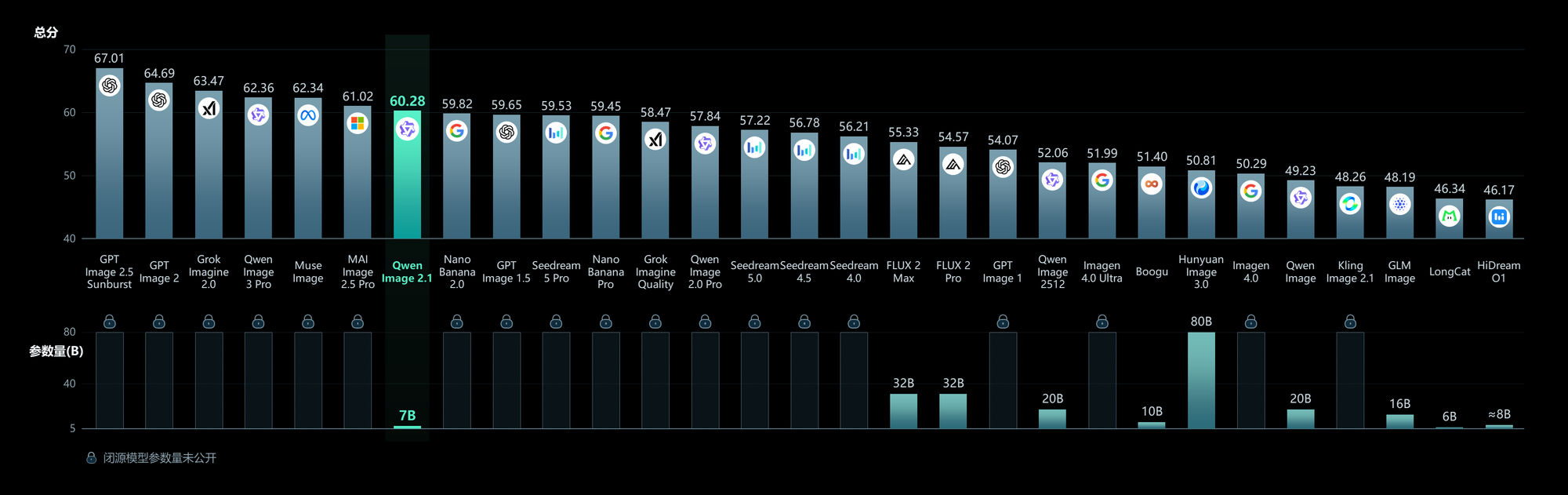
On September 20, 2026, Alibaba's Qwen team quietly dropped something the independent-creator crowd has been asking for: Qwen-Image-2.1, an open-weight model that handles both image generation and image editing in one package, small enough to run on a consumer GPU. No subscription, no per-image meter, no rate ceiling — just weights you download and run.
That pitch alone wouldn't be news; open image models appear every month. What makes this release worth thirty minutes of your attention is a specific combination: native transparency output, editing with up to ten reference images, and a genuinely small footprint. There is also a license catch that most breathless headlines skipped, and we'll get to it — because it changes who this tool is actually for.
What exactly was released?
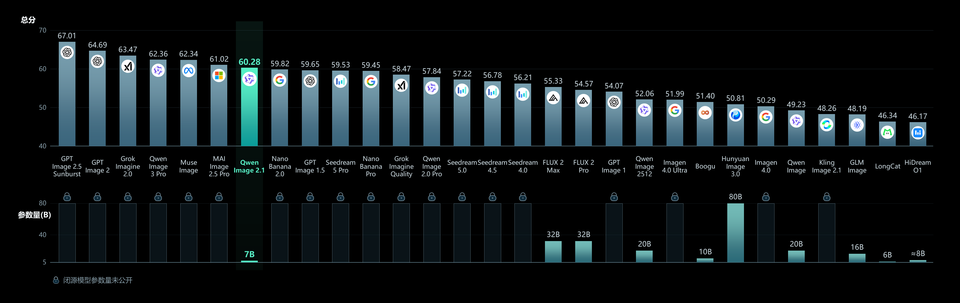
The release lives where you'd expect: a model card on HuggingFace, a code repository on GitHub, and an official blog post from the Qwen team. The visual generation component runs on 7 billion parameters — thirty-two single-stream DiT layers — which is deliberately compact. For context, closed frontier image models are estimated to run orders of magnitude larger, and that gap is exactly why this one fits on a desktop card while they stay in data centers.
The architecture uses mixed-granularity attention and reuses a prefix KV cache across generation steps, which the team says keeps inference fast — particularly when you feed it multiple reference images in a single request. Supported output sizes range from square 2048×2048 up to 16:9 at 2752×1536 and 9:16 at 1536×2752, covering every social format without upscaling tricks.
Four capabilities that matter for working creators
Native RGBA transparency, not background removal
The model generates images with a real alpha channel from the start. In practice: logos, stickers, product cutouts, and overlay elements come out ready to composite — no secondary removal pass, no fuzzy edges on hair or glass. It also edits transparent layers directly (swap the text on a sticker, recolor a badge) and can lift a subject out of a regular photograph when you need a clean cutout.
Ten reference images in one request
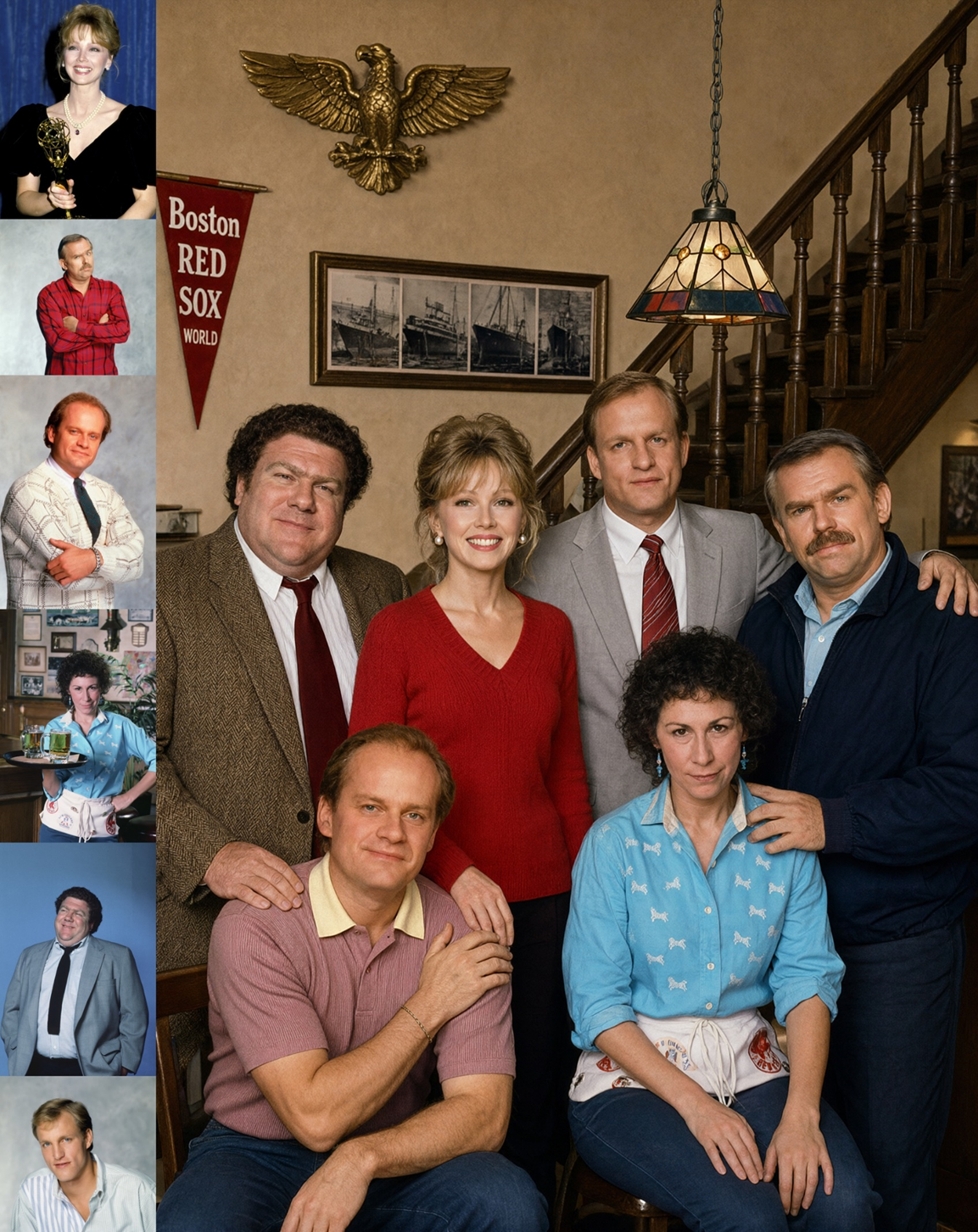
You can attach up to ten reference images and the model preserves the identity of people and products across them. The team's showcase example: a group portrait assembled from six separate individual photos. Think remote-team pages, family composites, product lines shot at different times — scenarios where you need consistency across inputs that were never shot together.
Local editing without precise masks
To target an edit, you circle the region, scribble a rough annotation, or supply a proper mask if you want surgical precision. Change a product color, remove a photobomber, replace a background — the kind of small edits that used to justify opening a full editor. Lowering the friction on micro-edits is quietly one of the biggest workflow wins here.
Typography and texture improvements
Qwen says 2.1 improves in-image text rendering, portrait lighting, and fine textures like fabric and skin. The official typography samples look strong. As with every vendor claim, treat the superlatives as provisional — independent benchmark results are not out yet, and the leaderboard talk you may have seen traces back to Qwen's own evaluations.
How to actually get your hands on it
Four routes, easiest first. One: the official demo space on HuggingFace Spaces — zero install, useful for judging quality before committing anything. Two: the weights on HuggingFace, run locally through the diffusers library (the model card includes copy-paste snippets for generation, editing, and transparent output). Three: the GitHub repository with code and examples. Four: ModelScope, the Chinese mirror, which matters if your download routes to HuggingFace are slow.
On hardware: coverage of the release indicates the model runs on an RTX 3090-class card with bfloat16, and the card documents a model-CPU-offload option to shrink memory use. Output at 2048px and above in forty inference steps is realistic on that class of hardware — this is a real workstation tool, not a cluster project.
What this means for your workflow
- E-commerce operators: batch product variations (colors, backgrounds, seasonal banners) from a single source photo, with transparent assets ready for store templates.
- Social media managers: quick localized edits and on-format exports (16:9, 9:16) without a per-image bill — useful for high-volume, lower-stakes content.
- Freelance designers: a production aid for repetitive compositing and cutout work; your judgment stays the product, the model handles the tedium.
- Privacy-sensitive teams: local execution means client imagery never leaves your machine — a genuine differentiator versus every cloud tool.
One honest caveat for non-Latin scripts: the documented text-rendering examples are English. If your work involves Arabic, Devanagari, or other scripts, test in the demo space first — image models have a mixed track record with connected and diacritic-heavy writing systems, and nothing in this release documents improvements there.
Quick comparison with what you're probably using
- Qwen-Image-2.1: free open weights · native RGBA transparency · up to 10 reference images · runs locally on an RTX 3090 or better.
- ChatGPT Images 2.5: subscription or paid API · limited transparency · fewer references · cloud only.
- Qwen Image 3.0 Pro: cloud service · partial transparency · limited references · no local option.
- Nano Banana 2.0 (Google): inside Gemini products · partial transparency · limited references · cloud only.
For deeper context, read our breakdown of ChatGPT Images 2.5 features and our hands-on-angle review of Qwen Image 3.0 Pro for content creators. The pattern to internalize: open models win on cost, privacy, and freedom; cloud services still win on convenience, consistency, and zero setup.
The honest limits — read before you build on this
- The license is research-only. The Qwen Research License prohibits commercial use. Shipping these images in a client campaign or a live store requires negotiating a separate commercial license with the Qwen team. "Free" means free to learn, test, and build — not free to monetize.
- Vendor benchmarks only. The "beats closed models" narrative circulating in coverage comes from Qwen's own leaderboard. Independent evaluations are explicitly still pending. Interesting, promising, unverified.
- No polished end-user app. Beyond the demo space, you're in Python-and-diffusers territory. Third-party GUIs will adopt it eventually; at launch, this is a builder's tool.
- Hardware gate. A 3090-class GPU and tens of gigabytes of disk exclude plenty of otherwise-interested users.
- Day-one software. Expect rough edges, community patches, and fast iteration. Don't wire anything mission-critical to a model released this week.
Frequently asked questions
Is Qwen-Image-2.1 really free?
The weights are free to download and use for research and development. Commercial use requires a separate license from the Qwen team, so budget for that conversation if this becomes part of a money-making pipeline.
Can I run it on my own computer?
Yes, if you have an RTX 3090-class GPU or better, adequate system RAM, and disk space for the weights. The model card documents a CPU-offload mode to reduce memory pressure on tighter setups.
What image sizes does it support?
Square 2048×2048, plus common aspect ratios up to 2752×1536 (16:9) and 1536×2756 (9:16) — covering web banners and vertical social formats natively.
How is it different from Qwen Image 3.0 Pro?
3.0 Pro is Alibaba's cloud-hosted offering; 2.1 is the open-weights release you run yourself. Different distribution, different license terms, different trade-offs — we cover 3.0 Pro separately.
Does it render non-English text well?
The official samples are English, and no claims are documented for other scripts. Test your target script in the demo space before relying on it.
Bottom line
Qwen-Image-2.1 is the most practical open image model release in a while for people whose livelihood involves producing lots of images: native transparency, ten-reference consistency editing, and workstation-scale requirements. Treat it as a power tool with a research-only license — superb for learning and prototyping, contractual homework required before commercial use. If your priority is a ready-to-use Arabic-first workflow instead of a local rig, tools like ARWriter's image prompt library deliver consistent results from the browser, and the ARWriter platform wraps writing, imagery, and publishing in one place.