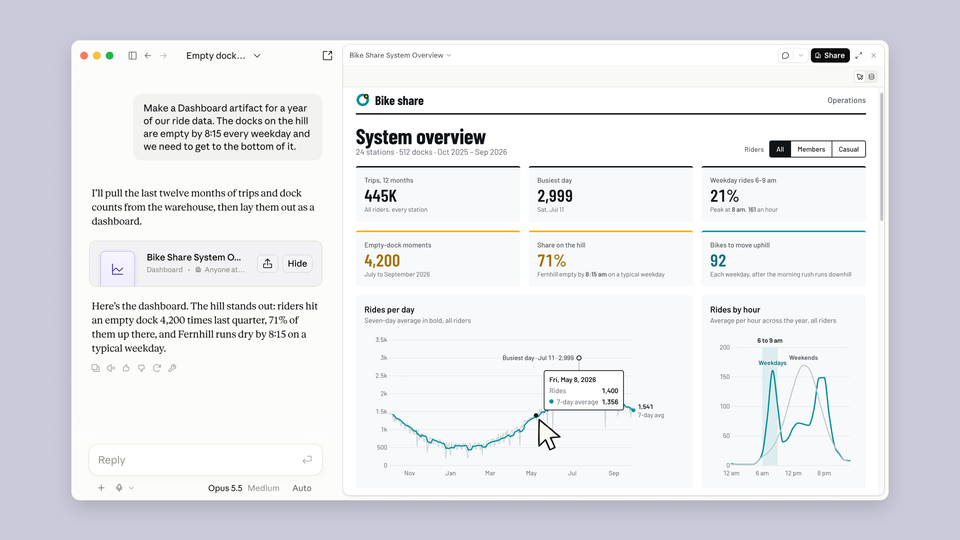
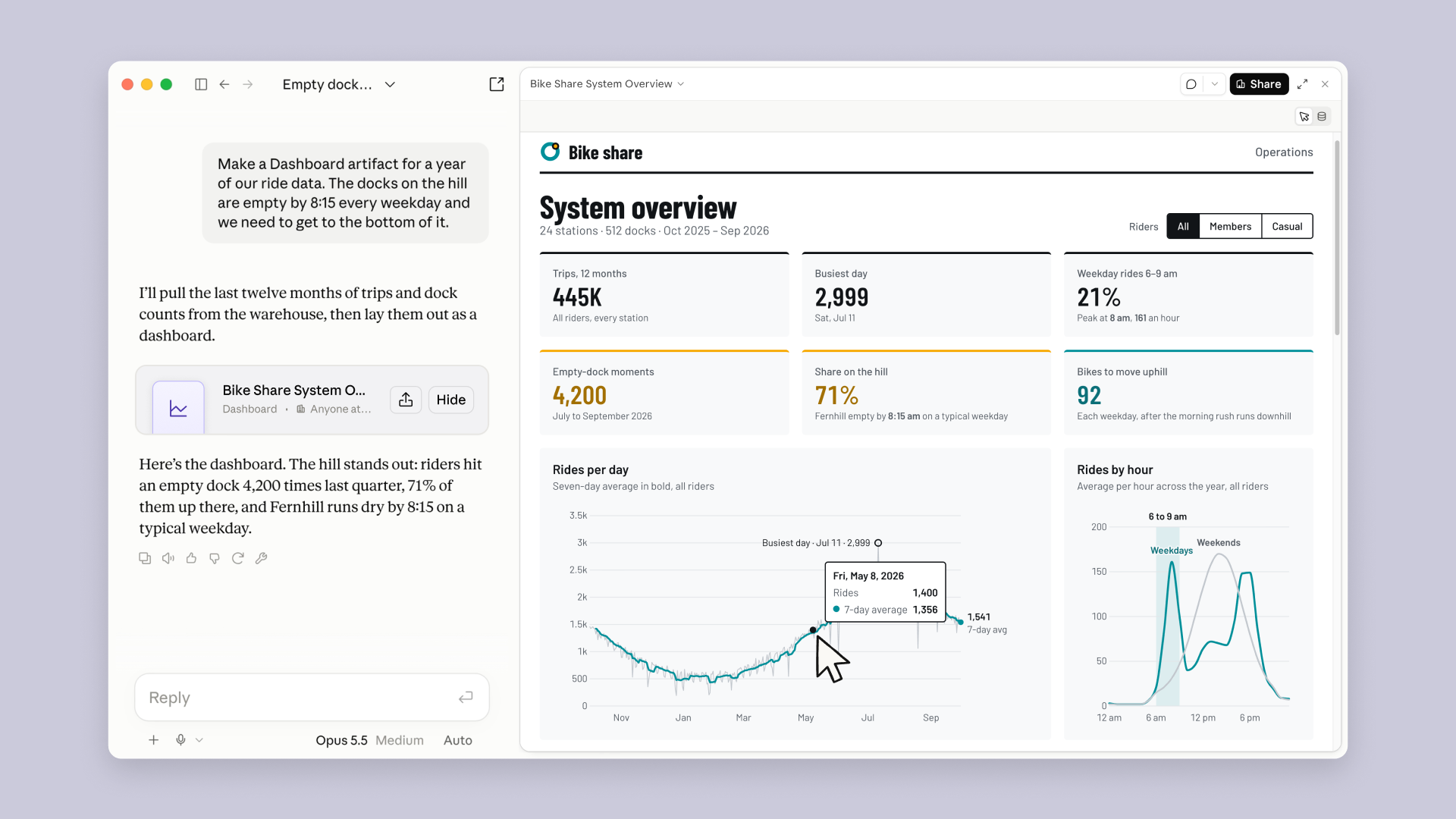
On October 8, 2026, Anthropic announced an update that changes what working inside Claude looks like: from "a conversation that produces text" to "a workspace that produces finished deliverables." Claude Dashboards, interactive data dashboards built inside the conversation, entered beta for paid plans. Claude Motion, which turns content into polished animated video, entered beta for Team and Enterprise plans. And the embedded Docs, Slides, and Design apps reached general availability for all plans — including the free one. The official announcement came in a detailed article on the Claude site dated October 8, confirmed within hours by Reuters and specialist coverage.
For anyone following Anthropic's fall cadence, the timing is no accident: two weeks after the Opus 5.5 launch and its new creator pricing, and one week after Claude Sonnet 5.5, 30% faster, the company is trying to convert its models' drafting and analysis strength into actual user retention — by turning Claude from a tool you ask into a place you work. This guide breaks down exactly what shipped in each feature, who should consider upgrading for it, and the honest limits to know before relying on any of it.
Dashboards: from question to panel in one request
The core idea in Dashboards is simple but solves a real problem. Instead of asking Claude a question and getting a text answer that scrolls away with the next message, you can request a full dashboard — built in front of you as a live, interactive artifact inside the conversation that anyone on the project can use. The data isn't static screenshots: click any number in the panel and Claude shows you the query that produced it, so verifiability is built in for anyone who wants to check where a metric came from.
At launch the feature supports direct connections to the major data sources: Amazon Redshift, Google BigQuery, ClickHouse, Databricks, Snowflake, and Salesforce — near-complete coverage of the tools companies actually run on. Every dashboard displays a "last refreshed" timestamp, which makes it usable for ongoing monitoring rather than a one-off session.
For teams that want to go deeper, dashboards support hand-off to specialized analytics tools: Amplitude, Grafana, Hex, Mixpanel, Omni, Perplexity, PostHog, and Sigma, with Looker, monday.com, and Tableau promised soon. In practice, a content team can start inside Claude and export the work to the tool the data analyst already knows — without rebuilding anything.
Motion: animated video from your content — fully editable
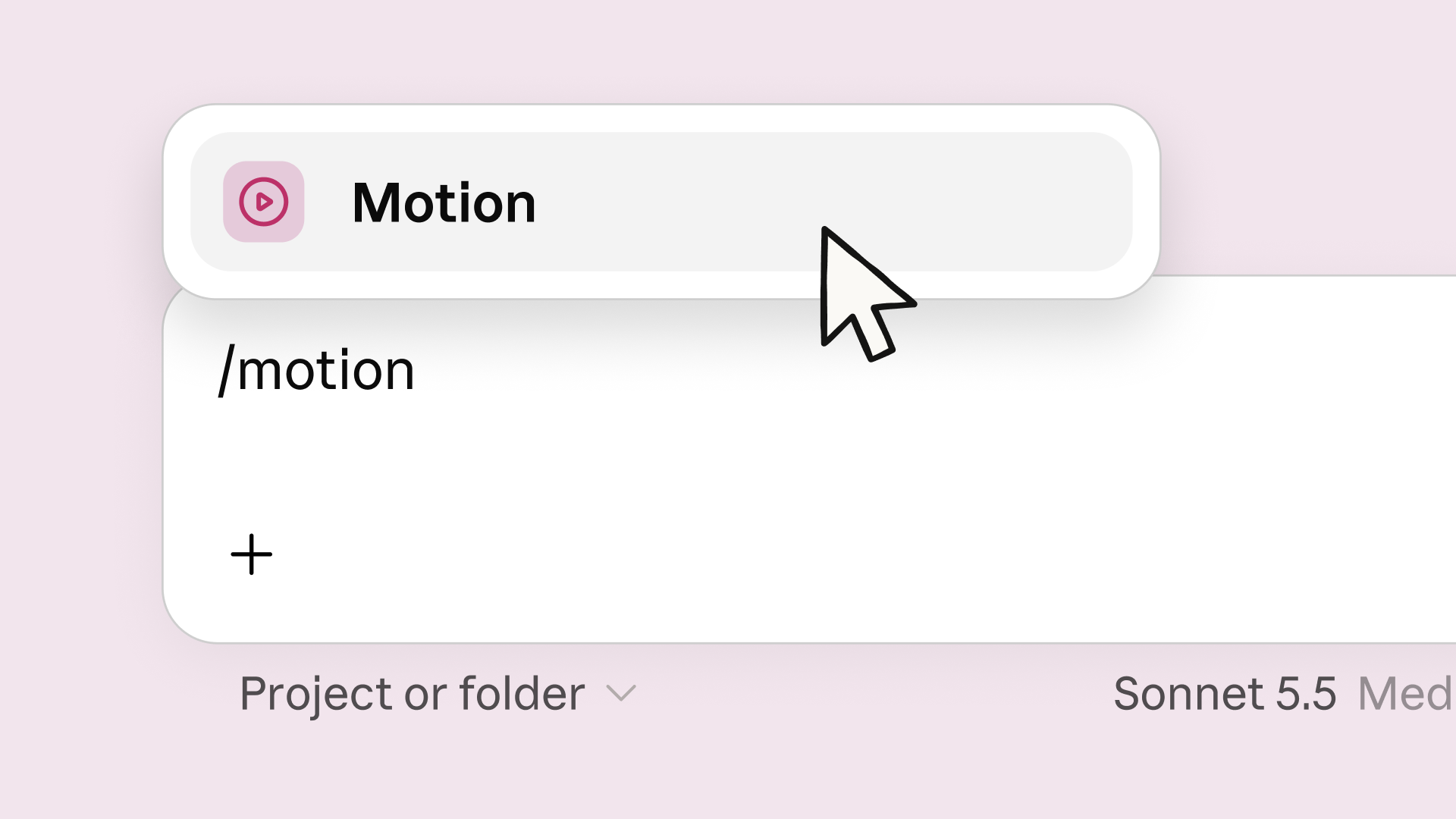
Here is the part that matters most to content creators specifically. Type the /motion command inside Claude — or ask for an animated video in plain language — and Claude turns the content into an animated scene: moving text, charts that build progressively, shapes and images sequenced professionally. The output exports as an MP4 ready to publish wherever you want.
But the detail that separates Motion from every AI video generation tool: the resulting scene is editable as code. Every word, every number, every motion timing can be adjusted after generation. You are not hostage to what the model produced; you own a living file you edit the way you'd edit a document. That's precisely what content teams working under a fixed visual identity and multi-round review cycles need.
And to set expectations honestly: Motion is not a video generation model in the familiar sense — it will not produce synthetic people or photorealistic footage. It's an animation engine for informational content: animated presentations, explainers, visual summaries, digital ads. For those who need more, Anthropic announced editing partnerships with Adobe, Descript, HeyGen, Higgsfield, invideo, Luma AI, and Runway — fully generated video has its own separate track through those tools, with Canva and Captions on the way.
Docs, Slides, and Design reach general availability — free tier included
The third part of the announcement concerns people who use Claude as a daily workspace: the embedded Docs, Slides, and Design apps (which open your files beside the conversation and edit them with you) graduated from preview to general availability for all plans — including Free. Anthropic noted in the announcement that users have produced more than 45 million artifacts through these apps so far.
The details that matter to professional teams: support for customer-managed encryption keys (CMEK) for companies that require full control over encryption, co-editing for collaborative work on the same file, and PowerPoint and PDF export that preserves formatting — historically the downfall of every cloud editing tool. Google Slides export is now directly editable, and mobile editing is available. For enterprises: the rollout arrives gradually over two weeks with administrative control, and the apps will be enabled by default for organizations starting October 15.
As for the standalone Claude Design tool, it continues until December 14, 2026, before being fully merged — with an official migration guide on the support pages for anyone with files in it.
What this means for content professionals
Let's step out of the announcement frame and into practical impact for people who write, design, and publish on deadlines:
- Visual summaries without a designer: informational content — a monthly performance report, a research summary, an explainer of a complex idea — used to require either a designer or a rigid template in an animation tool. With /motion it becomes an editable animated scene in minutes, which opens short-form educational video to writers themselves.
- Data becomes visible inside the conversation: anyone running a publishing calendar or analyzing post performance can build a live metrics panel straight from the data sources, and verify every number by clicking it — no screenshots from other tools, no hand-built spreadsheets that go stale weekly.
- Zero entry threshold for documents: the Free plan now includes Docs, Slides, and Design inside Claude, so a starting creator can test the full workflow (writing + editing + presentations) before paying anything.
- Export is no longer the obstacle: PowerPoint and PDF export with formatting preserved, plus editable Google Slides export — what you produce inside Claude can actually be delivered to a client or team living in Office or Google.
- An honest note: if your core work is long-form text, this announcement doesn't change the essence of the writing itself — Claude's value to you remains drafting and editing. The leap here is for anyone expanding their content toward the visual, the animated, and the data-driven.
A practical workflow: from article to animated video in one session
To make this concrete, here is a realistic scenario for a creator turning a weekly article into a short educational video using the full October 8 feature set:
- Prepare inside Docs: the article is written and edited as a Claude document (or a Google Doc via the connectors). Before animating, you ask Claude to extract the "visual skeleton": the core points, the key numbers, and the closing message — translating written logic into scene logic.
- Build the dashboard if numbers are involved: if the article includes performance data or statistics, you request a dashboard straight from the data source, and click each number to inspect its query before it ends up on video — a precision step that protects you from animating a wrong figure in front of your audience.
- Animate with /motion: request an animated scene that opens with the question the article answers, builds the points progressively, and renders numbers as moving charts rather than static text. The first output is a draft — that's normal.
- Edit instead of regenerating: and here is Motion's decisive advantage: rather than rewriting the prompt from scratch hoping for a better result, you open the scene and edit directly — the word that didn't land, the shot that runs slow, the number that changed. Every element is editable the way you'd edit a spreadsheet cell.
- Export and publish: export the MP4 and publish wherever your audience lives. For a higher professional polish (voice, editing, an on-camera presence), the official path is the partner tools: Descript for text-based editing, HeyGen for virtual presenters, Runway and Luma AI for generated scenes.
The total time for this scenario the traditional way — a motion designer plus email review rounds — is measured in days. The new way is measured in hours, and that gap is precisely why the October 8 announcement is news for content creators, not just data engineers.
The part teams care about: security and admin control
For teams and enterprises, the announcement carried operational details that go beyond headlines. Customer-managed encryption key (CMEK) support means the company keeps encryption control in its own hands — a contractual requirement in sectors like finance and healthcare. Co-editing means the decks and documents inside Claude are now collective assets managed like any cloud document, not individual outputs stranded in separate conversations.
On the other side of the ledger: dashboards reach organizations disabled by default and are governed under Org settings → Artifacts, while the embedded apps will be enabled by default for organizations starting October 15 — meaning admins have a two-week window to tune policies before automatic enablement. Anyone managing a Workspace account for a content team should review these settings now rather than be surprised by them.
The October 8 features at a glance
| Feature | Who gets it now | Status | Headline capability |
|---|---|---|---|
| Claude Dashboards | Paid plans | Beta | Interactive panels from Snowflake, BigQuery, Salesforce and more, with an inspectable query behind every number |
| Claude Motion | Team and Enterprise | Beta | Content to editable MP4 animated video — not camera-generated footage |
| Docs and Slides in Claude | All plans including Free | General availability | Co-editing, formatting-preserving PowerPoint/PDF export, editable Google Slides |
| Claude Design | All plans | GA — merges December 14 | Design beside the conversation, with an official migration path |
| Enterprise controls | Enterprise admins | Gradual rollout | Dashboards off by default for organizations, managed under Org settings |
The limits and drawbacks, honestly
From Anthropic's own announcement and the official support pages, these are the documented constraints:
- Beta, not finished product: both Dashboards and Motion are in beta — expect imperfect behavior and limits that shift with updates.
- Motion is not a video generator in the popular sense: no synthetic people, no photorealistic scenes. That need is routed to the partners (Runway, Luma AI, HeyGen, and the rest).
- Uneven feature distribution: Dashboards is paid-only and Motion is Team-and-Enterprise-only — an individual Pro user gets neither Motion today, a strange gap in the rollout worth waiting out.
- Enterprises start locked: dashboards are disabled by default on Enterprise and require administrative enablement under Org settings → Artifacts — an understandable security posture that nonetheless slows adoption.
- Limited source list: 6 major sources at launch; teams with data in other systems wait for the list to expand or route through an intermediary tool.
- Migration window: standalone Claude Design users have until December 14, 2026 before the full merge — anyone with active projects there should plan the migration now, not later.
Frequently asked questions
Does Claude Motion generate AI video like Sora does?
No. Motion is an animation engine for informational content — text, charts, shapes, and images moving in an editable professional sequence that exports to MP4. Generating realistic scenes and people is a separate track via partners like Runway, Luma AI, and HeyGen.
How are Dashboards different from traditional BI panels?
A BI panel needs an analyst and weeks of work, while a Claude dashboard is built from a natural-language request inside the conversation, usable by any project member, with the query behind every number inspectable by clicking it. Faster to reach, but not yet a full replacement for deep enterprise analytics.
Are the embedded apps (Docs, Slides) really free?
Yes. They reached general availability for all plans including Free, with formatting-preserving PowerPoint and PDF export, editable Google Slides export, and mobile editing.
I'm on an individual Pro plan — do I benefit from this update?
Partially. You get Dashboards (beta) and the Docs, Slides, and Design apps at general availability. But Motion is currently reserved for Team and Enterprise plans, so it doesn't reach you unless Anthropic widens its availability later.
What happens to my files in standalone Claude Design?
The standalone tool runs until December 14, 2026, then merges fully into the unified Claude experience. Anthropic published an official migration guide on the support pages, and design is already available inside Claude for all plans.
The verdict: which door do you open?
The October 8 announcement paints Claude as a full workspace project: you write in it, edit your documents and decks beside the conversation, build live data panels, and animate your content into video — now with an audience stretching down to the free plan. For working creators, the practical message is that the threshold for trying a visual workflow has dropped to nearly zero (Free is enough to start), and short animated educational video is now within a writer's reach, not just a designer's. But treat the beta as beta: experiment, evaluate, and don't migrate your whole workflow before the features settle.
And if you want the other side of the equation — producing publish-ready articles and research at speed with consistent quality — try ArWriter, which brings writing, images, and research together in one bilingual workspace, with the automatic article and research writer that takes you from an idea to a publishable draft, on plans starting at $4.99/month.