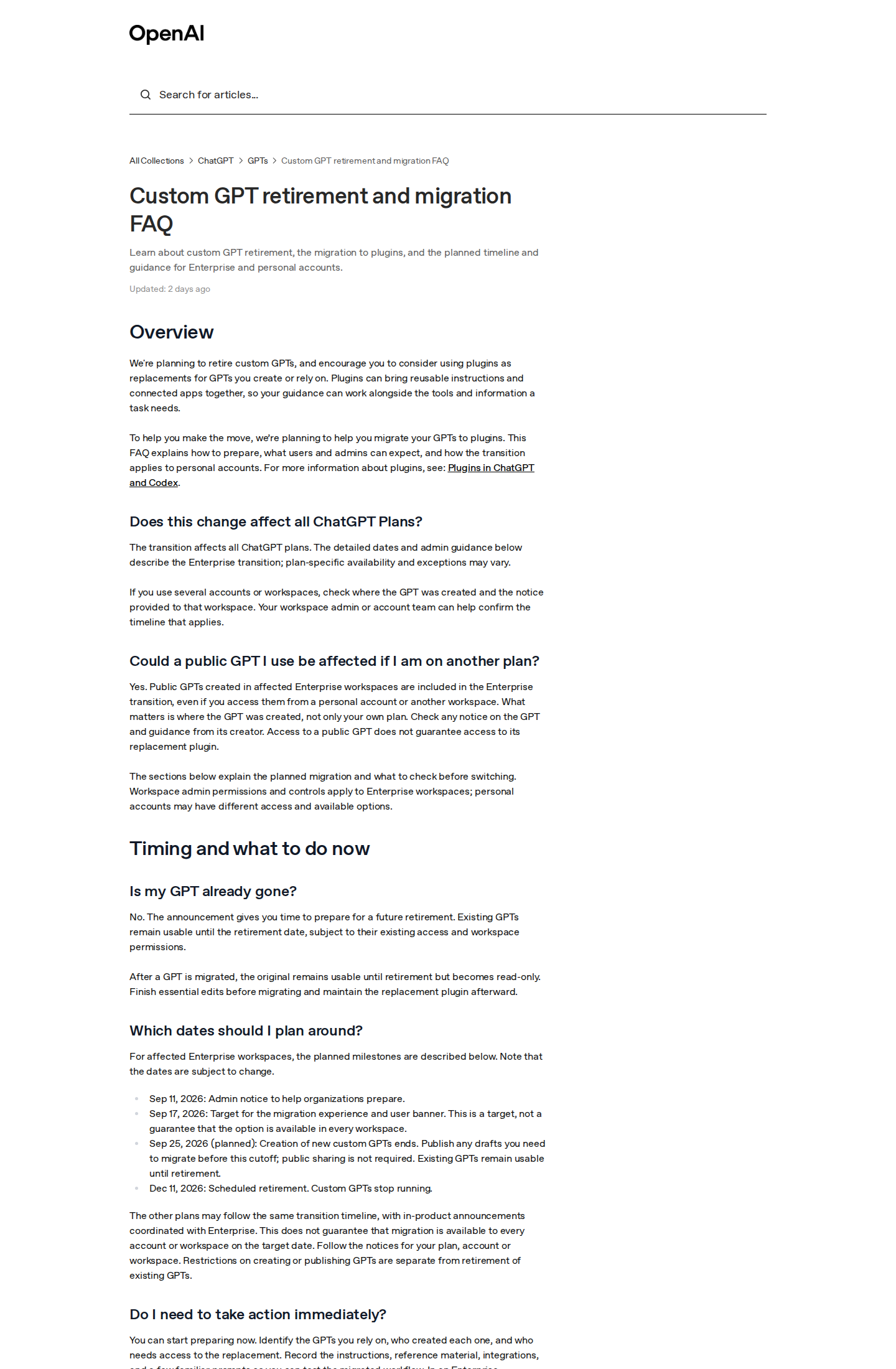
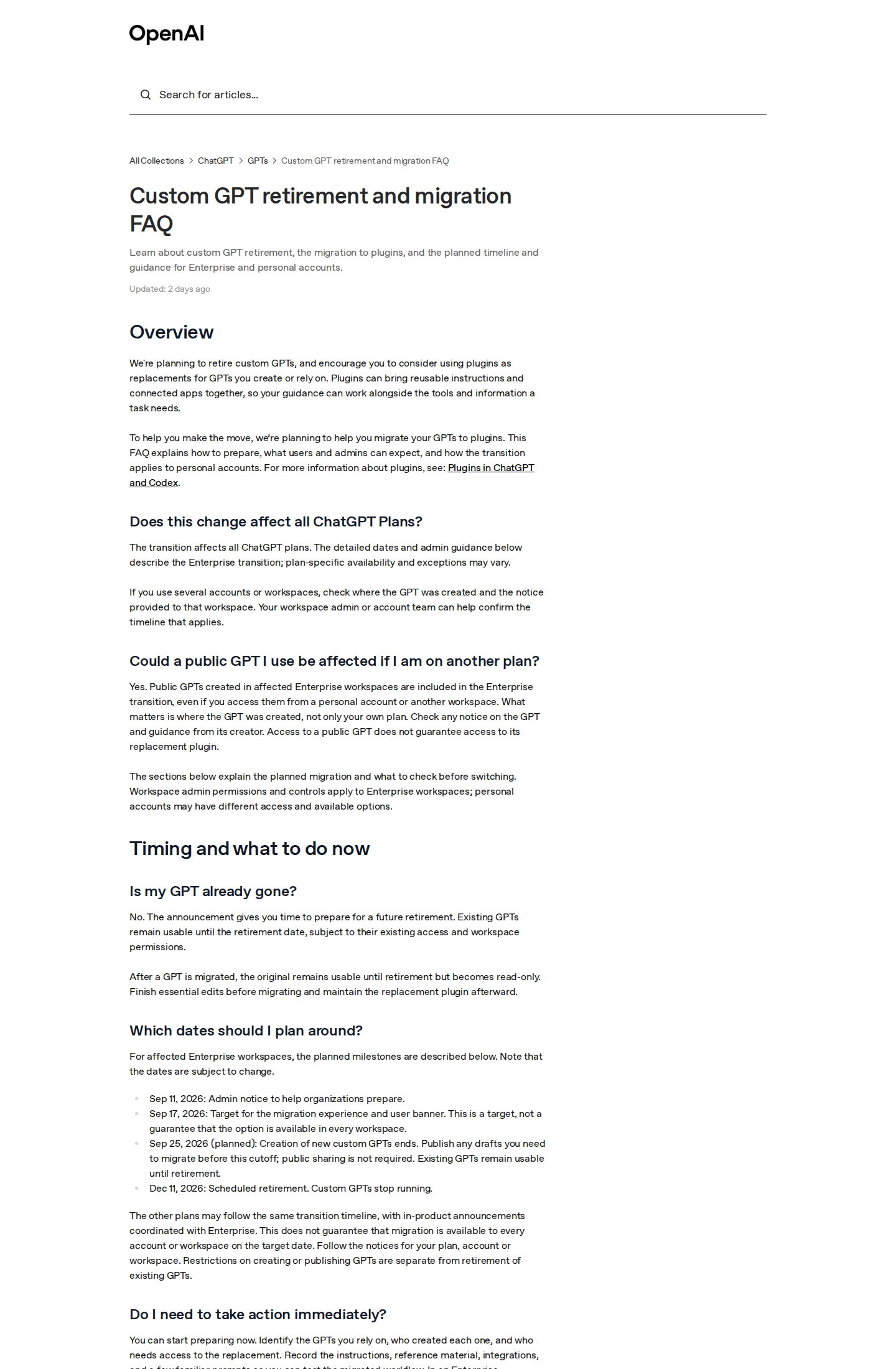
In one of the biggest platform shifts since the GPT Store opened, OpenAI has formally announced that it is retiring Custom GPTs entirely and moving everyone to its newer plugins system. This is not a rumor or a leak: the company published a full official document in its Help Center titled "Custom GPT retirement and migration FAQ," and a wave of press coverage followed on September 18–19, 2026 from outlets including PCWorld. Whether you built GPTs for your audience, or you simply rely on someone else's GPT every working day, there is now a fixed countdown — and on December 11, 2026, every custom GPT is scheduled to stop running.
This piece is a complete walkthrough of everything the official document says: what is actually happening, when, what migrates automatically from your GPT into its plugin replacement, what gets lost along the way, and how to prepare while the window is still open.
First: what a Custom GPT was, and why its disappearance matters
Custom GPTs launched in November 2023 as OpenAI's no-code customization layer: any user could build a personal version of ChatGPT with fixed instructions, uploaded knowledge files, and connections to outside services — without writing a single line of code. The GPT Store turned the result into a bustling marketplace of tens of thousands of specialized assistants: grammar fixers, contract generators, study buddies, marketing copilots.
For creators and small businesses especially, Custom GPTs were the first "programming without programming" tool at scale. A teacher could ship a tutor bot to their students; a shop owner could stand up a customer-service assistant that spoke their brand's language; a YouTuber could distribute a "script doctor" to subscribers. That is why retiring the system is not a minor technical note — it closes a whole era of tool-building, and opens the plugins era in its place.
The complete official timeline
The official FAQ lays out four precisely dated milestones. This is the most important table in the article — screenshot it:
| Date | What happens |
|---|---|
| September 11, 2026 | Admin notice sent to Enterprise organizations to begin preparing |
| September 17, 2026 | Target date for the migration experience inside the product, plus a user-facing banner |
| September 25, 2026 (planned) | Creation of new custom GPTs ends permanently — anyone with drafts to migrate must publish them before this cutoff |
| December 11, 2026 | Scheduled retirement: all custom GPTs stop running and leave the GPT directory |
The document is explicit that the transition affects all ChatGPT plans, free and paid alike — the detailed admin guidance was simply published for Enterprise customers first, with other plans following the same transition and in-product notices. One caveat the company itself states verbatim: the dates are "subject to change." Treat them as an announced plan, not a law of physics.
There is also a subtle rule that captures OpenAI's philosophy in this migration: what matters is where the GPT was created, not where it is used. A public GPT built in an affected Enterprise workspace is included in the Enterprise transition even if you access it from your personal account.
What transfers automatically — and what gets lost on the way

Migration — which only the GPT's creator or a workspace admin can perform — works as follows, per the official document:
What moves into the replacement plugin:
- Instructions: your GPT's guiding prompt becomes a "skill" inside the new plugin — the core of your tool's identity survives.
- Connected apps: services wired to the GPT are added as apps inside the plugin.
What does not move and needs manual rebuilding:
- Custom Actions: any programmatic integration you built against an external API does not transfer automatically — it must be rebuilt with supported connectors or a custom MCP server, with security approvals that may need a technical team.
- Model selection: the specific model your GPT used does not carry over; workspace defaults apply to the replacement.
- Conversation starters and chat history: may not be copied — export any conversations you care about now.
- Reference files and templates: the FAQ advises reviewing and re-testing them after migration rather than trusting them blindly.
One documented oddity:
After you migrate a GPT, the original stays usable but becomes read-only — and its creator cannot even delete it. At final retirement in December, the old creations leave the directory, and links to migrated GPTs are planned to redirect to the replacement "for people who have access" — meaning the redirect grants no permissions by itself.
How to prepare, step by step
The official FAQ boils preparation down to a practical checklist, which we translate here with adjustments for individual users:
- Audit your dependencies today: list every GPT you actually use — who created it, what it does, and who will need access to its replacement.
- Document instructions and files: copy the instruction text and keep a local backup of reference files and templates outside the platform.
- Save test cases: write down three to five prompts you already know produce good answers, so you can compare the replacement plugin's behavior against them.
- Mind your drafts: unpublished GPTs cannot be migrated directly — if a draft matters to you, publish it (privately, with no public sharing) before September 25.
- Inspect custom actions: if your GPT connects to external systems, plan the rebuild early; this is the one part that never migrates automatically.
- Test before inviting others: the replacement plugin starts private. Share it only after confirming it selects the right skill, uses your reference material, and produces output in the format your workflow needs.
So what are the replacement "plugins"?
OpenAI's own document defines the newcomer in one dense sentence: "Plugins can bring reusable instructions and connected apps together." In plainer terms: if a custom GPT was a "smart character with files and tools," a plugin is a "bundle of skills and apps you install into your conversations."
The documented usage model is simple: invoke a plugin with an @ mention in chat, or open the plus menu and choose "More" where supported. The bigger deal — and a genuinely new capability — is that ChatGPT may automatically select a relevant installed skill when its description matches your request, without you naming it. That is a shift from "open a separate bot" to "the intelligence calls its own tools in place" — the same direction OpenAI has been pushing all month, as we saw in its sponsored-agents advertising experiment covered here.
What happens to the GPT Store itself?
Everyone who built an audience through the store is asking the same question, and the official document gives a partial but revealing answer. At the December retirement, old creations "leave the GPT directory" — which in practice means today's store shelves empty out progressively as migration completes. A migrated replacement does not automatically take the original's place in a public listing; it starts private, requires an explicit sharing decision from its creator, and then an explicit install from every end user.
That inverts the economics of distribution. Under the old store model, a good tool found its audience through browsing and ranking; under the plugins model, distribution becomes a direct relationship between builder and audience: a link, a referral, an explainer video. For creators who built inside GPT Store, this is a serious strategy-review moment — your mailing list, your follower relationships, your brand name are now the assets that decide who reaches their audience after December.
What this means for content creators specifically
The impact sorts neatly into three real-world groups:
- Builders with an audience: if you distributed a GPT to followers or clients — a writing assistant, a product-description generator — the pressing questions are how to repackage it as a plugin your audience installs themselves, and how to preserve your knowledge files through the move. Migrated plugins start private, which means "a store that distributes your tools" is about to look radically different from today's GPT Store.
- Heavy users of other people's GPTs: prioritize. The GPT you open daily will need its replacement installed before December, and any GPT built in an Enterprise account transitions on the Enterprise schedule even if you use it from a personal plan.
- Agencies building custom experiences: custom actions not migrating is a service opportunity — shops and companies will pay to rebuild their integrations on the new connectors before December, a genuine window for developers and automation agencies.
Across all three groups the golden rule is identical: your knowledge assets are yours; only their container is changing. Great instructions and well-curated files survive any platform — which is exactly what tools like ARWriter's article and research writer are built around: an Arabic-first library of commands and writing workflows that stays under your hand whatever system runs underneath.
Quick comparison: where the replacement stands among rivals
| System | Idea | Note for creators |
|---|---|---|
| Custom GPTs (outgoing) | A custom bot with instructions and files, distributed via a store | Stops running December 11, 2026 |
| Plugins (incoming) | Instructions + connected apps invoked inside chat | ChatGPT may auto-select them based on their description |
| Google Gems | Custom Gemini versions with instructions | The closest free analogue to the Custom GPT concept |
| Claude Skills | Skill-style tooling inside Claude — see our Cowork merge coverage | Evolving quickly inside Anthropic's ecosystem |
The whole landscape is converging on one shape: "installable skills" instead of "separate bots." Creators with strong instructions and knowledge bases will move between these systems cheaply; those who locked everything into one platform with no exports are about to discover how close December is.
Honest limits and caveats
- Dates can move — by the company's own wording, with the September 17 migration target explicitly described as "a target, not a guarantee."
- Enterprise got the details first: individual-plan users will see guidance in in-product notices that may differ in the fine print.
- The replacement is not a carbon copy: OpenAI itself warns that a migrated plugin "may respond differently" and asks you to test at least one harder case before rolling it out to a team.
- The information gap: the official document is dry and technical, and independent coverage (PCWorld, mixed-news) was still early at the time of writing — we will update this piece as the picture clarifies.
Frequently asked questions
When exactly do Custom GPTs stop working?
The officially scheduled date is December 11, 2026, when existing GPTs stop running and leave the GPT directory. Creation of new GPTs ends earlier, on September 25, 2026.
Will I lose the files I uploaded to my custom GPT?
The FAQ says reference files, templates, examples, and tools must be reviewed after migration, with no guarantee they carry over intact. The only smart insurance is downloading copies of every file and instruction set today and storing them outside the platform.
Does the retirement affect free accounts or only paid ones?
The document is explicit that the transition "affects all ChatGPT plans." The detailed timeline was published for Enterprise first; other plans follow the same transition with in-product notices.
What is the practical difference between a plugin and a custom GPT?
A GPT is a full persona living in its own window with fixed instructions and files. A plugin is a bundle of a skill plus connected apps, invoked inside your normal conversation with an @ mention — and ChatGPT can select it automatically when its description matches what you asked for.
What is the closest free alternative to Custom GPTs today?
Google's Gems inside the Gemini app are conceptually closest (custom versions with instructions), with differences in files and integrations. Ready-made professional prompt libraries — such as ARWriter's toolset — remain the fastest way to benefit from expert instructions without building anything.
Should I migrate my GPTs now or wait?
No panic is needed — existing GPTs keep working until retirement. But do not wait past September: migration requires a published GPT, new creation ends September 25, and custom-action rebuilds can take weeks of calendar time.
Can I roll back a migration if I dislike the replacement?
The document describes no rollback mechanism. Quite the opposite: after migration the original GPT becomes read-only and cannot even be deleted by its creator, with all future changes happening on the plugin. The practical takeaway: migrate only when you are ready to test, and only after saving a complete copy of your instructions and files.
Official source: OpenAI Help Center — "Custom GPT retirement and migration FAQ" (published mid-September 2026; press coverage by PCWorld, September 18).
The bottom line: start your audit today
Retiring Custom GPTs is not the end of customization in ChatGPT — it is a redefinition of it: from separate bots you beg to be opened, to installable skills the system summons when needed. Between now and December 11, 2026, the difference between those who lose and those who transition cleanly is simply who started auditing early: instructions backed up, files exported, actions rebuilt, replacements tested before the team is invited.
And if part of your work is writing and content production in Arabic or bilingually — scripts, articles, research, scheduled posts — remember that your most valuable asset is your instructions and knowledge, not their container. Try ARWriter's tools to turn those instructions into a full production line built for your language first — one that no platform's December can switch off.