Last updated: September 2026
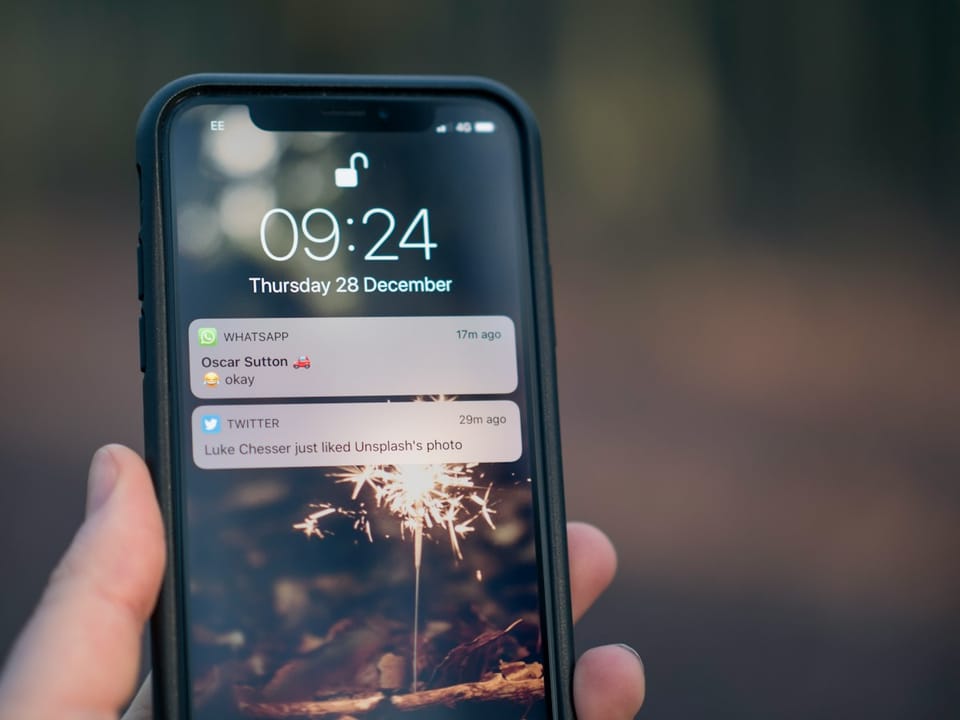
The average US smartphone user receives 46 push notifications a day. Against that wall of noise, push notification copywriting is no longer a nice-to-have writing skill — it is the difference between a tap-back and an uninstall. AI has changed the economics: what used to be a copywriter drafting three variants by hand is now a model producing ten disciplined options per message, a full re-engagement sequence, or a fatigue audit of your entire send calendar in minutes. The failure mode is just as fast. Generic AI output ("Don't miss out! 🎉") is why OneSignal's editorial team concluded most pushes go unread — senders treat notifications like billboards when users only respond to conversations. This guide is the working playbook: the platform rulebooks from Apple and Android, length limits with the numbers behind them, opt-in priming copy, nine prompts, a win-back case study, and the fatigue guardrails most teams learn only after churn spikes.
Short answer: Write push copy like a conversation, not a billboard: one user benefit per message, 30–40 characters for the title, 90–120 for the body, earned via a priming screen, and personalized where personalization is expected. Use AI to generate and test variants, cap frequency, and measure returned sessions — not opens alone.
The two rulebooks at a glance: Apple HIG vs Android
Before writing a word, know what each operating system does to it. These rules come straight from Apple's Human Interface Guidelines and Google's official notification docs.
| Rule | Apple (HIG) | Android (official docs) |
|---|---|---|
| Title usage | Only if it adds context; title-style capitalization, no ending punctuation | System truncates long titles — put the hook in the first 30–40 characters |
| Body style | Complete sentences; no promotional tone in alerts | Free-form, but truncation varies by channel and device |
| Repetition | Never repeat the same notification for one event | Channels let users mute categories individually since Android 8 |
| Error messages | Alerts are for errors; notifications are not the channel | Same principle — use in-app surfaces, not push |
| Action buttons | Maximum 4 | Actions attach to channels; group with a summary when stacked |
| Permission | Opt-in prompt at the app's choosing — prime first | POST_NOTIFICATIONS runtime permission since Android 13 |
| Repetition control | Grouped since iOS 12; "Deliver Quietly" is user-side | Android 15 Cooldown tones down repetitive notifications for up to 2 minutes |
| Stacking behavior | Auto-grouped by app | Android 16 auto-groups when one app sends 4+ without a summary |
Three consequences for copywriters. First, the first four words decide everything — Android truncation and iOS lock-screen previews both cut mid-sentence. Second, channels (Android) and per-app settings (iOS) mean users can mute your marketing while keeping your transactional messages, so write each category in a register that could stand alone. Third, the platforms are now actively defending users against high-volume senders; Cooldown and auto-grouping quietly neutralize the burst tactics growth teams loved in 2019.
What push notification copywriting actually is
Push notification copywriting is the craft of writing the title, body, and call-to-action for messages delivered to the lock screen or notification shade — transactional ("Your order shipped"), behavioral ("Ana finished reviewing the draft"), and re-engagement ("Your trial ends Friday"). OneSignal's diagnosis is the billboard-versus-conversation distinction: a billboard shouts the sender's goal at everyone; a conversation says something the specific reader, at that moment, benefits from hearing.
The anatomy is fixed, so the craft is allocation. Recommended lengths from OneSignal's performance data: title 30–40 characters, body 90–120 characters, CTA 10–15 characters. Within those limits, every message should pass three questions:
- Value test: does the message say what the user gets, not what the app wants?
- Timing test: would this sentence make sense if read three hours late?
- Frequency test: is this the only message from us this user sees today?
Transactional pushes — order confirmed, shipped, out for delivery, delivered, refund issued — are the easiest wins and the most neglected. They get opened because they are wanted, so keep them plain: no marketing language, no emoji, under 90 characters. The trust they build is what buys attention for your re-engagement sends later.
Why the math is brutal: 46 notifications a day
The retention numbers behind push are stark. US smartphone users receive an average of 46 push notifications per day (Business of Apps data cited by OneSignal). OneSignal's editorial team reports that roughly 60% of users opt in to push at all, and only about 4% engage with the notifications they receive. You are writing for a fraction of a fraction, on the most contested screen in your user's life.
When copy is done right, the payoff is measurable. OneSignal's 2024 State of Customer Engagement data shows personalized notifications drive 344% higher engagement than non-personalized ones, and messages with emoji see open rates 85% higher on average — though emoji is a test, not a rule; it can cheapen a B2B workflow alert. And the channel keeps growing: 81% of shoppers planned to use mobile apps for Black Friday and holiday shopping in 2024, up from 68% in 2023 and 65% in 2022.
The ethical ceiling matters as much as the ceiling of skill. The Princeton dark-pattern audit found 1,818 instances across 15 manipulation types on roughly 11,000 shopping sites — and fake-urgency push copy is among the easiest patterns to slide into. Fabricated countdowns and "Last chance!" loops buy a spike and repay it in uninstalls and, increasingly, regulatory attention. Honest urgency — a trial genuinely ending, a price actually rising — converts fine without the theater.
By the way, if you're writing push messages, interface text, and lifecycle emails yourself, ArWriter drafts all of them in one workspace — starts at $4.99/month.
Earn the opt-in: the priming screen decides your audience
On both platforms, the system permission prompt is one shot. Fire it cold at first launch and most users reflexively decline — and you cannot ask again. The fix is a pre-permission priming screen: two plain sentences explaining what you will send and why it is worth it, shown at a moment when the user has just felt the need for it.
The sequencing that works: trigger the primer right after the user completes an action the notification would enhance — placing a first order, creating a project, setting a deadline. Not at onboarding step one, when nobody knows what they want from you yet.
Priming screen (2 sentences):
"Want to know the moment your order ships? We'll only send updates about
YOUR orders — nothing else, usually under 5 messages a month."

Then 3 variants of the trigger line:
1. "Yes, notify me about my orders"
2. "Keep me posted on this delivery"
3. "Track this order with notifications"
Notice the copy does double duty: it states the value and it self-limits ("usually under 5 messages a month"). That specificity is what separates an honest ask from permission farming, and it pre-frames the frequency expectation your fatigue guardrails will honor later. Users who accept a bounded promise churn on messages far less than users who accepted a vague one.
How to write and test push copy with AI: a 6-step loop
This is the weekly loop we recommend for a team with one growth person and no dedicated copywriter.
- Define the message's single job. Before prompting, write one line: who receives this, what they get, what action follows. "Users whose trial ends in 3 days; they get a reminder that saved work stays free; action = open the upgrade page." If you cannot write that line, no prompt will save the send.
- Generate ten variants with hard constraints. Use the first prompt below — title under 40 characters, body under 110, value-first, no dark patterns. Ten, not three: you are mining for one specific, non-generic option, and it usually appears around variant four to seven.
- Apply the three tests and cut. Value test, timing test, frequency test from the anatomy section. Kill anything that reads like a billboard. Keep one no-emoji and one emoji variant of the best line so the emoji question gets settled by data, not taste.
- Personalize from fields the user knows you have. Plan tier, last action, first name, city — never data that feels surveillant ("we noticed you opened the app at 2am"). OneSignal's 344% lift comes from personalization that feels like a benefit, not tracking. If a field would surprise the user, do not use it.
- A/B one variable at a time. Control versus variant, changing only personalization, emoji, or the CTA verb — never two at once. Run each pair on a meaningful slice for at least a week to cover weekday and weekend behavior. Log hypothesis, result, and decision; the log becomes your house patterns file.
- Audit the calendar monthly. Run the fatigue-audit prompt below on your full send schedule. Flag any day with two or more sends per segment, consolidate overlapping campaigns, and check that every recurring message still maps to a job someone would miss. Then document the whole system as an SOP — the same way teams write standard operating procedures with AI — so the rules survive the person who made them.
Nine AI prompts for variants, sequences, and audits
Generate 10 push notification variants for [event] under 40 characters (title) and
110 characters (body) that create urgency without dark patterns. App: [app].
Audience: [audience].
Rewrite these 5 push notifications to pass a "value test": each must say what the user
gets, not what the app wants. Add one variant with an emoji, one without: [paste]
Write a 6-message re-engagement sequence for users inactive 7/14/30 days. Message 1 =
gentle nudge with concrete value, last = farewell with opt-down choice. Tone: [tone].
Product: [product].
Create copy for a pre-permission priming screen (2 sentences) explaining why we send
notifications, then 3 variants of the permission-moment line, for: [use cases e.g.,
order shipping, price drops]
Personalize this notification using these user fields [plan, last action, city]. Produce
5 variants mapped to different lifecycle stages. Do not reveal data the user wouldn't
expect us to have.
Turn this email subject line into 8 push-notification titles (max 40 chars): [paste].
Keep verb-first and benefit-first structure.
Audit this notification calendar for fatigue: [paste schedule]. Flag days with 2+ sends,
suggest consolidation using inbox-style/grouped notifications, and propose frequency caps
per segment.
Write 6 transactional push notifications (order confirmed, shipped, out-for-delivery,
delivered, review request, refund) — plain, no marketing language, under 90 characters
each.
Generate A/B test pairs (control vs variant) for this notification, varying only:
personalization / emoji / CTA verb. State the hypothesis and success metric for each
pair: [paste notification]
Devon's win-back: how a 12-person Atlanta SaaS woke 353 dormant users in six weeks
Devon is a product manager at a 12-person Atlanta SaaS that makes a reporting tool for marketing agencies. The problem: 4,100 users had gone 28+ days without a session, and the company's entire re-engagement effort was one weekly blast — "New in Reports!" — that read like a billboard and performed like one. Push opt-in rate among the dormant cohort was still 61%, an asset being spent badly.
He rebuilt the program with the 6-step loop. First, segmentation: dormant users split by what they had done before lapsing (connected a data source but never scheduled a report; scheduled one but never shared it; shared one and stopped). Then, with the AI prompt library, he drafted a six-message sequence per segment — each message referencing the user's actual stopping point, not a generic hook. Message one for the "never shared" segment: "Your Q3 report is 3 clicks from done — want us to finish it with you?" The farewell message offered a genuine opt-down: "Too many pings? Choose what you still want to hear about."
Every send was capped at one per week per user, quiet hours enforced, all pushes written inside the length budgets. Over six weeks, 353 of the 4,100 dormant users — 8.6% — returned and completed at least one session, and 41 of them upgraded or renewed within the quarter. Uninstall-related complaints, which had averaged 9 a month, fell to 2. Devon's retrospective note: the win was not the AI's wording. It was that constraints forced each message to name one user, one stopping point, one next action — the billboard finally became a conversation. For teams without Devon's instincts, keeping that tone consistent is exactly what a brand-voice system built for AI drafting is for.
Fatigue guardrails: caps, quiet hours, and what Android already does for you
Fatigue is the silent killer of push programs, because uninstalls are measured later than opens. The guardrail set:
- Frequency caps: our default is a hard cap of 2 marketing pushes per week per user, with transactional messages exempt — they are wanted, not tolerated. Audiences will forgive five order updates in a day and zero marketing blasts in a month.
- Quiet hours: nothing between 22:00 and 08:00 in the user's local time unless the message is time-critical (a delivery slot change, a security alert).
- A preference center: let users choose categories — price drops, product updates, digests. An opt-down path is cheaper than the uninstall it prevents.
- Respect the OS: Android 15's Cooldown already reduces the appearance, sound, and vibration of repetitive notifications for up to 2 minutes, and Android 16 auto-groups when one app sends four or more without a summary. Apple has grouped by app since iOS 12 and users have had "Deliver Quietly" as an escape hatch. Fighting these mechanisms with volume is a losing strategy; write for a calm notification shade.
The channel decision matters too. Push is an interrupt; email is a queue. Habit-forming updates and time-sensitive triggers belong on push; anything requiring more than 90 characters belongs in the onboarding email sequences where you have room to explain. And the words inside the product itself — the screens these notifications land on — follow the UX microcopy rules we cover separately. One voice, three surfaces.
Push notification FAQ
What is a good push notification open rate?
Context is everything, and one should benchmark on engaged reach rather than opens. OneSignal's editorial figures suggest roughly 60% of users opt in and only about 4% engage with a given notification, so a click-through in the low single digits is normal for a broadcast. Personalized messages perform far better — 344% higher engagement in OneSignal's 2024 data. Track returned sessions per 1,000 sends as your north-star metric.
How many push notifications per week is too many?
For marketing pushes, more than two per week per user is where complaints and uninstalls climb, and our default cap sits exactly there. Transactional messages are exempt because they are solicited. Also cap per day: if a user would see two messages from you in one day, consolidate them — Android 16 auto-groups four or more anyway, so the stack will be collapsed whether you plan for it or not.
How long should a push notification be?
Follow OneSignal's performance-backed budgets: title 30–40 characters, body 90–120 characters, CTA 10–15 characters. The title carries the hook because both platforms truncate; the body adds the specific benefit; the CTA names one action. If your message genuinely needs more room, it is an email, not a push.
How do you write a push notification that gets clicked?
Lead with the user's benefit in the first four words, be specific ("Your refund of $42.10 was issued"), and match the emotional register to the message type — plain for transactional, warm for re-engagement. Personalize only from data the user knows you have. Then generate variants with AI, A/B one variable at a time, and let returned sessions, not raw opens, pick the winner.
What is push notification fatigue?
Fatigue is the accumulated annoyance that turns users from ignoring notifications to disabling or uninstalling. It builds silently — opens stay flat while opt-outs and uninstalls tick up weeks later. The average US user already receives 46 notifications a day from all apps. Guardrails: frequency caps, quiet hours, a category-level preference center, and a monthly calendar audit.
How do I ask users for notification permission without annoying them?
Never fire the system prompt cold. Show a priming screen first — two sentences stating exactly what you will send and how often — at a moment when the user just felt the need for it, like right after placing an order. The user who accepted a bounded promise ("order updates only, under 5 a month") tolerates far more than one who accepted a vague one.
Do emojis increase push notification open rates?
On average, yes: OneSignal reports emoji-lifted messages see open rates about 85% higher. But the average hides context — emoji suits consumer deals and streak reminders, and cheapens refund updates or B2B alerts. Treat it as a test variable, not a style rule: generate matched pairs with and without, run them, and let your audience decide per message category.
What is the difference between push notifications and in-app messages?
Push arrives on the lock screen or notification shade and interrupts — it reaches users outside your app, with opt-in mechanics and OS truncation. In-app messages render inside the product during a session: no permission needed, more room, and full context. Use push to bring users back, in-app to guide them once they are there, and keep the voice identical across both.
Before you ship: a 7-point checklist
- First four words carry the benefit, inside the 30–40 character title budget.
- Body under 120 characters and passes the billboard test — it says what the user gets.
- One variable differs between control and variant, and the hypothesis is written down.
- Frequency cap honored: max two marketing sends per user this week.
- Quiet hours respected in the user's local time zone.
- Personalization uses only fields the user would expect you to have.
- The destination screen's microcopy matches the promise the notification made.
That last point is where most programs quietly fail — the message says "Finish your report" and the screen says "Dashboard". When you are ready to run the whole loop — variants, sequences, fatigue audits, and the email and interface copy around them — ArWriter drafts all of it in one workspace, from $4.99/month on Plus to $24.99/month on Premium. Write like a conversation, cap like a friend, measure what returns.
Sources
- Notifications — Apple Human Interface Guidelines — official Apple rules for titles, repetition, action buttons, and what belongs in alerts
- Notifications — Android developer documentation — channels, POST_NOTIFICATIONS permission, Android 15 Cooldown, and Android 16 auto-grouping
- Why Most Push Notifications Go Unread — OneSignal — the 46-per-day figure and the billboard-versus-conversation diagnosis
- Push Notifications That Drive Black Friday Conversions — OneSignal — the 344% personalization lift, 85% emoji lift, and recommended copy lengths
- A Timeline of Push — OneSignal — how notification expectations evolved from APNs (2009) to the privacy era
Read also: app release notes written with AI