Last updated: August 2026
If you run content for a brand, a Shopify store, or a solo consulting practice, you have probably seen OpenCode in developer feeds: an open-source AI agent for the terminal with a huge GitHub following. The useful question is not “Is it better than Cursor for engineers?” It is: can a non-developer content operator gain real hours back—or will setup cost erase the benefit?
Direct answer: OpenCode is a free, MIT-licensed agent that can read project files, run tools, and call models from 75+ providers. It shines on file-heavy, repetitive content ops. It is a poor default for people whose whole day is browser-based drafting and scheduling. For Arabic-first production in one place, products like ArWriter remain the lower-friction path; OpenCode is an optional automation layer.
💬 Disclosure: Some links in this article are referral links. We may earn a small commission if you buy through them, at no extra cost to you. That support helps us keep publishing free guides and does not change how we evaluate tools.
What OpenCode is (plain language)
OpenCode is an open-source AI coding agent available as a terminal UI, desktop app, or IDE extension. Official materials highlight LSP support, multi-session agents on one project, optional share links, login paths for certain subscriptions, and model choice through Models.dev—including local models. The project reports very large community metrics (160K+ GitHub stars and multi-million monthly developer usage on the marketing site). The canonical repository is anomalyco/opencode under MIT.
Think of it as a harness, not a single brain. Writing quality still depends on the model you attach (Claude, GPT, Gemini, GLM, local, etc.). That distinction matters for content teams who accidentally shop for “OpenCode quality” when they are really shopping for model quality.
Why content operators should care at all
Modern content work is not only prose. It is folders of assets, transcript dumps, CSV product catalogs, email sequence files, and leftover exports from design tools. Browser chat is weak when the bottleneck is hundreds of files. A terminal agent can apply one careful instruction across a directory tree—if you can supervise it.
High-fit examples for marketers and freelancers:
- Normalize 40 interview transcripts (strip timestamps, keep meaning, write clean
-clean.txtcopies). - Rename campaign assets to a date-channel-topic pattern before handing them to a scheduler.
- Split one cornerstone article into channel packs (LinkedIn posts, short video scripts, newsletter blurb) as separate files without inventing new statistics.
- Collect every outbound URL from a folder of drafts into a checklist before legal review.
Low-fit examples: daily Instagram captions, one-off thought leadership posts, or “make this sound premium” edits. Those jobs finish faster in a polished web editor—especially if you need bilingual Arabic/English production with templates. See also our creator-focused notes on Claude Opus 5, Gemini 3.6 Flash, and GLM 5.2 pricing and quality.
Setup reality check (before you install anything)
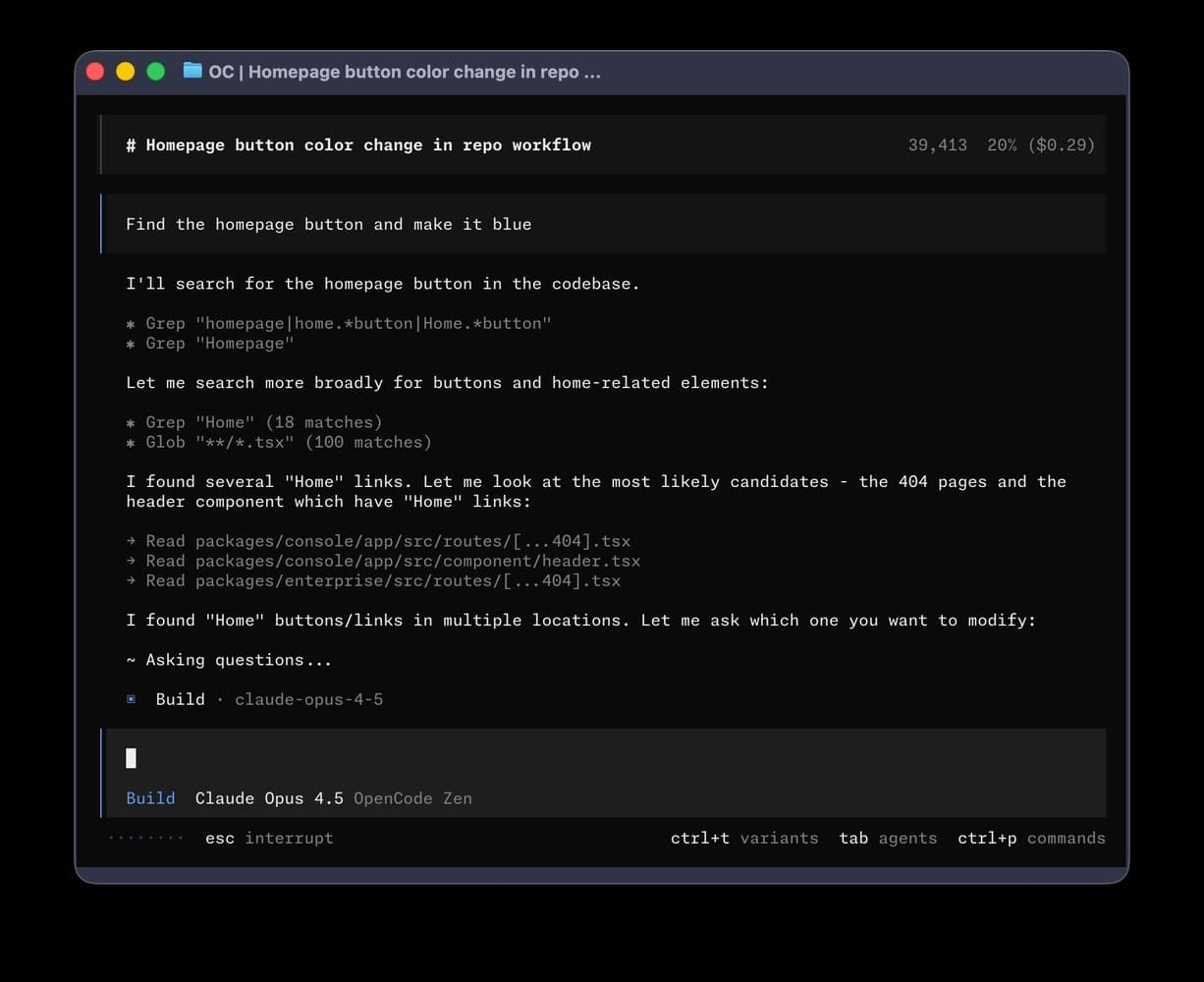
Docs expect a modern terminal emulator and provider API keys. The default install path is:
curl -fsSL https://opencode.ai/install | bash
Alternatives include npm install -g opencode-ai, Homebrew taps, and platform packages. Then you cd into a project, run opencode, and often /init to generate an AGENTS.md the agent can follow.
If those sentences already feel hostile, stop. That reaction is data. You do not “fail” at AI by preferring a GUI. You fail when you burn a weekend fighting Node permissions while a competitor ships five posts from a tool they already understand.
Cost layers to budget honestly:
- Software: OpenCode itself is free/open source.
- Models: pay your provider, or use free/local options with quality tradeoffs.
- OpenCode Go: official low-cost plan at $5 the first month, then $10/month for a curated open-model lane (opencode.ai/go).
- Zen: pay-as-you-go balance for tested models.
- Learning time: usually the largest line item for non-engineers.
If you decide to try the official Go path through our referral (same price to you): OpenCode Go referral link.
Content ops map: where OpenCode wins or loses
| Job | OpenCode | Web chat (ChatGPT/Claude) | ArWriter-style product |
|---|---|---|---|
| 2,000-word draft | Possible, setup-heavy | Excellent | Excellent for structured production |
| Batch rename 200 assets | Excellent | Painful | Not the core job |
| Transcript cleanup at scale | Strong | File-by-file paste tax | Good once text is inside the editor |
| Social scheduling | Only with extra wiring | No | Closer to content workflow tools |
| Product description CSV | Strong with careful prompts | Medium | Templates + human review flow |
| Repo-scale code changes | Designed for this | Weak | Out of scope |
Rule of thumb: use OpenCode when the bottleneck is files and repetition. Use a writing product when the bottleneck is language quality, brand voice, and publishing cadence.
A cautious first workflow for non-developers
- Copy a non-sensitive project folder. Never start on the only copy of client work.
- Install OpenCode via the official script; confirm the binary runs.
- Connect the cheapest acceptable model for experiments.
- Give a narrow task with an acceptance check: “Clean timestamps only; do not summarize; write sibling
-cleanfiles.” - Review diffs like you would review a junior contractor.
- Scale from five files to the full batch only after spot checks pass.
Time-box the experiment to 90 minutes. If you are still wrestling installers, switch back to production tools and revisit later with a technical friend. Opportunity cost is real.
Privacy notes freelancers actually need
Enterprise docs state OpenCode does not store your code or context; processing is local or direct to the provider you choose. That is better than casually pasting client contracts into random chat UIs—but it is not magic anonymity:
- Cloud providers still process prompts under their policies.
- Optional
/sharesends conversation data to OpenCode’s share hosting if enabled—disable it for sensitive work. - Local models reduce exfiltration risk and often reduce writing polish.
Practical hygiene: one folder per client, no production secrets in sample projects, and a written rule that marketing interns cannot enable sharing.
Pricing clarity without hype
People say “OpenCode is free” and then surprise themselves with model invoices. Separate three wallets: software (≈$0), models (variable), and optional Go/Zen lanes. Compare that to a predictable SaaS seat—ArWriter lists Plus $4.99, Pro $9.99, Premium $24.99—when your job is shipping language, not maintaining agent configs.
Neither stack is universally cheaper. A creator who automates a weekly 45-minute file chore may recover Go’s $10 easily. A creator who only writes captions will not.
Referral link again for readers who intentionally want Go: https://opencode.ai/go?ref=ZW75NZAEHN.
By the way: if your real goal is to write, design prompts, and schedule content without living in a shell, ArWriter keeps Arabic-first tooling, prompt libraries, and auto-writing under one login—starting at $4.99/month. Use terminal agents later for the chores they uniquely solve.
A field story: Maya’s two-week trial
Maya runs content for two DTC brands in Austin. She installed OpenCode after a YouTube thumbnail promised “Claude Code for free.” Night one was dependency pain. Night two, she successfully standardized filenames for a 120-image launch folder—work that used to steal half a standup every Monday. When she asked the agent to “sound more premium” on product PDPs, results were uneven and slower than her usual Claude web workflow. She kept OpenCode for asset hygiene and left drafting in browser tools plus her scheduler. That hybrid is the adult outcome: specialized tools, not a personality cult around a TUI.
Honest “do not use this” list
- You are allergic to terminals and have no support person.
- Your KPI this quarter is posts shipped, not pipeline automation.
- You work primarily on mobile.
- You want one button that publishes a full brand system without review.
- You confuse GitHub stars with brand-voice quality in your market.
Skipping OpenCode can be the professional choice. Forcing it to feel modern is not.
Common mistakes content teams make with CLI agents
- Running destructive prompts on production folders.
- Mixing creative rewriting and filesystem surgery in one vague instruction.
- Ignoring token spend while iterating on huge corpora.
- Publishing unedited model prose that drifts off brand.
- Leaving
/shareenabled on client material. - Evaluating the harness with a weak model, then blaming the harness forever.
How OpenCode relates to model choice (GLM, Claude, GPT)
OpenCode does not replace model selection. If Arabic long-form quality is your constraint, pick the model first—our GLM 5.2 guide covers price and practical writing impact—then decide whether you need a file agent. If your constraint is renaming and batch transforms, model excellence matters less than reliable tool use and supervision.
Agencies often let one technical producer own OpenCode while writers stay in shared web tools. That split prevents “everyone must learn the terminal” theater.
A hybrid stack that ships in 2026
- Daily language layer: ArWriter or your preferred editor with brand prompts.
- Model layer: choose by task cost/quality (flash models for drafts, stronger models for flagship essays).
- File automation layer: OpenCode only when a weekly chore is measurable.
- Visual layer: CapCut/Canva/etc.—outside OpenCode’s job description.
For broader agency workflow design, see AI content workflow for marketing agencies.
Comparison snapshot
| Tool | Primary user | Ramp | Best at | Weak for creators when… |
|---|---|---|---|---|
| OpenCode | Builders + technical operators | Medium–high | Repo/files/agents | You need guided marketing UX |
| Cursor-class IDEs | Developers | High for non-devs | Software changes | Campaign writing is the job |
| Web chat | Everyone | Low | Ideation + drafts | Batch filesystem work |
| ArWriter | Writers/marketers | Low | Arabic-first production tooling | You need a full IDE agent |
| Design AI tools | Design/video | Low | Visuals | Text ops at folder scale |
Pre-adoption checklist
- Is there a weekly file task ≥30 minutes?
- Is someone comfortable in a terminal?
- Are client folders isolated?
- Do we know monthly model spend caps?
- Did we define success in minutes saved, not vibes?
Three “no” answers → defer. Content calendars do not care how many agents you installed.
Detailed content scenarios you can copy
Good OpenCode tasks name inputs, outputs, and verification. Vague tasks produce vague file damage.
Brand voice normalization across old PDPs
Drop 25 legacy product descriptions into pdp-raw/. Instruct the agent to preserve facts and prices, unify tone to your short brand voice sheet, and write outputs to pdp-clean/ with a one-line report listing files that contained non-numeric prices. Manually review five samples before trusting the batch.
Cornerstone article → multi-channel pack
Start from one strong Markdown draft. Request separate files for an 80-word summary, five LinkedIn posts, three short-video scripts (hook/body/CTA), and a YouTube description. Hard rule: no new statistics not present in the source. Weak sources still produce weak packs—the agent amplifies structure, not truth.
Link harvest before legal review
Ask for a de-duplicated list of outbound URLs and domains across a draft folder. Humans still verify status codes and claims; the agent removes the boring extraction step across dozens of files.
If none of these resemble your week, you do not have an OpenCode problem—you have a calendar and messaging problem better solved in a writing product.
A note on expectations for 2026 content stacks
Open-source agents will keep improving, and marketing Twitter will keep overselling them. Your advantage is not installing every new binary on day one. Your advantage is knowing which layer of the stack is currently expensive in human time—ideation, drafting, editing, asset hygiene, or distribution—and applying tools only there. OpenCode is a sharp knife for asset hygiene and scripted transforms. It is a dull instrument for brand strategy. Keep that distinction written on a sticky note if you have to.
Frequently Asked Questions
What is OpenCode?
An open-source AI agent for terminal, desktop, and IDE that works on your project files with models you connect. It is primarily built for software work and can help with file-heavy content operations when supervised.
Is OpenCode free?
The software is free and open source. Model usage, OpenCode Go ($5 then $10/month per official pages), or Zen usage may cost money. Budget the full stack.
Do I need to code?
You do not need a software-engineer title, but you need comfort with terminals, folders, and API keys. Without that, a writing SaaS will outperform OpenCode on content KPIs.
Is it safe for client content?
OpenCode states it does not store your context; providers still process cloud prompts. Disable sharing features and separate client directories.
OpenCode vs ChatGPT for marketing?
ChatGPT excels at conversation and drafts. OpenCode excels at acting on local project files. Most teams need both patterns, not a forced monogamy.
Can it replace our social scheduler?
Not out of the box. Treat it as automation glue, not a full marketing suite.
How should a small team pilot it?
One technical owner, one non-production folder, one repetitive chore, one week, minutes-saved metric, then keep or kill.
Where do non-terminal creators start instead?
ArWriter, your prompt library, and the model guides linked above—then add OpenCode only if files become the bottleneck.
What to do next
If your pain is folders and repetition, run a guarded pilot and use the official Go entry when it fits—here is our referral link: opencode.ai/go?ref=ZW75NZAEHN. If your pain is shipping clear content on a cadence, invest in writing workflow first via app.arwriterai.com and keep CLI agents in the “advanced” drawer until the ROI is obvious.
Sources
- OpenCode official site
- OpenCode documentation
- GitHub repository
- Enterprise/privacy documentation
- OpenCode Go pricing page
Want writing, prompts, and scheduling without living in a terminal? Start free on ArWriter →