On November 10, 2026, MiniMax released H3-Image, an open-weight image generation model built on its H3 architecture. The model handles text-to-image generation, reference-based generation, and image editing, and the headline claim is blunt: it generates a full 4K (4096 × 4096) image in under 10 seconds — at up to 5× the speed of mainstream alternatives — while understanding up to 16 reference images in a single request.
For anyone who produces content for a living, that combination matters more than another leaderboard point. Open weights mean you can run it yourself. Sub-10-second 4K means high-resolution images stop being a "special occasion" asset. And a per-image price of a few cents means the cost argument against generated imagery keeps getting weaker. In this piece we dig into the official numbers, the full pricing table, the four ways to use the model today, and — just as important — the caveats the announcement does not shout about.
What exactly was announced?
The official MiniMax blog post, titled "MiniMax H3-Image: Bringing 4K Image Generation into the 10-Second Era" and dated November 10, 2026, lays out the release:
- The model is open-weight, downloadable via Hugging Face, continuing the approach MiniMax took with its H3 foundation model.
- It supports three core tasks: text-to-image, reference-guided generation, and image editing.
- It generates 4K (4096 × 4096) images in under 10 seconds per the company's own description, roughly 5× faster than mainstream alternatives.
- It accepts up to 16 reference images in one request — well beyond the one-to-three image budgets most competitors expose.
- Paid access runs through the MiniMax API platform, MiniMax Code, and the Hailuo AI app for teams that do not want to host the weights.
A note on timing: this article was written two days after the announcement. That gap is deliberate — it lets us report the full official latency and pricing tables instead of just repeating the headline, and it is exactly the kind of context piece our news coverage is designed for.
Why 4K actually changes the workflow
Most mainstream image models output 1K (around 1024 × 1024) or 2K images. That is fine for social posts. It falls apart in three common situations:
- Hero images for articles and landing pages. A 1K image looks soft on large displays and collapses under printing. A 4K image (about 16.7 million pixels) survives cropping, zooming, and professional reproduction.
- Ad creative for competitive placements. Higher resolution gives you room for small overlay text — or localized text for multiple markets — without quality loss.
- Brand asset libraries. Backgrounds and textures that a team will reuse across dozens of designs should be captured at the highest resolution available from the start.
The historical blocker for 4K was speed: previous model generations needed tens of seconds per 4K image, which turned "let's try ten variations" into an exercise in waiting. MiniMax's core argument is that 4K is now practical for everyday iteration, not just final renders — and that, more than any single quality metric, is what would change how creators actually work.
The official speed numbers, read carefully
MiniMax published an official chart comparing median (P50) latency in seconds between H3-Image and leading competitors. Here are the numbers as published. One honest caveat before the table: these are vendor-run benchmarks. No independent systematic comparison exists yet at this writing.
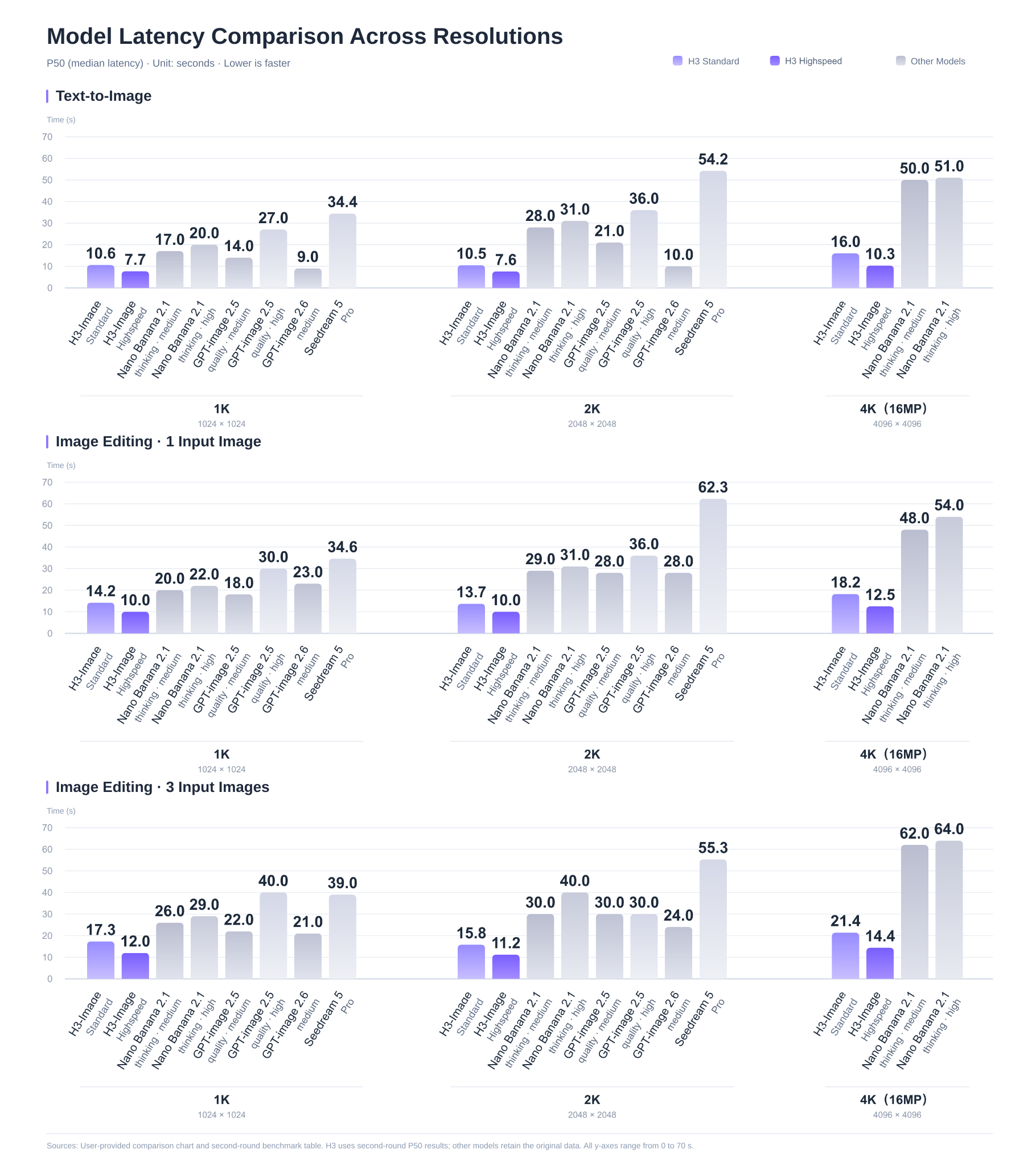
Text-to-image generation (P50 latency, seconds)
| Model | 1K | 2K | 4K |
|---|---|---|---|
| MiniMax H3-Image — Standard | 10.6 | 10.5 | 16.0 |
| MiniMax H3-Image — Highspeed | 7.7 | 7.6 | 10.3 |
| GPT-image 2.6 | 9.0 | not listed | not listed |
| GPT-image 2.5 | 14.0 | 28.0 | not listed |
| Nano Banana 2.1 | 17.0 | 54.2 | 50.0 |
| Seedream 5 Pro | 34.4 | not listed | not listed |
Image editing (P50 latency, seconds, at 4K unless noted)
| Task | H3-Image Standard | H3-Image Highspeed | Nano Banana 2.1 |
|---|---|---|---|
| Editing with 1 reference — 1K | 6.4 | 5.1 | not listed |
| Editing with 1 reference — 4K | 18.2 | 12.5 | 48.0 |
| Editing with 3 references — 4K | 21.4 | 14.4 | 62.0 |
Three observations worth making explicitly:
- The real gap opens at 4K, not 1K. At 1K, H3-Image clearly beats Nano Banana 2.1 and Seedream 5 Pro, but GPT-image 2.6 is very close (9.0 vs 7.7 seconds). At 4K the picture changes completely: 10.3 seconds for H3-Image in Highspeed mode versus roughly 50 seconds for Nano Banana 2.1 in the official chart.
- "Under 10 seconds" deserves a precision check. The blog title says under 10 seconds; the official chart's P50 for a 4K text-to-image in Highspeed mode is 10.3 seconds. The difference is trivial in practice, but we report both numbers because our readers make purchasing decisions based on our tables. Some runs presumably land under 10 seconds; the published median sits a hair above it.
- Highspeed mode is a real trade, not a label. It cuts latency by roughly 30–36% across the board, at a premium price — the exact premium is in the pricing table below.
16-reference editing: the feature online stores should test first
Support for 16 reference images in one request is the capability most likely to change day-to-day production workflows. Consider a small apparel brand: upload the base product photos, the fabric close-ups, and mood shots, then ask for the same garment placed in different environments — a clean studio backdrop for ads, a lifestyle scene for the newsletter, a seasonal setting for the homepage banner.
Before this class of capability, each variation meant manual compositing or a designer's hour. Now "change the background but keep the fabric texture and the drape intact" is a single request that returns in well under a minute at 4K — and, as we will calculate below, costs less than a dime.
Open weights: real freedom, with one licensing caveat
This is the structural difference between H3-Image and every closed competitor in the table above. The weights are downloadable from the model page on Hugging Face, which means in practice:
- Privacy. Stores working with sensitive product shots or client imagery can run the model on their own infrastructure — no pixels leave the building.
- Customization. Technical teams can fine-tune the model on their house style, their product category, or specific needs like typography-heavy layouts.
- No platform risk. No single vendor can raise prices or discontinue the service out from under you, because a copy of the model lives on your hardware.
- Cost control at scale. If you generate tens of thousands of images a month, self-hosting math becomes worth running.
The caveat: the license is not Apache or MIT. It is a custom "MiniMax H3-Image Community License Agreement." Before building a commercial product on top of the model, read the full license text on the Hugging Face page and confirm your use case complies — especially if your customers are large enterprises or you plan to resell generation as a service. Open weights do not automatically mean "do anything commercially, no questions asked."
It is the same open-ecosystem strategy we saw in MiniMax's earlier H3 video model release and across the wider 2026 open-weights wave: compete for developers and community mindshare while closed labs compete for subscriber lock-in.
Four ways to use H3-Image today
- Hailuo AI app — the easiest entry point for non-technical users: a ready-made interface on the Hailuo H3-Image tool page, pay per use, zero setup.
- MiniMax API platform — the natural choice for developers and product teams: full documentation in the official image generation guide, with Standard and Highspeed modes.
- MiniMax Code — the company's build-and-experiment environment, starting from the model's Quick Start page.
- Download the weights — for advanced needs: the full model on Hugging Face, running on your own hardware.
Full pricing: what an image actually costs
MiniMax published an official per-image price table in USD, mirrored on the official pricing page. The 4K rows below show the launch-week price with 50% off, and the regular price in parentheses:
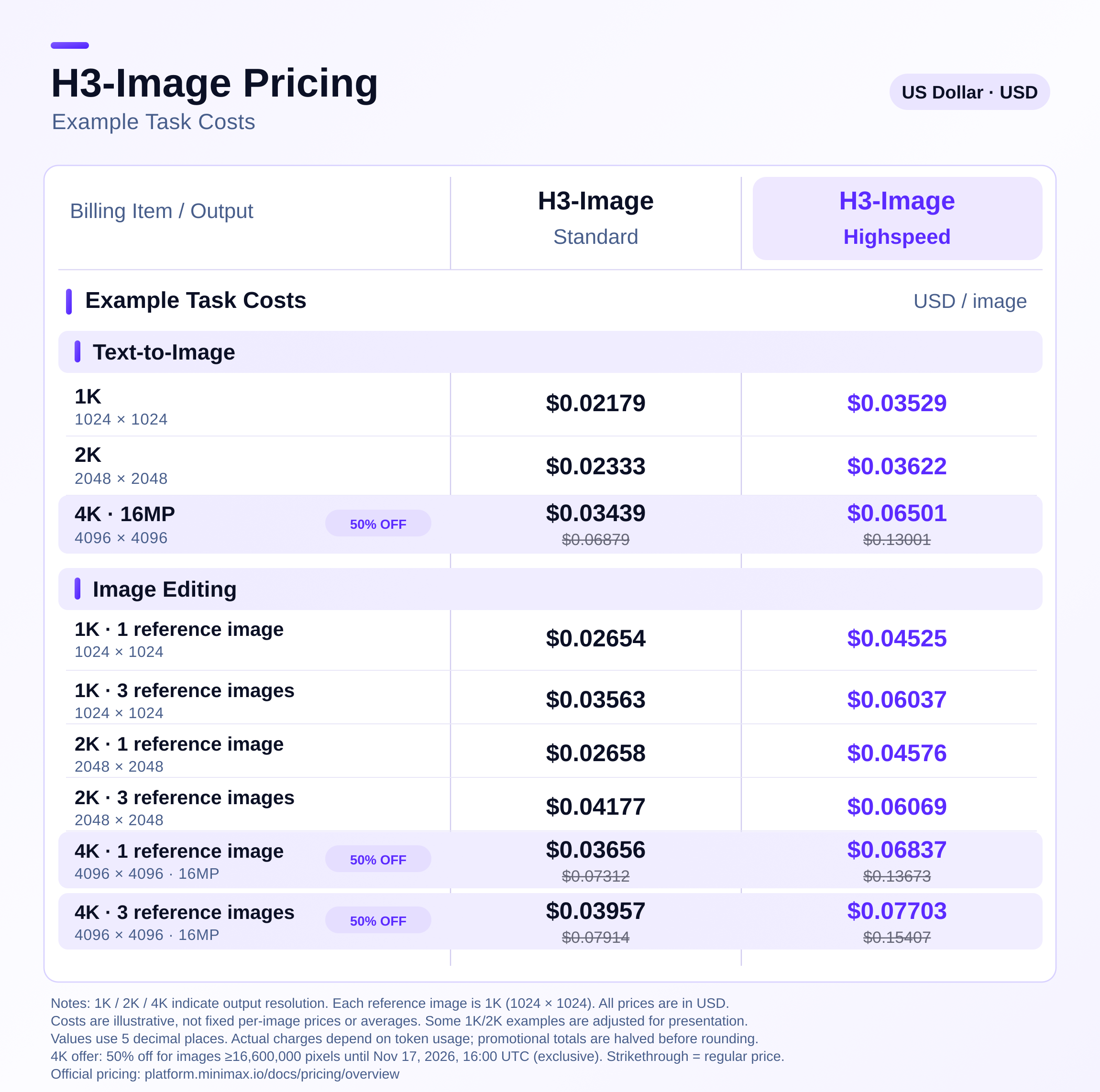
Text-to-image (USD per image)
| Resolution | Standard | Highspeed |
|---|---|---|
| 1K | 0.02179 | 0.03529 |
| 2K | 0.02333 | 0.03622 |
| 4K (launch discount) | 0.03439 (reg. 0.06879) | 0.06501 (reg. 0.13001) |
Image editing (USD per image)
| Resolution & references | Standard | Highspeed |
|---|---|---|
| 1K — 1 reference | 0.02654 | 0.04525 |
| 1K — 3 references | 0.03563 | 0.06037 |
| 2K — 1 reference | 0.02658 | 0.04576 |
| 2K — 3 references | 0.04177 | 0.06069 |
| 4K — 1 reference (launch discount) | 0.03656 (reg. 0.07312) | 0.06837 (reg. 0.13673) |
| 4K — 3 references (launch discount) | 0.03957 (reg. 0.07914) | 0.07703 (reg. 0.15407) |
To make that concrete: one hundred 1K article images in Standard mode cost about $2.18, and a single 4K Standard image costs under 4 cents while the launch offer lasts. MiniMax positions its overall pricing at 50–70% of comparable mainstream offerings.
Time-sensitive detail: the 50% discount on 4K-and-above generation is a launch-week offer ending November 17, 2026 at 16:00 UTC, and it applies to images of 16.6 megapixels and larger. If you have been planning an intensive 4K evaluation session, this week is the window.
How to choose between H3-Image and the alternatives
A quick decision guide based on what the official numbers do and do not show:
- Priority: high resolution plus speed. H3-Image is the clearest option on paper right now, especially with the launch discount active through November 17.
- Priority: maximum quality regardless of time or price. Also test the leading closed models on your own scenes; 15–20 second waits are acceptable in final-render workflows if output quality is visibly better on your material.
- Priority: privacy or deep customization. The open weights make the call nearly automatic — no other documented open model delivers 4K at this speed today.
- Priority: non-Latin text inside images. No current model offers reliable guarantees here, in any language with connected scripts. Plan a text-editing pass in a design tool rather than betting on the generator.
The golden rule before any financial commitment: spend one hour generating the same scene on two or three tools with identical prompts, and compare results on a plain background, a complex background, and a real product photo. Model differences show up fast on your own material — and never fully show up in vendor benchmark charts.
Honest limits to know before you commit
- Every number above is vendor-measured. No independent reviews exist yet at this writing; community evaluations of the weights will land over the coming weeks. Treat comparison tables the way you treat any marketing-adjacent figure: directionally useful, not a neutral verdict.
- Self-hosting is not free. A fast 4K model needs serious GPU hardware or rented compute, and the math differs radically between 100 images a month and 100,000.
- The custom license means "open" has boundaries here. Read the terms before wide commercial deployment, as noted above.
- In-image text — especially connected non-Latin scripts — remains a known weak point across image models, and MiniMax makes no official claim of having solved it in H3-Image. Test short words yourself before relying on it in paid creative.
What this means for your workflow
If you write and publish with AI assistance — the working assumption we make about ARWriter readers — three practical shifts open up:
- High-resolution article art for pennies. Once your draft is written in a tool like the ARWriter platform, the "good images are expensive" objection is gone; a 2K illustration costs roughly two and a half cents.
- Faster idea iteration. A 7–10 second turnaround means trying ten cover-image variations takes two minutes instead of a quarter hour of waiting — which quietly changes how much you experiment.
- A micro production line for small stores. With 16-reference editing, a solo merchant can produce a consistent-looking image set for every new product in one session — work that required a photographer or a designer until very recently.
MiniMax's trajectory is also worth watching as a strategy. Our earlier coverage of the MiniMax Design desktop app showed a company assembling a full creator stack, not just shipping isolated models — and H3-Image slots directly into that picture as the image engine of the ecosystem.
Frequently asked questions
Is MiniMax H3-Image free?
The weights are free to download and run yourself under the model's community license, but self-hosting requires capable hardware or rented GPU servers. Access through the MiniMax platform or Hailuo is paid per image, starting around $0.02 per 1K image.
What is the difference between Standard and Highspeed modes?
Same resolution, different latency: Highspeed cuts generation time by roughly 30–36% for a higher price — for example a 4K text-to-image takes 16.0 seconds in Standard versus 10.3 in Highspeed, costing 0.03439 versus 0.06501 USD. Choose Standard for batch work you will walk away from, and Highspeed when you are sitting there waiting.
Does H3-Image understand prompts in languages other than English?
The announcement does not make specific claims about non-English prompt quality. Community experience with comparable models suggests basic prompts work in major languages, but English gives finer control over scene details. The safest pattern is an English scene description with any in-image text specified explicitly, then a review pass on the result.
When does the 50% 4K launch discount end?
The launch-week offer ends November 17, 2026 at 16:00 UTC and covers generation and editing requests at 4K and above — images of 16.6 megapixels or larger. After that, prices return to regular levels; a Standard 4K image goes from about 0.03439 back to 0.06879 USD.
Where do I get the model to run it myself?
On Hugging Face under MiniMaxAI/MiniMax-H3-Image, where you will also find the full community license text and running requirements. If you lack the hardware, the paid interfaces are Hailuo AI and the MiniMax platform directly.
Last updated: November 12, 2026. All figures are documented from MiniMax's official announcement and pricing pages as of publication; prices and offers may change afterward.