On September 23, 2026, Google Labs announced something quieter than a model launch but arguably more useful for working creators: six new tools inside Google Flow, its AI filmmaking platform, designed and built by practicing creatives from three industries — architecture, sound design, and digital content. Among the builders is Hashem Al-Ghaili, the filmmaker and science communicator whose short explainers reach tens of millions of viewers. The six tools attack the least glamorous part of the creative process: the repetitive production work that eats a creator's week — captioning, thumbnail formatting, sound beds, collage assembly, and turning scripts into motion graphics.
First, the shift that matters: Flow is now a build-your-own-toolbox
When Flow launched, it was a text-to-video generator: describe a scene, receive a clip. Useful, but professional creators do not live in single scenes. They live in pipelines. A YouTube video is a chain of a dozen small tasks — transcribe, caption, style, thumbnail, mix ambient audio, assemble b-roll — each usually done in a separate app with files passed back and forth by hand.
The capability Google calls Flow Tools changes the unit of work. You describe the workflow you need in plain language, and the platform builds a reusable tool that performs it. Instead of renting a generator, you are effectively assembling a small production assistant shaped exactly like your process. The announcement then pushes this further: rather than guessing what users need, Google worked with leaders from architecture, sound design, and digital content to build six real tools born from real production pain, then opened all of them to everyone — ready to run as-is, duplicate and remix, or use as a starting template for your own.
That last part is the strategic story beneath the news. The competition among AI video platforms has moved from "who renders the prettiest shot" to "who shortens the whole pipeline." These six tools are Google's most explicit statement yet that it intends to compete on workflow, not just output quality.
The six tools, one by one
CaptionCast — captions that transcribe, style, and animate in a single pass
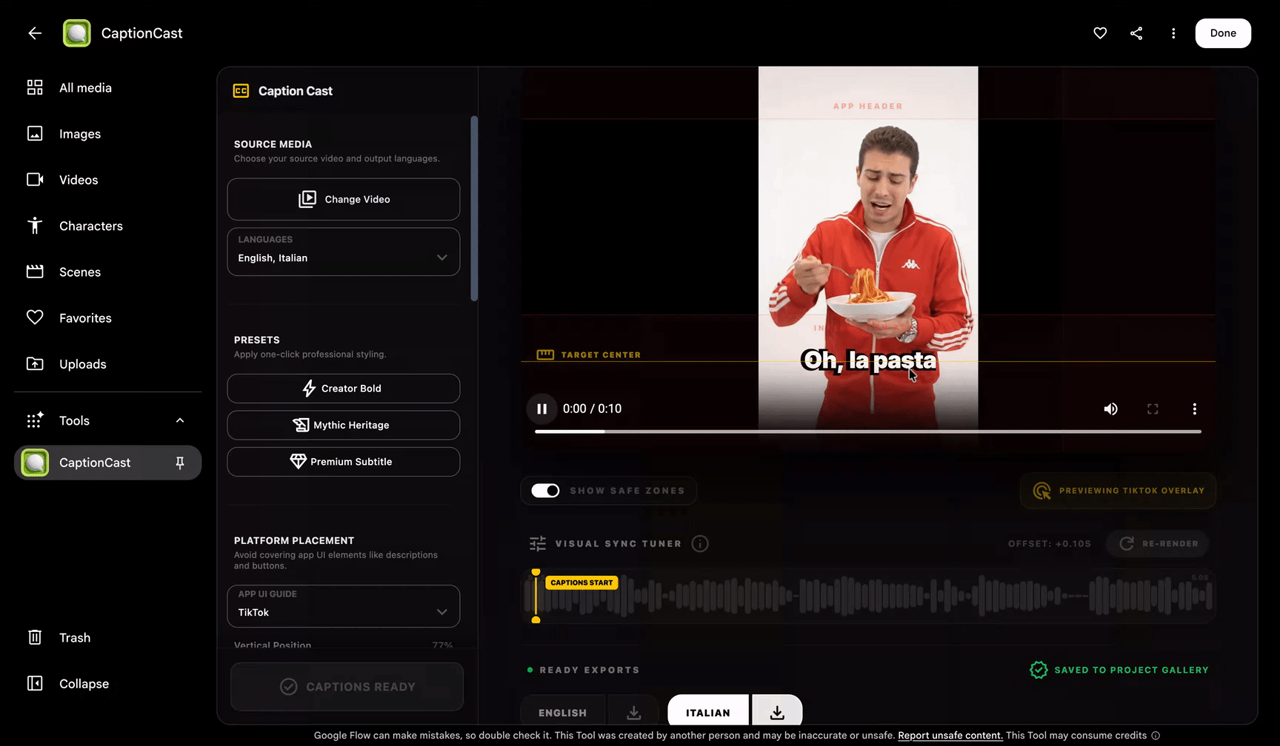
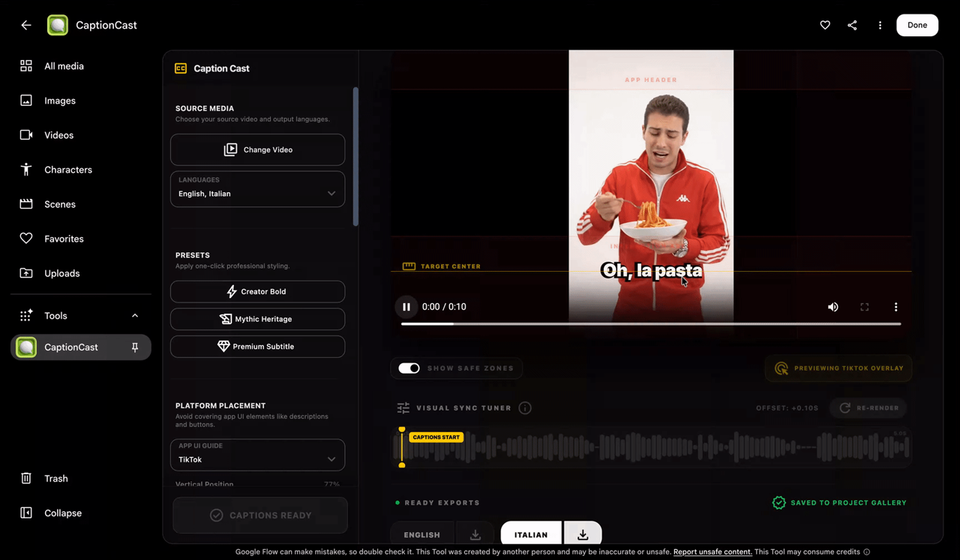
Built by Jay Pirabakaran, a digital storyteller known for weaving ancient mythology into cinematic, high-fashion visuals. His problem is universal: manual subtitling is slow, and styling animated captions in an editor is slower. CaptionCast runs a single-pass pipeline that transcribes the video, styles the text, and animates it — in seconds, across multiple languages. For a creator with an international audience, the practical consequence is obvious: one video can ship with several caption tracks without opening an editor, and the caption track stops being the reason your reach stops at your language border.
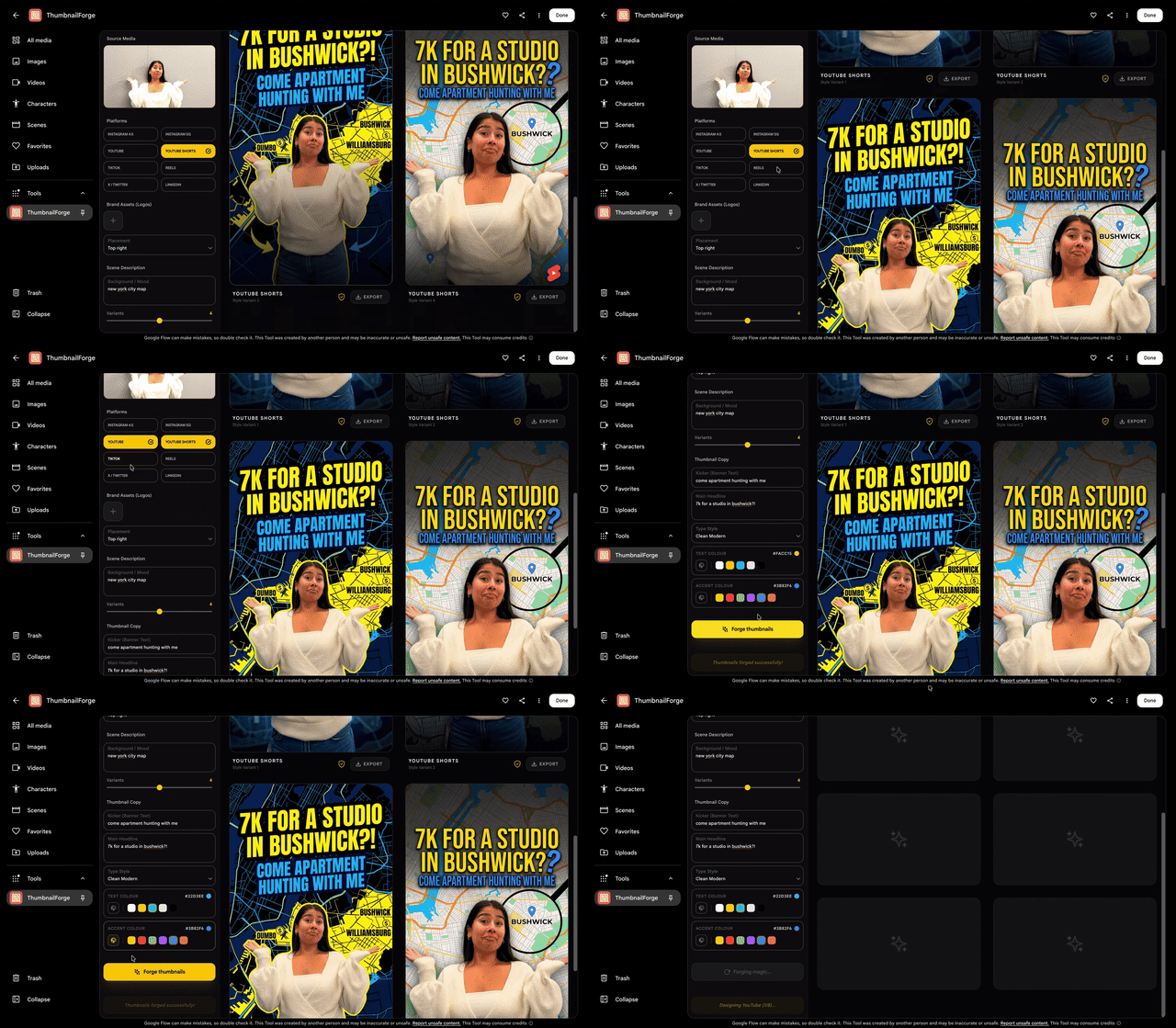
ThumbnailForge — the click-deciding image, generated from three inputs
Also by Pirabakaran. The thumbnail remains the single highest-leverage asset in the video business: it is what a viewer judges in the half-second before clicking or scrolling away. ThumbnailForge takes one image, a headline, and a short prompt, and produces photorealistic, high-engagement social thumbnails formatted for each platform — replacing the tedious manual cycle of resizing and re-rendering cover art for every destination. The quiet advantage is iteration speed: generating multiple thumbnail variants to test against each other becomes cheaper than committing to one guess.
Mondo Sónico — ambient sound and foley on editable, exportable stems
Built by creative director Ricardo Villavicencio and sound designer Sebastián Carvallo after years of collaboration. The tool generates custom background ambience, foley, and contextual sound effects that stay automatically synchronized while living on separate, editable tracks — and each stem can be exported individually for professional post-production. This detail matters more than it may first appear. Generated audio that arrives as one flattened blob is nearly useless to a working editor; audio that arrives as stems slots directly into an existing mix. It is the difference between a toy and a tool.
Surface — instant material ideation for architects and interior designers
Built by Vojtek Morsztyn, an interior designer and multidisciplinary technologist. Surface generates custom textures — from minimalist patterns to Art Deco tiling — and maps them in real time onto 3D walls, ceilings, and floors, collapsing the slow phase of sourcing and test-rendering materials during ideation. It is the one tool of the six aimed squarely at the architecture crowd, but anyone producing interior, real-estate, or home-product content will recognize the same acceleration: the client sees the finish on the wall immediately, not after a rendering queue.
CollageMotion Pro — mixed-media collages at scale, from text
The first of the two Hashem Al-Ghaili tools. Mixed-media visuals are among the most compelling formats in documentary storytelling — and among the most labor-intensive to craft by hand, with every image needing its own cut, timing, and motion. CollageMotion Pro automates the assembly and generates dynamic, animated collages at scale from simple text prompts. For educators, documentary channels, and news-style creators, this is the difference between a format you admire and a format you can actually afford to produce weekly.
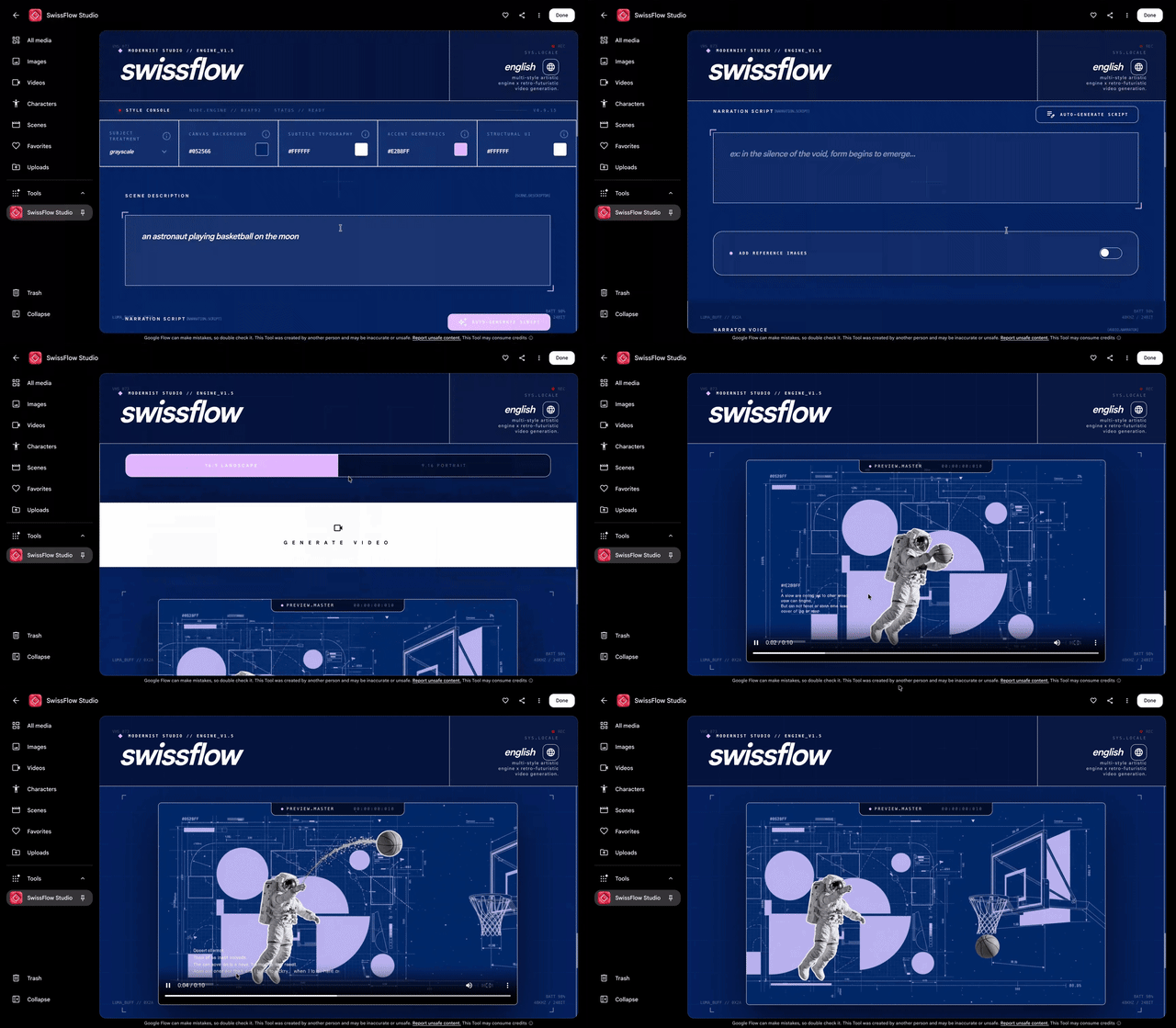
SwissFlow Studio — scripts become Swiss-style motion graphics
The second Al-Ghaili tool, and the one with the widest audience. SwissFlow Studio simplifies traditional keyframing by converting scripts into Swiss-style motion graphics — the clean-grid, strong-type visual language familiar from editorial and corporate explainer work. The announcement explicitly names its audience: creators, designers, and marketers who need striking motion design on demand without a motion-designer's timeline skills. Read that as: the text you already wrote is the input, and a publishable animated video is the output.
How to actually get started
The announcement lays out three entry points, and they are worth following in order:
- Run the tools as-is. All six are live inside the platform — start with the one closest to your weekly bottleneck, likely CaptionCast or ThumbnailForge if you publish video regularly.
- Duplicate and remix. If a tool's defaults do not match your style, copy it and change its description until the output fits your brand. This is the step most people will skip and shouldn't: it is where a shared tool becomes your tool.
- Build from scratch. Open Google Flow, describe the task you repeat most, and let the platform assemble a custom tool for it. The six official tools are best understood as worked examples of what this mode can produce.
The full announcement, with each tool credited to its builder, is on the official Google blog.
What this means for you as a content creator
- If you publish on YouTube or short-form platforms: captioning and thumbnail production are typically 20–40% of the time behind each video. Two of the six tools attack exactly those two tasks. That is a direct capacity increase — more publishable output with the same headcount, or the same output with your evenings back.
- If your strength is writing: SwissFlow Studio is the bridge from text to screen. A finished script — for example one drafted with a dedicated writing environment like ARWriter's article and research writer — can now become an animated explainer without hiring an animator, which makes a text-first content strategy far more defensible.
- If you produce for clients: the remixable nature of these tools means you can encode a client's visual identity into a duplicated tool once, then produce on-brand deliverables repeatedly. That is a service differentiator that compounds.
- If you are a designer or studio: Surface compresses the material-ideation loop, and the broader signal is that Google is courting professional workflows, not just hobbyist clip generation — worth tracking even if you do not adopt today.
Quick comparison: what each tool replaces
| Tool | What it does | What creators use today |
|---|---|---|
| CaptionCast | Transcribes, styles, and animates multilingual captions in one pass | Manual transcription plus caption styling inside an editor |
| ThumbnailForge | Generates photorealistic thumbnails from an image, headline, and prompt | Hand-built templates resized per platform |
| Mondo Sónico | Generates synced ambience and foley on exportable stems | Stock sound libraries and per-cut sound design |
| Surface | Maps generated textures onto 3D surfaces in real time | Physical samples and slow render previews |
| CollageMotion Pro | Builds animated mixed-media collages from prompts, at scale | Layer-by-layer manual assembly in editing software |
| SwissFlow Studio | Converts scripts into Swiss-style motion graphics | Professional motion-design tools with steep learning curves |
This is also not the platform's first expansion this season. We have previously covered Google Flow's creative controls update and 4K support and Google Vids becoming free with the Gemini Omni engine. Taken together, Google's video stack is now competing across three price tiers at once, from free (Vids) to prosumer (Flow) to enterprise production.
Honest limits you should know before rebuilding your pipeline
- No pricing or quota details in the announcement. The official post does not specify usage limits for the new tools, and Labs-stage quotas have a history of changing. Verify current limits on the platform page before you make any of these tools a load-bearing part of a client deadline.
- Generated output still needs review. Caption transcription can stumble on accents, jargon, and multilingual code-switching; generated thumbnails can mangle text rendered inside the image. The tools collapse production time, not editorial judgment — someone still has to watch the result before it ships.
- Labs products graduate or disappear. Google Labs experiments either evolve into core products or get sunset. Building an entire business on a Labs-stage tool carries real platform risk; build it on the process instead, and keep the tool swappable.
- English-first design. The tools and their examples are English-first. Underlying models handle other languages with varying quality, so creators working in Arabic or other languages should expect to iterate more on prompts — and to proof generated text in those languages carefully.
- The six tools serve their builders' niches first. If you make podcasts or long-form writing, nothing here targets you directly yet. Your play is the third entry point: describing your own repetitive task and building the tool the announcement didn't include.
Frequently asked questions
What are the six new Google Flow tools announced in September 2026?
CaptionCast (animated multilingual captions), ThumbnailForge (social thumbnails from an image and headline), Mondo Sónico (ambience and foley on editable stems), Surface (real-time textures on 3D surfaces), CollageMotion Pro (animated collages from prompts), and SwissFlow Studio (scripts converted into Swiss-style motion graphics). All six were built with working creatives and are available inside Google Flow.
Are the new Flow tools free to use?
The announcement does not specify pricing or usage quotas. Flow operates with usage limits, and the current terms are published on the official platform page — check there before relying on the tools for scheduled production work.
Do the tools work with languages other than English?
Yes, with caveats. CaptionCast explicitly handles multilingual captions, and the underlying models understand many languages. But the interface, examples, and prompt-tuning are English-first, so expect more iteration for non-English creative directions and always proofread generated text in the target language.
Do I need to know how to code to build my own Flow tool?
No. The entire premise of Flow Tools is describing the task you want in plain language; the platform assembles it. You can also duplicate any existing tool and modify its description rather than starting from zero.
Who is Hashem Al-Ghaili?
A filmmaker and science communicator with one of the largest science-content audiences online, known for short, highly produced explainers. He built CollageMotion Pro and SwissFlow Studio as part of this Google collaboration — a notable case of an independent creator shaping tools on a major platform rather than merely using them.
Bottom line
The six tools are individually useful and collectively significant. Individually, they remove concrete, recurring costs — captioning hours, thumbnail iterations, sound-bed hunting, motion-design outsourcing. Collectively, they mark the point where AI video platforms started competing on your production pipeline rather than their demo reels. The creators who benefit most will not be the ones who marvel at the announcements, but the ones who duplicate one tool this week, point it at their most repetitive task, and measure the hours saved. Start with the script you already have — draft it properly in a writing environment built for creators such as ARWriter, then let the new tooling turn it into something that moves.