
Since the start of November 2026, video creators have been talking about a new name in monetization: the Video Kickstart Bonus, an invite-only pilot program from X (formerly Twitter) that pays direct cash bonuses for vertical video — with no link to ad revenue sharing. The first structured press coverage appeared on November 1, 2026, and since then the program's official help page has been the single authoritative source for its details.
The problem: those details live on a long English help page with no consolidated practical breakdown. This guide closes that gap. Everything below is built from X's official help documentation and Social Media Today's November 1 coverage, plus an honest read of what the program means for working creators.
What is the Video Kickstart Bonus, and who can join?
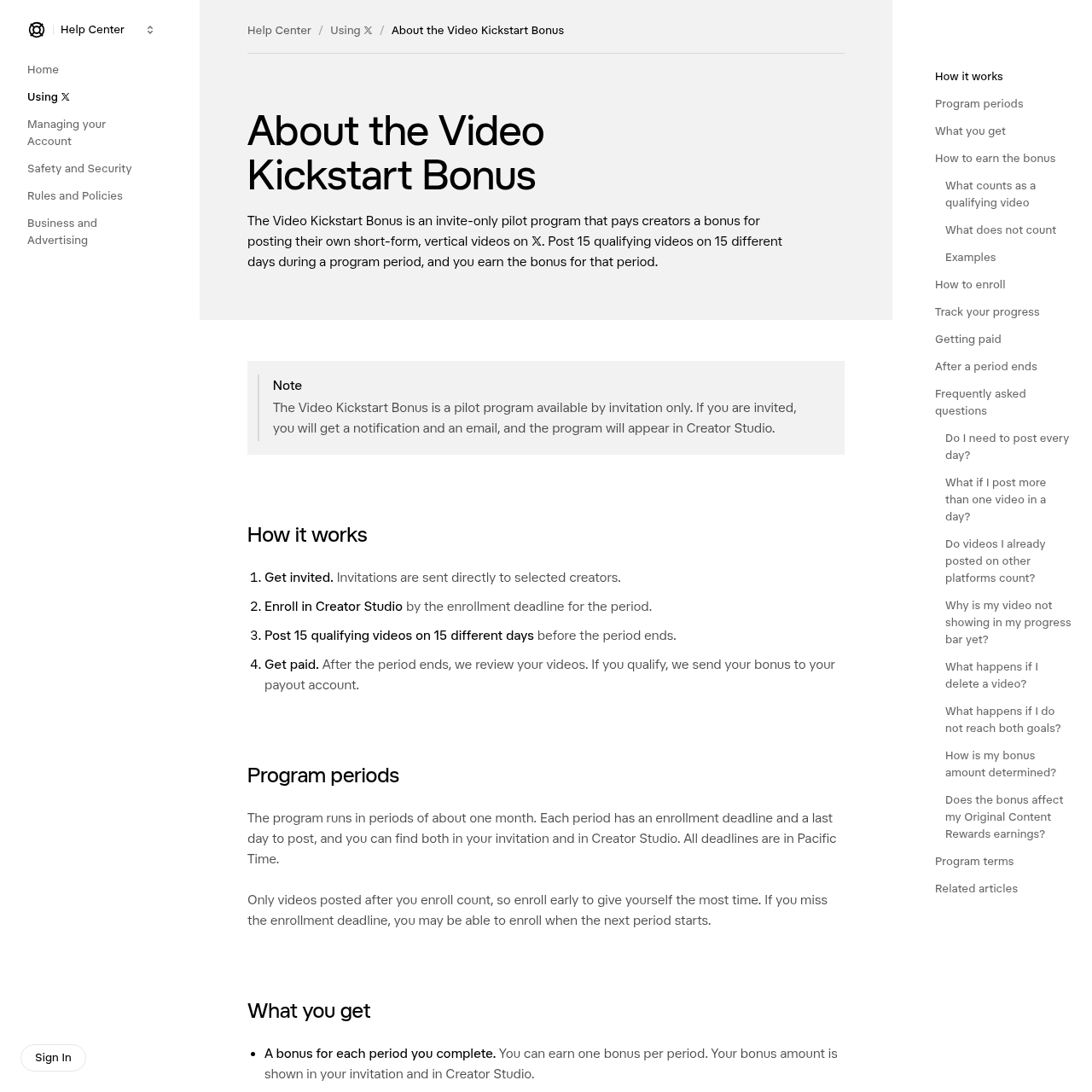
The Kickstart Bonus is an invite-only pilot: X sends invitations directly to a selected group of creators, and as of this guide's publication there is no open application path. If an invitation lands in your account, you become eligible to enroll through Creator Studio before that period's enrollment deadline.
One point matters from the very start: this bonus is fundamentally different from ad revenue sharing. There is no per-video view threshold and no percentage of ad income. What is required is disciplined publishing behavior: original vertical videos, at a steady cadence, inside the program period. That is exactly what the name explains — a kickstart: X pays you to build the habit of consistent posting.
The bonus amount itself is not published as a fixed public number, because it is set by your total follower count across X and other platforms combined at the time you were invited: each follower range maps to a set amount, yours stays the same for the whole program, and it is shown in your invitation and inside Creator Studio. You will find no unconfirmed figures in this guide — deliberately.
How the program works, step by step
The official page condenses the cycle into four steps:
- Get invited. Invitations go directly to selected creators.
- Enroll in Creator Studio by the period's enrollment deadline.
- Post 15 qualifying videos on 15 different days before the period ends.
- Get paid. After the period closes, X reviews your videos, and if you qualify, the bonus goes to your payout account.
The program runs in periods of roughly one month. Each period has an enrollment deadline and a last day to post, both shown in your invitation and in Creator Studio. All deadlines are in Pacific Time — a detail with real consequences we will return to.
The official warning worth repeating: only videos posted after you enroll count. Enrolling early buys you more posting days; missing the enrollment deadline may mean waiting for the next period.
What counts as a qualifying video
Four conditions must all hold for a video to count:
- Vertical: a 9:16 aspect ratio.
- Under 3 minutes long.
- Yours: a video you created. Videos you already posted on other platforms — Instagram, TikTok, YouTube — count too, as long as they are yours.
- Posted from your enrolled account after you enroll and during the period.
That third condition is the big one for cross-platform creators: the program does not demand exclusivity. A clip you posted on TikTok last month and decide to bring to X counts — subject to one strict rule we cover next: no other platform's watermark.
What does not count: the complete list
This is where most attempts die. A video does not count if:
- It is not your own content.
- It was downloaded from another X user and reuploaded as yours.
- It is a repost or quote post of someone else's video.
- It carries another platform's watermark, name, or logo — a TikTok, Instagram, or YouTube mark disqualifies the clip instantly, even if you own it.
- It is claimed by another rights holder.
- It is a duplicate of a video you already posted — one clip counts once, no matter how often you repost it.
- It is showing a Community Note rated Helpful.
- It is a paid partnership or third-party sponsored post.
- Its engagement is inauthentic — purchased or artificially boosted views.
- It violates the X Rules or the Creator Monetization Standards.
The practical translation: if you plan to bring your TikTok clips over, use the original clean export — the file you downloaded before it was branded, or the version that came straight out of your editor. That single detail is the difference between a qualifying video and a wasted posting day.
The two goals: 15 videos, 15 separate days
To earn a period's bonus you must hit both goals inside the same period: 15 qualifying videos, spread across 15 different days. A day is one Pacific Time calendar day, and posting multiple videos in one day still counts as exactly one day.
The days do not need to be consecutive — the most forgiving rule in the entire program. The official examples table makes it concrete:
| Situation | What happens |
|---|---|
| 15 of your own vertical videos, under 3 minutes, one on each of 15 days | You earn the bonus. |
| One qualifying video every other day for 30 days, starting day one of the period | 15 videos on 15 days — you earn the bonus. |
| Post 5 days in a row, pause, then 10 more days before the period ends | Days need not be consecutive — you earn the bonus. |
| 15 vertical videos, all on the same day | 15 videos but 1 posting day — no bonus. |
| 30 videos across only 10 days | Extra videos add no extra days — no bonus. |
| 20 videos across only 14 days | One posting day short — no bonus. |
| Your TikTok or Instagram video, no other platform's watermark | Counts. |
| The same clip carrying a TikTok, Instagram, or YouTube watermark | Does not count. |
| Posting the same video again | Still one video. |
| Resharing a video, or posting someone else's clip | Does not count. |
| A landscape, square, or longer-than-3-minute video | Does not count. |
| Hitting 15 on 15 days, then deleting some before the period ends | Deleted videos drop off; you can fall below 15. |
And the second silent killer: your videos must stay up through the end of the period. A deleted or removed video — or one hidden because you switched your account to protected — stops counting. You can complete 15 days flawlessly and still demolish the bonus by deleting one clip in the final week.
Tracking your progress in Creator Studio
After enrolling, Creator Studio's Programs section shows a progress dashboard: how many days you posted a qualifying video out of 15, how many days remain in the period, which of your videos qualified, and your potential bonus.
Two operational cautions:
- Progress can take up to 48 hours to update. Do not panic if a video does not appear the next morning.
- A video that shows as qualified during the period can still be disqualified in the final review — for example if a rights holder claims it or it receives a Community Note rated Helpful. What matters is the post-period review, not the mid-flight progress bar.
How the bonus is paid
After each period ends, X runs a final review of every video you posted during the period, including ones already showing as qualified. If you posted 15 qualifying videos on 15 different days and they are all still up, X sends a notification and the bonus is paid with your next Original Content Rewards payout, to the payout account connected in Creator Studio:
- U.S. users: payouts through X Money.
- Non-U.S. users: payouts through a connected Stripe account.
That second line is significant for international creators: the program was designed with a global payment path from day one. Actual availability in your country still depends on receiving an invitation and on Stripe's coverage there.
The extra perks: Original Content Rewards and Premium+
Beyond cash, the program bundles two benefits:
- Fast-tracked entry into the Original Content Rewards Program — X's ongoing ad-revenue-based monetization system — so your content keeps earning during and after the pilot.
- Premium+ free for one year (if you do not already have it): the blue checkmark, a bigger reply boost, and no ads in your For You and Following timelines.
The economic translation: even counting the subscription alone, joining the program delivers more than a one-time cash bonus — it is a double gateway into X's permanent monetization ecosystem.
What this means for you as a creator
Three honest observations:
First — the program is invite-only, but readiness is your decision. X has not published its selection criteria, but the bonus is sized by your combined following across platforms at invitation time. Building a consistent vertical-video presence on X today is direct preparation for any invitation tomorrow.
Second — Pacific Time arithmetic deserves five minutes of your attention. A Pacific calendar day starts at a fixed offset from your timezone. If you post in your local evening, you are comfortably inside the same Pacific day; if you post in your local early morning, you may be landing at the tail end of the previous Pacific day. Pick a posting window you can repeat without doing mental date math every night.
Third — 15 videos a month means a content pipeline, not spontaneity. This is a production commitment, which is exactly why AI writing tools belong in the equation: batch-drafting 15 scripts in one session, then filming in one or two blocks, collapses the cost of the commitment. Tools like the AI auto-writer at ARWriter exist precisely for batch content production — script after script in your own voice, on demand.
A practical strategy if the invitation arrives
- Enroll immediately — the first hour, not the first week. Every day of delay is a lost posting day, because pre-enrollment videos never count.
- Audit your content bank: your original, watermark-free clips from TikTok, Instagram, and YouTube are ready capital. Ten clean clips mean ten covered days before you film anything new.
- Build a 15-day calendar across the remaining period days: one day, one video, no doubled days except as insurance.
- Check every clip before upload: vertical 9:16? Under 3 minutes? No other platform's mark? No Community Note?
- Delete nothing until the period closes and review completes — even a low-performing clip still counts as a day while it stays up.
- Connect your payout method early (X Money or Stripe) so a qualified bonus never waits on account setup.
And because production quality is no longer a technical barrier — AI video generators like Kling 4.0, which we covered in detail, produce publish-ready vertical clips — the real bottleneck has moved from production to ideas, scripts, and consistency. That is an open door for anyone fluent with smart writing tools.
Quick comparison with competing creator programs
| Criteria | X Kickstart | TikTok Creator Rewards | YouTube Shorts |
|---|---|---|---|
| Qualification mechanic | 15 videos on 15 days | Qualified views above a per-video floor | Share of Shorts ad revenue |
| Performance requirement | No published view threshold — consistency and quality | Views and watch time driven | Views and ad revenue driven |
| Entry | Invite-only pilot | Open with published eligibility rules | Open within YouTube Partner Program terms |
| Non-U.S. payout | Stripe | Varies by country | AdSense |
| Direct cash bonus | Yes — fixed amount per follower range | Variable by performance | Variable by performance |
The philosophical difference is stark: other platforms pay for performance after it happens; Kickstart pays for discipline before performance is even measured. That is precisely why it is a genuine opportunity for creators building their X presence from near zero.
Honest limitations and risks
- It is a pilot X may change or end at any time — stated explicitly in the program terms effective October 15, 2026. Treat it as an accelerator, not a foundation for your income plan.
- Invite-only: the invitation may never come, and there is no public application path.
- Amounts are undisclosed: every number you see outside your own invitation is speculation — trust only the figure in your Creator Studio.
- The final review can kill any video: one Community Note or one rights claim in the closing weeks can sink an entire period. Keep a safety margin: post 17 or 18 videos on 17 or 18 days if you can.
- Sponsorship restriction: paid partnership posts do not count, so keep your 15 days organic and separate any sponsored content from the bonus calendar.
One more thing before anything else: if you use AI tools in production, follow disclosure rules strictly — the principles in our guide to labeling AI-generated content apply across platforms. Original content you made with assistive tools is still yours, but disclosure obligations do not disappear.
Frequently asked questions
Do I need to post every day?
No. You need a qualifying video on 15 different days within the period, and the days do not need to be consecutive. Every other day for a month, or every weekday for three weeks, gets you there.
What if I post more than one video in a day?
All qualifying videos count toward your 15, but each calendar day counts as one posting day regardless of how many videos you post in it.
Do videos I already posted on other platforms count?
Yes, as long as they are your own videos and carry no other platform's watermark, name, or logo.
Why is my video not showing in the progress bar yet?
Progress can take up to 48 hours to update. If a video still has not appeared after that, re-check the qualifying conditions: vertical 9:16, under 3 minutes, your own, no other platform's marks, posted after enrollment.
What happens if I delete a video?
A deleted video stops counting immediately. Qualifying videos must stay up through the end of the period and the final review to secure the bonus.
How is my bonus amount determined?
By your total followers across X and other platforms at the time you were invited. Each follower range has a set amount that stays fixed for the whole program; you can see yours in your invitation and Creator Studio.
Does the bonus affect my Original Content Rewards earnings?
No. The Kickstart Bonus is separate and does not change what you earn from Original Content Rewards — in fact, the bonus is delivered alongside your next Rewards payout.
Bottom line
The Video Kickstart Bonus is the closest thing X has built to paying creators for discipline instead of views: 15 original vertical videos on 15 days earns you a cash amount set for you personally, fast-tracked entry into permanent monetization, and a year of Premium+. The rules are strict but fully published, non-U.S. payouts exist through Stripe, days need not be consecutive, and Pacific Time arithmetic is manageable with a fixed posting window.
If the invitation arrives, the decision should not take long: enroll on day one, batch 15 scripts in a single night, and keep everything live until the period closes. If it has not arrived yet, the smart preparation is identical either way — a steady vertical-video presence on X, and a text pipeline capable of feeding it fifteen times a month.


