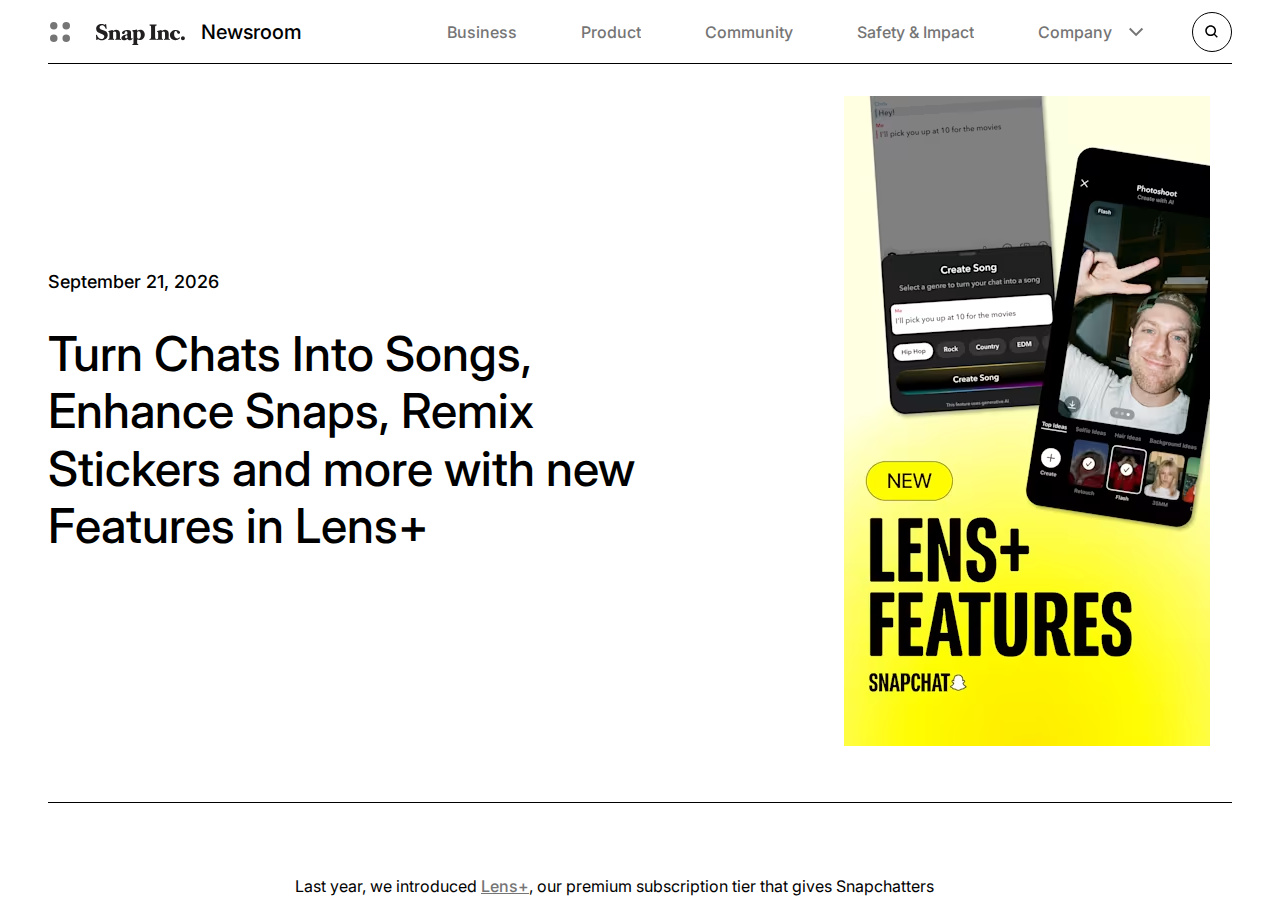
On September 21, 2026, Snap published an announcement on its official newsroom titled "Turn Chats Into Songs, Enhance Snaps, Remix Stickers and more with new Features in Lens+". The bundle adds five AI-powered capabilities to Lens+ — the higher tier inside the Snapchat+ subscription, which the post itself says has passed 25 million subscribers worldwide. Casual reading would file this under "fun extras." That would be a mistake. Snap's own sitewide figures claim more than 900 million people using Snapchat monthly and more than 350 million engaging with augmented reality daily, and every new creation shortcut that reaches that population changes what daily content looks like on the platform.
This guide covers the five features exactly as the official announcement describes them, how each one works, what they mean for creators who publish on Snapchat, and — just as important — what the announcement conspicuously does not say.
First, what exactly is Lens+?
Per the announcement page, Lens+ is a tier within Snapchat+ — a paid level above the base subscription, historically built around exclusive Lenses and immersive AR experiences. The September update expands what that tier buys you, and four of the five new capabilities produce something you would recognize as content: a song, an edited photo, a reimagined Snap, a redesigned sticker.
The five new features, as announced
1. Make your Message Sing
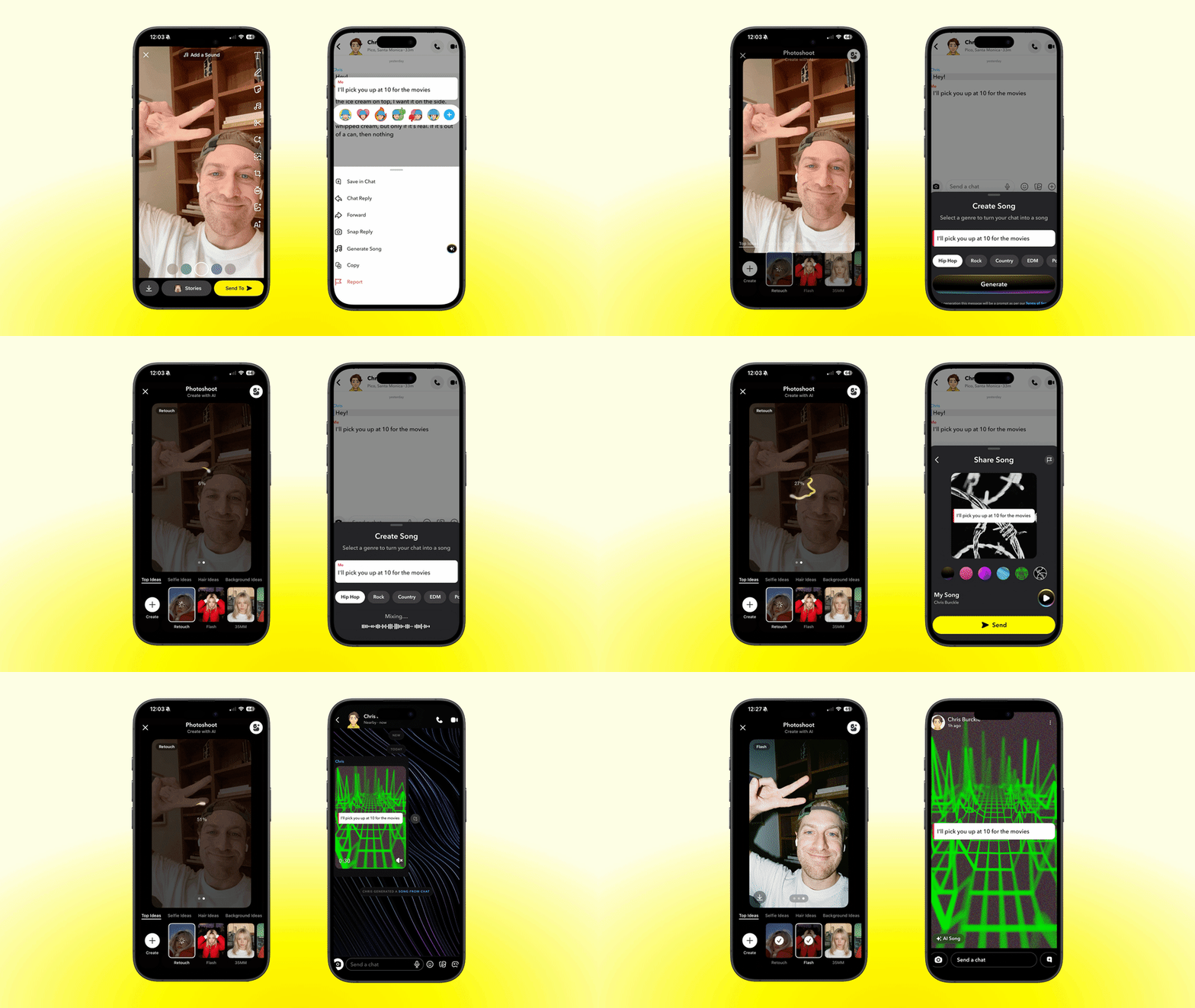
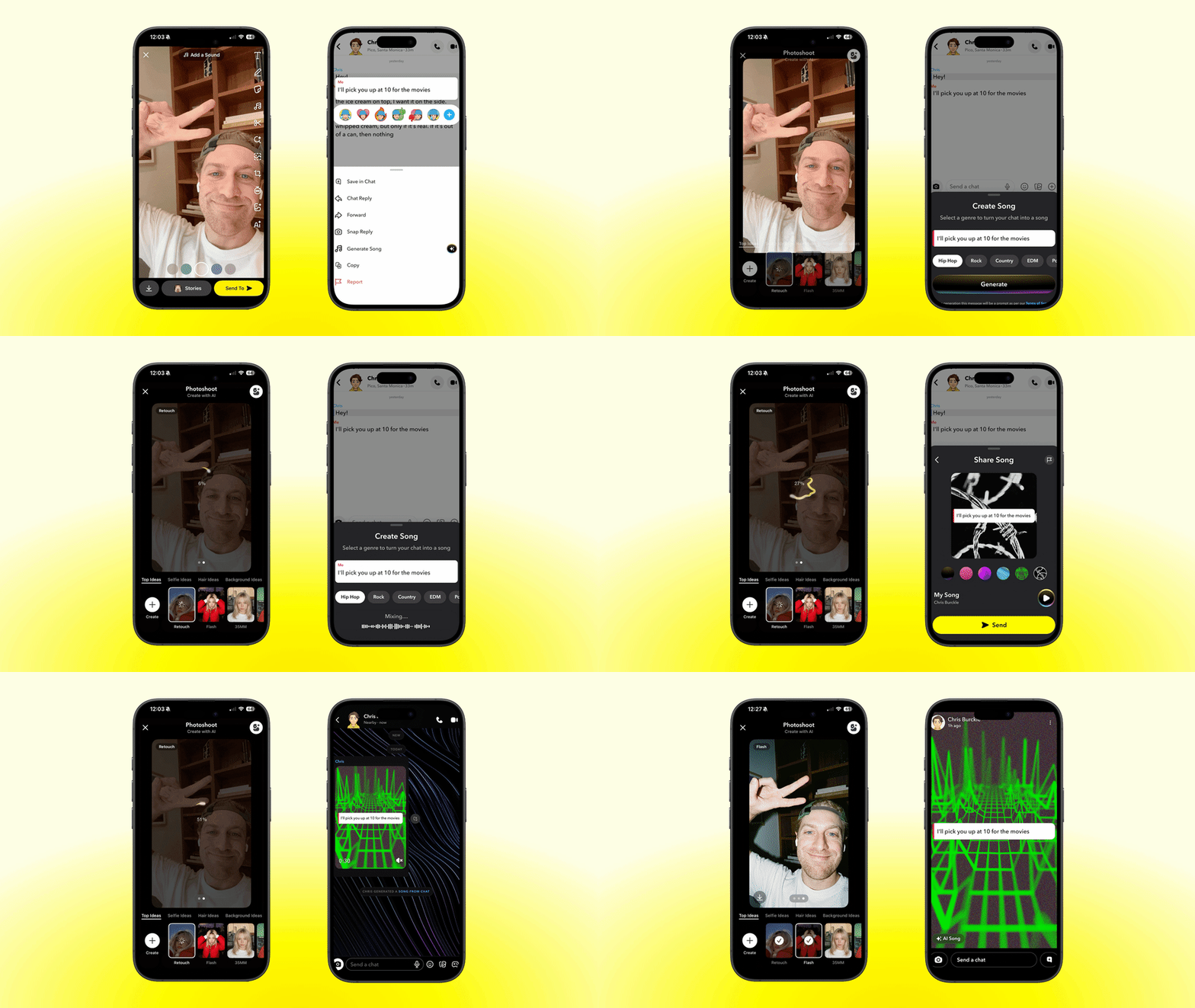
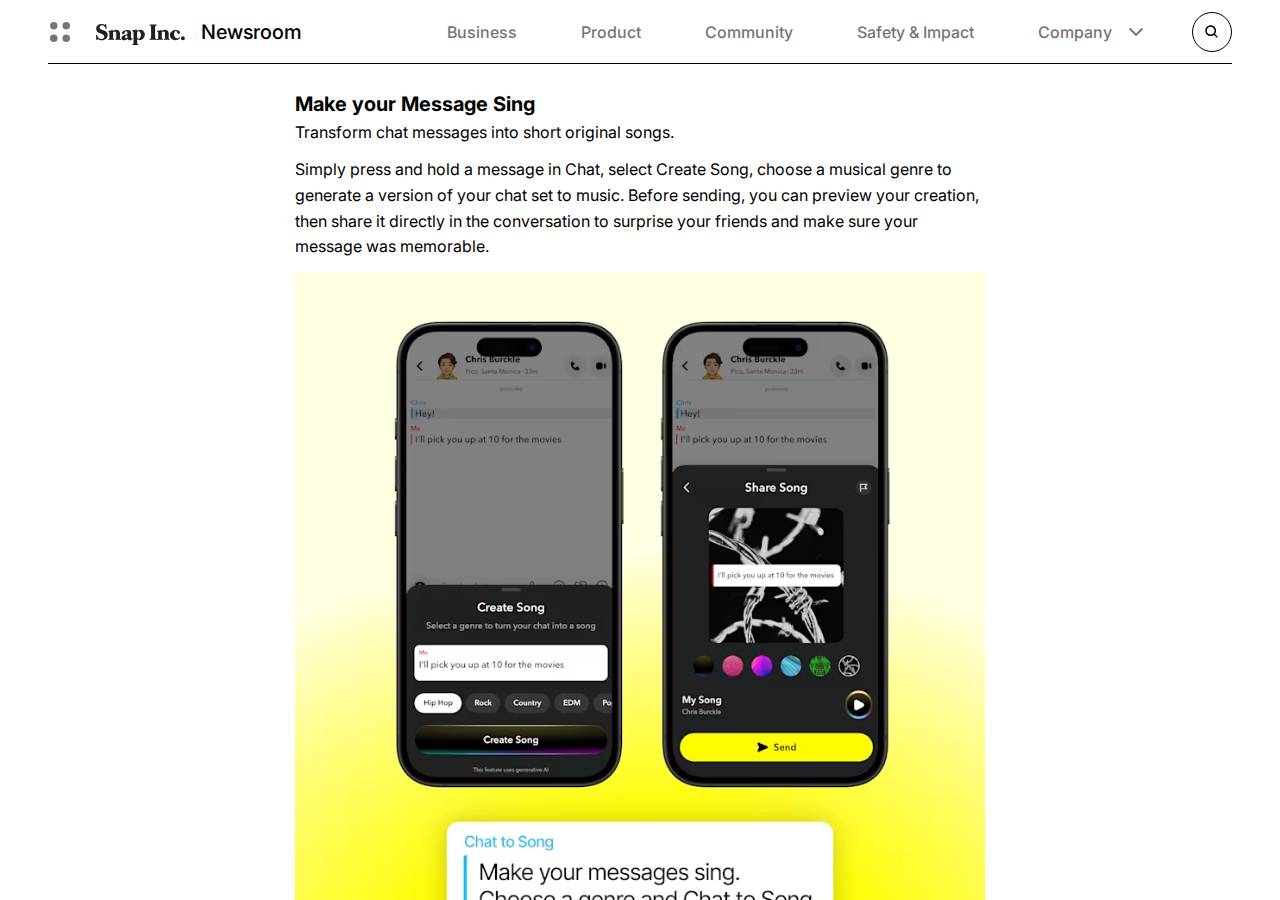
Turns a chat message into a short original song. The exact flow from the announcement: press and hold a chat message, choose Create Song, pick a genre, preview it, then send. The social use is obvious; the strategic meaning is bigger — plain text has become raw material for music, the most shareable format on short-form platforms.
2. Rescue your best Snaps (AI Photoshoot)
Fixes photos where someone blinked, looked away, or the lighting turned against you — so you can share the moment you meant to capture instead of the technical failure. For anyone building an audience with their face on camera, this is direct salvage for daily Snaps that would otherwise be deleted.
3. AI Remix
Lets subscribers reimagine a friend's Snap "in an entirely new style, creating a playful, unexpected version," in the announcement's words. Think of it as a visual reply: instead of an emoji reaction, you send the same shot re-imagined in a different artistic style.
4. Sticker remixing
Reinvent any sticker — custom-made, saved, or received — in a range of styles, mid-conversation. On Snapchat, stickers are a daily language; making them regenerable turns them into a renewable visual identity.
5. AI-enhanced caption fonts
New typeface treatments for captions, including "bubble letters, fuzzy textures, spray paint, foam" — so text overlays on photos and Snaps can carry personality instead of default typography.
What this means for creators
Whether you are building an audience on Snapchat or running a brand presence aimed at younger users, the practical takeaways are four:
- Daily production speed. The hardest part of Snapchat presence is cadence. Photo rescue and caption fonts shrink the prep time of a single post from minutes to seconds.
- New audience-interaction formats. Song-from-message and visual remix are reply mechanics that go beyond text — and anyone who has grown a following on Snapchat knows interaction tools are the fuel.
- A renewable visual identity. Sticker remixing and AI caption fonts mean the "look" of your account can be generated and varied without a designer.
- A direction signal for every platform. When a platform of this scale puts music and image generation inside a paid tier, it is testing the economics of AI-generated everyday communication. Watch it even if you never post on Snapchat — what works here tends to spread everywhere within a year.
If Snapchat is one node in a wider content operation — Snap plus Instagram plus TikTok — these features make the "Snapchat version" of your content faster to produce. The idea and the accompanying caption remain your job, and that part can run through ARWriter's writing tools alongside your publishing stack.
Availability and pricing: what the announcement says, and what it doesn't
This is where precision matters, because the announcement is deliberately thin:
- Rollout: the official text says the features are "rolling out now in all markets where Lens+ is available, but access may vary by region over the coming weeks." No countries are named — not even Snapchat's biggest markets.
- Pricing: the announcement contains no pricing for the Lens+ tier. The official way to know your local price is the subscriptions page inside the Snapchat app itself, where regional pricing is displayed.
- Who gets them: all five features are announced as Lens+ features — free accounts are not part of this launch.
Quick comparison: paid AI layers across platforms
| Platform | Paid layer | Signature AI features |
|---|---|---|
| Snapchat | Lens+ (inside Snapchat+) | Song from chat, photo rescue, Snap remix, sticker redesign, caption fonts |
| Instagram / Meta | Meta One | Expanded creation and publishing features across Meta apps |
| YouTube | Premium / Studio tools | Conversational editing and in-platform generation |
The pattern is identical everywhere: AI has become the number-one reason to pay for a platform subscription. We covered this shift in depth when Meta launched Meta One and its creator tiers — Lens+ is Snap's move in the same race, angled toward everyday communication rather than professional production.
How to check availability and pricing inside your own app
Because the announcement names no countries and no prices, the only trustworthy source is the app itself. The usual path: open Settings from your profile, find the Snapchat+ / subscriptions management page, and — if the tier has reached your market — Lens+ will appear with local pricing and its current feature list. If it is absent, your market is simply not in the rollout wave yet; the announcement itself says access "may vary by region over the coming weeks," so re-checking after a couple of weeks is the move. One golden rule: any price quoted in an article or a tweet that does not match what your app displays is not your price. The app store listing for your market is the single official source.
Remixing a friend's Snap: etiquette before buttons
AI Remix reimagines a Snap someone sent you privately — and that fact deserves a moment of candor. The photo in your chat belongs to its sender's context: remaking a goofy moment back to them can be a delightful reply, while regenerating something personal and forwarding the result to others crosses a line the feature never forces you to cross. The practical rule we would suggest: remix what was sent in a spirit of play (a scene, a joke, a celebration), and never redistribute a re-rendered personal moment beyond its original sender. Private messaging has always been Snapchat's trust contract with users; new tools test our taste in honoring it, not the other way around.
Creative uses per feature — beyond the defaults
- Chat-to-song: turn your audience's recurring welcome phrase into a short song and open a weekly story with it — a strange audio moment becomes a channel signature.
- Photo rescue: build a recurring "before and after" segment: show the failed shot, then the rescued one. Light educational content that demonstrates value while entertaining.
- Snap remix: use it as an audience-interaction ritual: followers send Snaps, and the best weekly submission gets a remixed version featured in your story (with their permission).
- Sticker redesign: build a style-consistent sticker set for your account and refresh it weekly. Visual repetition builds recognition faster than any bio edit.
- Caption fonts: lock one distinctive type treatment for your story headlines, so viewers recognize your content before they read your name.
The common thread: each idea converts a "conversation" feature into a content signature — which is exactly what professional creators do with every new tool platforms ship.
Honest limitations
- An announcement without numbers. No price, no country list, no detailed rollout dates. Anything more specific requires checking inside the app.
- Communication features, not production tools. Three of the five features (song, remix, stickers) are built for private conversations more than public posting — the creator value is indirect.
- Paid-only. Nothing in this launch is available to free accounts.
- Open questions on AI labeling. The announcement says nothing about how AI-modified content from these features is labeled. As labeling rules tighten across platforms — see Instagram's AI-generated profile labels and their reach effects — Snap will likely have to clarify its policy as rollout widens.
- Variable output quality. Turning a message into a song or a photo into a new style relies on generative models; results will vary. The preview step (present in the song feature) is your friend — always use it.
How to evaluate whether the subscription is worth it
Since pricing varies by market and was absent from the announcement, the economic decision rests on a simple frame rather than a single number. First, price your own time: if photo rescue and caption fonts save you ten minutes a day, that is roughly three hundred minutes a month — set that against your local subscription price and judge. Second, measure depth of use: daily publishers with an audience will extract value from nearly all five features, while occasional personal users will find two or three that matter. Third, watch the cadence: Snap shipped five features at once, and the subscription war means the next batch is coming — a subscription's value is measured by what gets added during it, not only by what ships on signup day. And if you run a presence across several platforms, the broader rule applies everywhere: pay for what genuinely compresses your workflow, not for features you will open once out of curiosity.
Who benefits first?
Three groups will find immediate value: the daily Snapchat creator fighting for cadence, the small brand addressing a young audience, and the technically curious who want to feel where communication platforms are heading. On the other side, someone using Snapchat for occasional personal contact will find the bundle "nice but not necessary" — a perfectly acceptable verdict. Not every paid feature has to be for everyone.
Frequently asked questions
What is Lens+ on Snapchat?
Lens+ is a higher tier inside the paid Snapchat+ subscription, historically centered on exclusive Lenses and immersive AR. The September 21, 2026 announcement added five new AI features to it.
How much does Lens+ cost?
The official announcement lists no pricing. Prices vary by market and are shown inside the Snapchat app's subscriptions page — treat any number from outside the app as unverified.
Are the new features available in my country?
Per the announcement, they are rolling out "in all markets where Lens+ is available," with access varying by region over the following weeks. The definitive check is the subscription page inside your app.
Are the generated songs actually original?
The announcement describes them as short "original" songs generated from the message text, with genre selection and a preview before sending. No deeper technical detail is given in the post.
Do these features help creators or just everyday chatting?
They are designed primarily for everyday communication, but creators benefit indirectly: photo rescue and caption fonts genuinely speed up daily posting, and the song and remix formats add new ways to interact with an audience.
Do I need a paid account?
Yes. All five features are announced as exclusive to the Lens+ tier within Snapchat+, the subscription Snap says has crossed 25 million subscribers worldwide.
Where do the features live in the app after subscribing?
Chat features like the song appear on long-pressing a message in a conversation (the Create Song option), while the photo and caption features sit inside the Snap and Story editing tools. If options do not appear immediately after subscribing, the announcement's region-by-region rollout is the likely explanation.
Are these features phone-only, or is there desktop support?
The September 21, 2026 announcement addresses the phone experience (chats, Snaps, stickers) and makes no mention of a web or desktop version of the five features. Until an official statement says otherwise, assume phone-first.
The bottom line
Snap's Lens+ update is not a revolution — it is a signal. Generative AI is being pushed into the heart of everyday communication (the message, the photo, the sticker) and turned into a reason to pay. For active Snapchat creators, the practical features (photo rescue and caption fonts) save real time, while the rest enrich audience interaction. Check availability and pricing inside your own app, test the features that match your cadence, and judge them against your workflow — not against the announcement's enthusiasm. For the daily idea-to-caption pipeline in Arabic and English, ARWriter's platform handles the writing side while these tools handle the visual layer.