On September 30, 2026, Instagram announced something that quietly redraws the line between analytics tools and creative tools: the Edits Assistant, an AI built into its Edits video-editing app that reads your actual account data — views, retention, likes, shares, comments — and turns it into tailored analysis and concrete content ideas. Not a generic chatbot that writes a random hook. A creative partner, in the company's own words, that "knows you and your audience."
The announcement came as an official post on Instagram's creators blog by Brett Westervelt, who leads the Edits app, stating that the assistant "is rolling out to everyone using Edits in the US." In the days since, the creator community outside America has been asking two questions: does this kill paid analytics tools, and when does the rest of the world get it? This explainer assembles the full picture from the primary source and major tech coverage — what the assistant genuinely does, what it costs, where it's available, and how to prepare if you're not in the US yet.
First, context: what Edits actually is
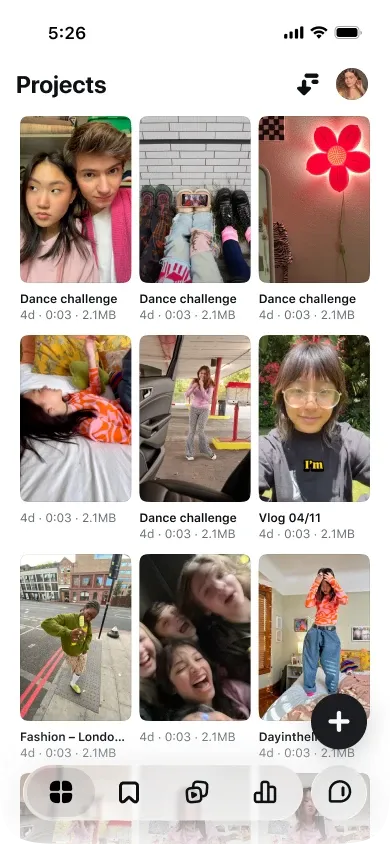
If you arrived late to this story: Edits is Meta's video-editing app, launched as a direct answer to CapCut after trust in the ByteDance-owned editor eroded in several markets. It offers trimming, captioning, voiceover, high-quality watermark-free export, and native Instagram integration — including trial reels, the feature that previews different versions of a clip with a slice of your audience before you publish for real. We covered Edits' previous major update in early September, which added generative tools for turning ideas into footage.
Until now, Edits was a knife: it executed decisions you had already made. The September 30 announcement makes it a participant in the decision itself.
What the Edits Assistant actually does
Per the official post — corroborated by TechCrunch, The Verge and PetaPixel — the assistant works across three connected layers.
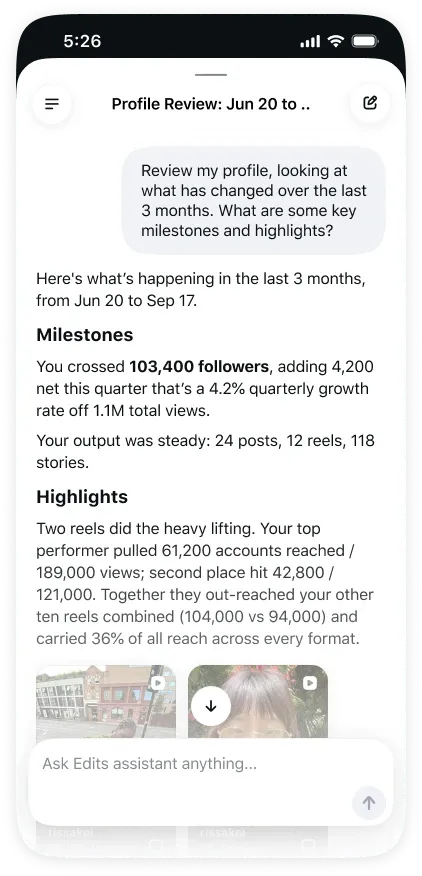
Layer one — reading performance. The assistant pulls your core account metrics: follows, views, video retention, likes and shares. It then combines them with your comments, what's trending on Instagram, and what your specific audience is into. Westervelt's summary: "The assistant knows your account's Instagram metrics, things like follows, views, video retention, likes, shares and combines them with your comments, what's trending on Instagram and what your audience's into."
Layer two — pattern recognition. This is the part that separates it from the Insights tab you already have. Raw numbers show you what happened; the assistant tries to explain why. "It can spot patterns in your performance over time and surface actionable insights that are hard to see from the metrics alone." Why one reel held attention while another collapsed by second five. Which corner of your niche your audience actually rewards.
Layer three — content generation. Built on those patterns, it produces ready-to-use material: video concepts, hooks, captions, full scripts, and trending audio matched to your niche — savable directly from the chat. It can also research whether an idea you're considering has already succeeded on the platform, and refine your edits based on how your trial-reel variations performed.
Using it, step by step
- Update the Edits app to the latest version (iOS and Android).
- Open the app and tap the chat icon — that's the assistant's front door.
- Start with the question Instagram itself suggests: "What's working on my account right now?"
- Go diagnostic: "Why did this reel hold attention while that one didn't?" or ask for a profile review to find weak spots.
- When a trending-audio suggestion fits, save it straight from the chat into your next project.
The entire loop lives inside one app. No copying dashboards out of an analytics tool and pasting them into an external chatbot — the data connection is first-party and automatic.
Pricing: free, with a meter
The assistant is free inside Edits, with a daily limit on the number of prompts you can send. To go beyond the cap, Meta says "power users will soon be able to unlock more usage with a Meta One subscription" — the new subscription umbrella the company launched in September, bundling paid features across Facebook, Instagram and WhatsApp, with reported plans ranging from $2.99 a month for individual app subscriptions up to $499 a month for the top business tier. No Meta One pricing specific to the assistant has been announced, and "soon" has no date attached.
What early testers reported
Instagram developed the assistant over "the past several months" with a council of creators testing early versions, and the launch post carries two telling testimonials. Plant-based cooking creator @turnipvegan discovered through the assistant that his non-food content — building a greenhouse in the desert — was outperforming his actual cooking videos; he called the tool "a cheat code for creators." Beauty creator and makeup artist @jaleesajaikaran got a suggestion to mix a seven-second reel into her feed of one-minute videos — the kind of granular, account-specific advice generic tools don't produce — and said that "giving me ideas based on those insights is mind-blowing."
Why this is a shift, not just a feature
The most quoted line from Westervelt's post is the sharpest: "There's no shortage of AI tools that can write a generic hook or spit out a content calendar. But they don't know your Instagram." That sentence describes the entire gap this product fills. Until now, generative AI answered general questions ("write me a reel idea about coffee"), while your private performance data sat locked inside analytics dashboards that couldn't write a word. The Edits Assistant merges the two for the first time inside Instagram itself, with no third party in the middle — which is also a privacy improvement over granting outside apps read access to your account, the standard price of most "reels analyzer" tools.
There's a strategic wrinkle worth noticing: every recommendation the assistant makes optimizes you deeper into Instagram's own logic. That's efficient, but platforms redraw their rules without notice — YouTube's October 1 decision to prioritize original content in Shorts is a same-week reminder. Treat the assistant as a brilliant analyst on staff, not as a substitute for understanding your audience yourself.
The trial-reels connection: closing the learning loop
One capability hides in plain sight and matters most strategically: the assistant doesn't only read your public posts — it also learns from trial reels, the variations you preview with a slice of your audience before publishing. That closes an entire loop inside a single app: draft the script with the assistant's input, shoot and edit in Edits, A/B two cuts via trial reels, then let the assistant explain which version won and why — and correct its next suggestion accordingly. Idea, execution, test, learning, better idea. That cycle used to require three disconnected tools and a human analyst stitching the threads; soon it's one free app. This is what the early tester meant by "a cheat code for creators."
What it means for shops and agencies
If you run a store account or a small brand page, the assistant attacks a problem you know intimately: nobody has time to analyze twenty reels a month, but publishing blind costs more than the analysis ever would. Your morning question becomes one line — "what worked yesterday, and why?" — and the day builds from there. For agencies managing client accounts, the feature cuts both ways. Basic "account management" retainers will compress, because the client now owns the analysis layer for free; genuinely creative services become more valuable, because interpreting suggestions into distinctive content is the remaining scarce skill. One concrete recommendation: agencies should revisit their service definitions and contracts before this rolls out globally, because Meta itself has drawn the line between who analyzes (the tool) and who creates (you).
Why Meta is shipping this now: the business model
The timing is not innocent. The assistant launches free with a daily cap, inside the Meta One subscription umbrella that spans $2.99 individual plans to $499 business tiers. The commercial logic is familiar from every platform this season: give the smart analysis away until it becomes part of every creator's daily routine, then sell capacity once dependence exists. For creators this is both good news and a caution: good, because tooling that used to cost a monthly retainer is now free and first-party; caution, because the free tier will remain a floor with a ceiling, and the ceiling is sold. The working rule for this generation of AI features: rely on them only to the degree you could afford to replace them.
A sample first session
Picture a realistic first run for a fashion account. You open the app, tap the chat icon, and type "what's working on my account this month?" The assistant replies that your "one piece, three ways" clips retain 40% better than your account average, while the longer in-store tours drop off after second seven. You ask why yesterday's clip underperformed; it points out that the opening line took four seconds before the product appeared, while your audience is trained on first-second reveals. You ask for five ideas in the winning pattern; it proposes five concepts with trending audio matched to your niche, and you save the fitting track with one tap. Ten minutes, and you leave with a week's plan built on your own numbers instead of generic internet advice. That picture is what "a creative partner that knows your audience" means in practice.
Quick comparison against what you use today
| Tool | Analyzes your performance | Tailored content ideas | Editing + publishing integration |
|---|---|---|---|
| Edits Assistant (Instagram) | Yes — first-party data | Yes — grounded in your history | Full — inside the editing app |
| General chatbots | No — only what you paste | Generic, audience-blind | None — outside the stack |
| Paid analytics apps | Yes — dashboards you interpret | Limited, generic | Read-only, no generation |
| CapCut and similar editors | No | No | Editing only |
If you're outside the United States
Let's be completely direct, because a lot of secondhand claims are circulating. The rollout is US-only. The official post names no other countries, gives no expansion timeline, and says nothing about interface languages beyond the site's own localization — there is no announced date for the Middle East, Europe, or anywhere else. Anyone quoting you a date is guessing.
What you can usefully do now: first, if you produce in English for a global audience, the feature will arrive ready to work — the richer your data, the better its analysis, so start running trial reels consistently and organizing work as projects inside Edits now. Second, the methodology is already available to you in manual form: pull your top five reels, find the common thread, and direct a writing tool against that pattern — ARWriter's auto-writer, for example, drafts scripts in Arabic or English built around the format and angle you feed it, which is the same loop the assistant automates. Third, skip the location-spoofing shortcuts people will inevitably sell; they violate terms of service and risk the account you're trying to grow, for a feature that historically reaches more countries within weeks to months.
Honest limits, stated in full
The assistant doesn't make the content, and Meta is emphatic that it shouldn't: "creators want a tool that handles the analysis, not one that does the creative work for them," Westervelt writes, adding "the creative calls are still yours." Generated suggestions still need your editorial judgment, because a performance pattern is a probability, not a recipe. The daily prompt cap may pinch for high-velocity creators until paid expansion arrives. And because the launch is US-only, treat any early "hands-on reviews" from outside the US with skepticism — they're either borrowed accounts or speculation. Finally, an assistant that reads your DMs-adjacent engagement data is still a data engine; if you manage brand accounts or client profiles, review what metrics access means for your arrangements before wiring it into client workflows.
Practical preparation checklist
- Turn on trial reels and use them on every meaningful post — their variation data is what the assistant reads best.
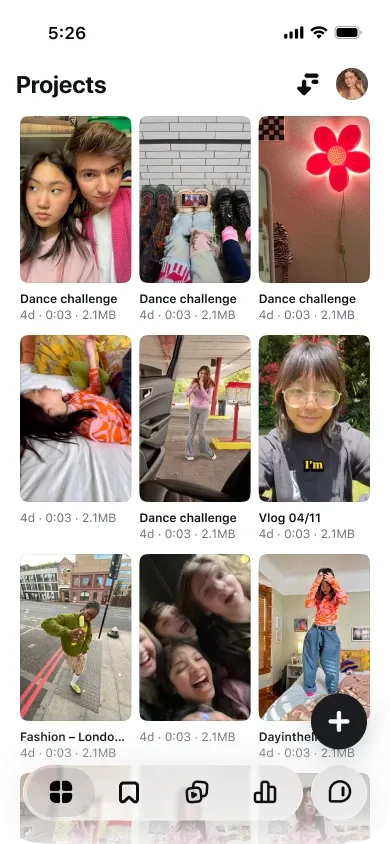
- Move your editing into Edits progressively, so your project history is populated when the assistant reaches you.
- Build a monthly written analysis habit: top five clips, shared traits, longest retention moment.
- Keep a shelf of draft scripts ready via ARWriter's tools so that new suggestions can be executed same-day.
Frequently asked questions
When was the Edits Assistant announced?
September 30, 2026, in an official post on Instagram's creators blog written by Brett Westervelt, who leads the Edits app.
Is it available outside the US?
No. The launch covers everyone using Edits in the United States. Instagram has announced no dates for additional countries so far.
Is it free?
Yes, free inside the Edits app with a daily prompt limit. Meta says a Meta One subscription will "soon" unlock more usage; no assistant-specific pricing has been announced.
Does it support languages other than English?
The announcement doesn't specify assistant languages. Availability and quality in other languages can only be confirmed once the feature reaches those markets.
Will it replace paid analytics tools?
For individual Instagram creators, it covers much of what those tools do, with better data and at no cost. Third-party tools still hold cross-platform comparison and competitor analysis, which the assistant doesn't do.
Can it write a complete reel script?
Yes — video concepts, hooks, captions, scripts and audio suggestions are all announced outputs. The company's own framing is that the final creative judgment stays with you.
Sources
Primary: Meet the Edits assistant, the one that knows your Instagram — Instagram creators blog, Brett Westervelt, September 30, 2026. Corroborating coverage: TechCrunch, The Verge, PetaPixel, PCMag. Background: our earlier coverage of the Edits app's September update, and you can start applying the same methodology today with ARWriter.