On the evening of October 22, 2026, Canva announced Canva Craft — the company's first fully in-house, frontier-grade AI image generation model, built specifically for design rather than generic picture-making. The launch went live on Canva's official newsroom page and the company's launch post on X, and the model is, per Canva, "available to everyone" inside the platform through Dream Lab, effective immediately.
This is a strategic break from Canva's playbook. Until now, the platform's AI image features leaned on external providers. Craft is the first model to come out of Canva's own in-house research lab, and it signals that the company intends to own the engine, not just the cockpit. Here is what that actually changes for your content workflow.
What exactly is Canva Craft?
Craft is an image generation model built by Canva's internal research lab with one design goal: to think like a designer, not a camera. Early coverage from The Verge highlights that the model "plans designs before generating them" — it reasons about what you are asking for (the platform, the purpose, where text should sit) and constructs the image around that intent instead of rendering a single frozen guess.
That distinction matters enormously for working creators. Most popular image models today produce final, "flat" images that need a full redesign the moment a client asks for one change. Craft is optimized for text-rich images — ads, video covers, cards, headline graphics — which is precisely the category most creators need daily and precisely where general-purpose models still mangle lettering. And its output does not stay frozen: through Canva's Magic Layers, generated elements can be converted into editable design layers inside the Canva editor, so you can move the headline, recolor the accent, or swap the background without exporting to a second tool.
The technical specs that matter
According to the official announcement page and launch-day coverage, the highlights are:
- Up to 2K resolution — comfortably enough for YouTube thumbnails, Instagram posts, and display ads without softening when cropped.
- 30+ aspect ratios out of the box — from 1:1 to 16:9 to vertical 9:16, covering effectively every platform you publish to with no manual cropping gymnastics.
- Native Dream Lab integration — the feature Canva users already know now runs on Canva's own engine.
- Magic Layers hand-off for converting generations into editable design elements inside the editor.
- An API in preview for technical teams, with faster variants named Craft-fast and Craft-ultrafast announced as upcoming, alongside planned MCP support.
The global ranking: where does Craft actually stand?
The boldest claim in the launch is competitive positioning. In its official announcement post, Canva states that with Craft it has become, in its own words, one of the world's most advanced AI labs for image generation on the DesignArena leaderboard. The official launch video included a slide titled "Top AI labs for image generation," ranked by each lab's highest-ranked recent model, listing Canva alongside OpenAI, Google, Microsoft, xAI, Reve, and ByteDance — data dated October 23, 2026.
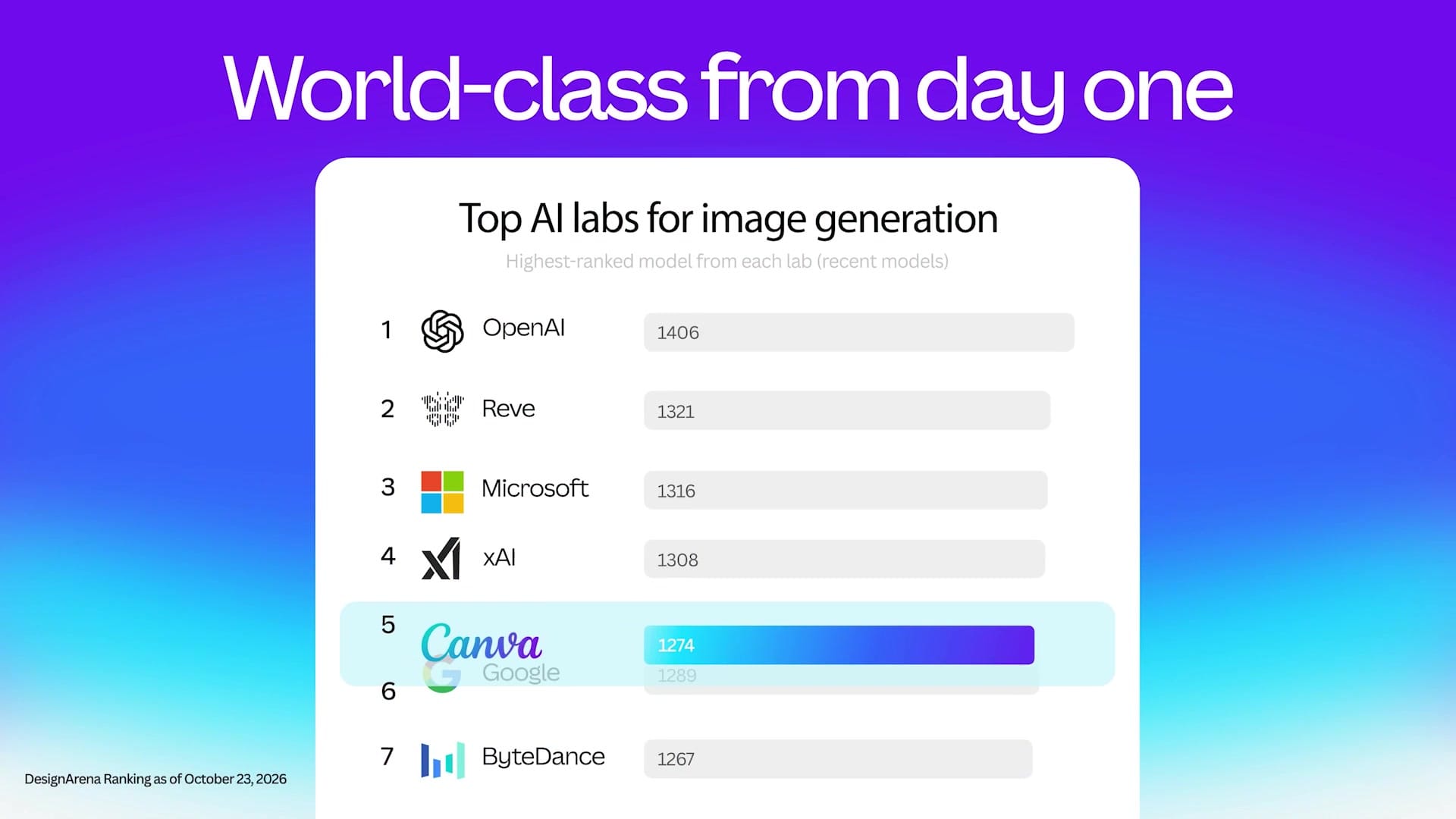
The balanced takeaway: a design-platform company entering the frontier-model arena and immediately ranking among the global leaders on day one is a genuine feat. But as a creator, do not buy on a leaderboard number alone — arena rankings shuffle weekly. What should actually drive your decision is: text rendering quality in your language, editability after generation, and price. And that is exactly where Canva's argument is strongest — the model ships inside the design tool you already use, with no separate subscription announced.
What does this mean for you as a content creator?
- YouTubers: 2K thumbnails with legible in-image text — historically the weak spot of the external models Canva previously relied on.
- Social media managers: generate 30+ platform-ready sizes from one prompt, then fix the copy and logo placement inside the same editor. That is a full hour saved on every publishing day.
- Small businesses and stores: ads and banners with intact typography, without a dedicated designer or a second SaaS subscription.
- Anyone prompting professionally: great output still starts with a precise brief. Browse the ARWriter image prompt library to structure design briefs that produce usable results in Canva or any other generator.
Quick comparison: Craft vs. the traditional route
| Criterion | Canva Craft (inside Canva) | Generic image model outside a design suite |
|---|---|---|
| Max resolution | 2K | Varies by provider |
| Aspect ratios | 30+ ready-made | Limited per request |
| In-image text | Explicit focus on text-rich images | Often distorted glyphs |
| Editing after generation | Direct in Canva editor (Magic Layers) | Requires export and redesign |
| Cost | Included in Canva, no extra plan announced | Separate subscription or per-image pricing |
| API | Preview only | Generally wider availability |
The honest limits you should know
Full transparency: this is launch-day news coverage, not a hands-on field review. We have not yet tested non-Latin text rendering (including Arabic) inside generated images — a full test will follow once availability widens. The API remains in preview only; the speed variants (Craft-fast, Craft-ultrafast) and MCP support were announced as roadmap items, not shipping features. And "available to everyone" in the launch post does not necessarily mean every usage limit of Canva's free tier disappears — watch your account's usage screen as you would with any Canva AI feature.
If you have been following Canva with us, this step will not surprise you: in September 2026 the company bundled professional-grade tools into the ProSuite package we covered earlier, and before that shipped over 100 Visual Suite upgrades. Craft is the logical continuation: having assembled the tools, Canva now wants to own the engine underneath them.
How to start today
Open your Canva account, head to Dream Lab from the elements panel, and write a precise brief (platform, purpose, the exact text that must appear in the image, and the aspect ratio). Since output quality starts with prompt quality, draft your brief professionally — ARWriter's AI writing platform handles the idea-to-brief step, then let Craft handle the pixels.
Frequently asked questions
Is Canva Craft free to use?
Canva announced Craft as "available to everyone" via Dream Lab, with no paid-plan restriction mentioned in the official announcement. The usual per-plan usage limits on AI generations may still apply, as is standard for Canva's AI features.
How do I try Canva Craft step by step?
Open Canva on the web, create a new design, open Dream Lab in the side panel, describe your design including the aspect ratio, generate, and use Magic Layers to turn generated elements into editable layers.
Does Craft handle text inside images well?
That is its headline strength. Canva positions Craft as optimized for text-rich images — ads, covers, and cards — where most competing models distort lettering. Independent long-term benchmarks will tell how big the gap really is.
What is the maximum output resolution?
Up to 2K across more than 30 aspect ratios, which covers YouTube, Instagram, TikTok, LinkedIn, and standard web ad formats.
Can developers use Craft in their own apps?
Partially: the Craft API is available in preview for interested teams, with Craft-fast and Craft-ultrafast variants and MCP support announced as upcoming.
Bottom line: Craft redraws the map for creator tooling — for the first time, a frontier-grade image model ships inside the design suite hundreds of millions of people already use, with no tool-hopping. Try it on your next project. For more updates that change how you create and publish — and to draft the content those visuals will carry — follow our coverage and start with ARWriter for free today.