

The event: on August 20, 2026, the SenseNova team officially released SenseNova-U1.5-8B-MoT as a fully open model on its official GitHub repository and on Hugging Face, under the permissive Apache 2.0 license. The timeline matters, so let's state it precisely: the original U1 model had been open for a while, a U1.5 "Preview" appeared on July 31, 2026, and on August 20 the preview graduated into an official release with a complete changelog. This guide was written a few days after that official release, and covers what actually changed — and why it matters specifically for people who make content.
The short version: one model, eight billion parameters, that combines image generation, image editing, text rendering inside images, infographics, and mixed text-image dialogue — runnable locally on reasonable hardware, and freely modifiable and embeddable in your tools thanks to Apache 2.0. After weeks of headlines dominated by closed, subscription-rented models, this release puts the other option back on the table: owning your visual tooling.
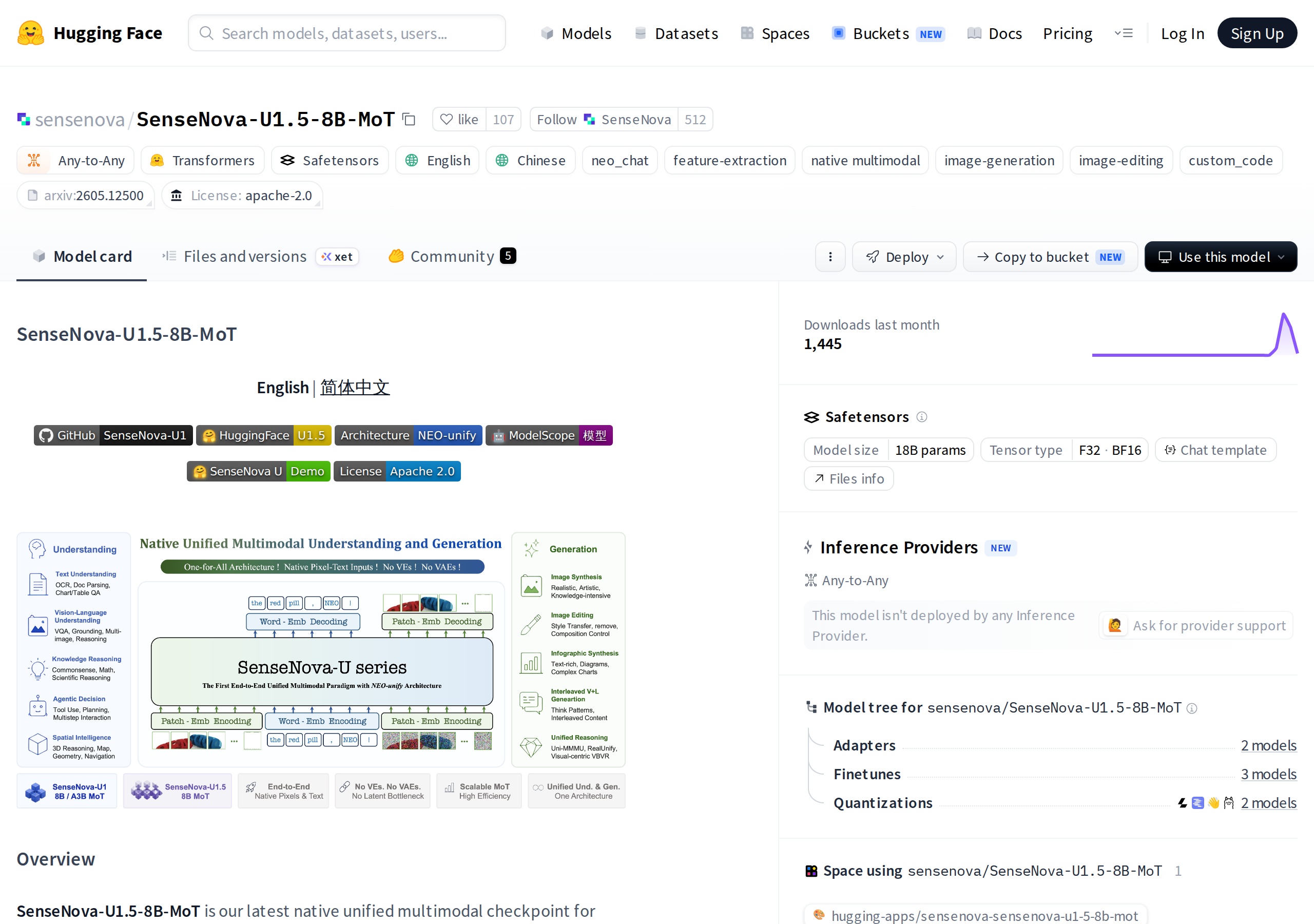
What is SenseNova-U1.5-8B-MoT?
The model belongs to the SenseNova-U1 family, and the MoT suffix refers to the Mixture-of-Transformers architecture described in the official repository. In plain terms: instead of one giant model that does everything, specialized components work side by side inside a single model, so text pathways and image pathways cooperate over a shared knowledge base. The practical outcome, as documented in the changelog, is higher performance in nearly every measured category compared to the previous U1-8B release, while keeping a size that stays within reach of capable consumer hardware.
The crucial difference from most famous image-generation models is that this one is natively multimodal — it was not built as an image generator with a language model bolted on afterwards. It understands and produces text, understands and produces images, inside one system. That is what unlocks capabilities specialized generators struggle with: interleaved text-and-image dialogue, editing a real photograph with a text command, or designing an infographic whose labels are written correctly inside the image itself.
The capabilities documented in the official release
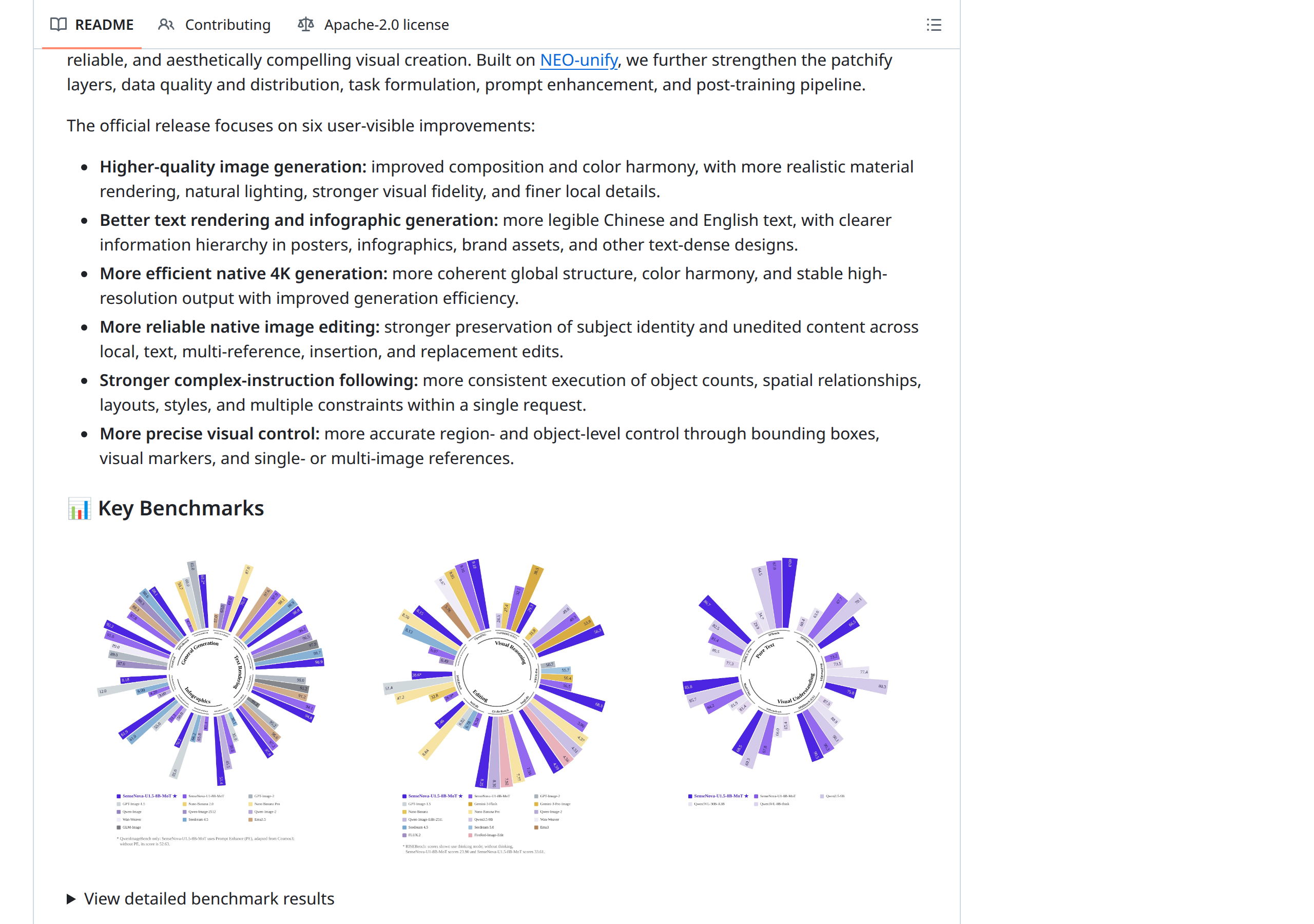
According to the official model card and changelog, U1.5 covers five main capability areas, and the team published a benchmark chart comparing the new release against its direct predecessor U1-8B:
- Text-to-Image generation: including high-resolution output up to 4K as documented on the model card, with control over style, composition, and detail.
- Image editing: modify an existing image with text instructions — swap an element, add an object, change lighting or background — while preserving the rest of the picture.
- Text rendering: generating readable text inside images, historically the hardest capability for image models. This makes infographics, image headlines, and educational cards possible directly from the model.
- Interleaved generation: producing content that alternates text paragraphs and images — bringing the model closer to a complete "visual content writer" that outputs an illustrated piece rather than an isolated image.
- Visual question answering: understanding an image you send and answering questions about it — a "reading" capability, not only generation.
The published chart shows improvement across all five categories compared to U1-8B — meaning this is not a cosmetic refresh but a documented benchmark step forward from the team itself, while keeping roughly the same model size and hardware class.
Apache 2.0: why the license is the real news
Many "open" models publish weights under licenses that forbid commercial use or impose heavy conditions. Apache 2.0 is one of the most permissive licenses in software, and for you it means concretely:
- Commercial use is allowed in your products, services, and paid content — no fees, no revenue share.
- Modification is allowed: you can fine-tune the model on your brand's visual style.
- Redistribution is allowed as long as license notices are preserved.
- Clearer legal protection: the license includes an explicit patent grant, which reduces legal ambiguity compared to bespoke weight licenses.
For a content creator, the difference between "free for personal use" and "Apache 2.0" is the difference between a tool you try and a tool you build a business on. This release belongs to the second category.
How do you run it? The documented options
The official repository documents three main deployment paths, in ascending order of effort:
- Transformers: the official integration with the widely used Transformers library. This is the easiest route for anyone with intermediate Python experience — load the model from Hugging Face and run it in a few lines inside your own environment.
- LightLLM: a high-performance inference server framework, the right choice if you will serve the model as an internal endpoint for your team or application with concurrent requests.
- ComfyUI: integration with the popular node-based visual environment designers use — here the model becomes a node in your design workflow, with almost no coding.
The changelog also notes that a lighter U1.5-Lite version in GGUF format is "coming soon" — the format used for personal and lower-spec machines. As of this guide's writing, however, that is an announced promise, not a published artifact, so do not build this week's plans on it.
One practical technical note: the repository recommends hardware with generous GPU memory for an 8B model, and actual consumption varies with the precision you run (full precision or quantized builds). Start at a lower precision and step up if needed.
What does this mean for you as a content creator?
- Images without a per-image bill: after a one-time setup, the marginal cost of an extra image approaches the electricity your machine uses. That changes the math for anyone producing dozens of images daily — thumbnails, quick ad variants, social assets.
- Infographics without waiting on a designer: in-image text rendering means you can produce educational cards, image headlines, and simple diagrams yourself, then hand the important ones to a designer for polish if you choose.
- File privacy: your unreleased campaign images never leave your machine. That is a material difference when you work with sensitive brands or pre-launch exclusive content.
- A consistent visual style: because the model runs locally and can be tuned, you can align its output with a stable visual identity across months, instead of chasing the shifting style of a cloud service that changes with every update.
- Automation inside your own tools: with the ComfyUI integration and the serving options, the model can plug into your existing production line — from article idea to cover image in one step inside the same working environment.
- Understanding what you publish: the visual question-answering capability makes the model a checking tool too: is this image fit to publish? which elements stand out? — before your audience sees it.
- Independence from vendor decisions: a local model is never suddenly discontinued, and its price never changes mid-campaign. What you own today will run tomorrow.
Because open tools require technical setup not everyone wants, a hybrid arrangement is often the most practical: cloud services for speed and bulk volume, and a local model for privacy and visual identity. Both sides can be coordinated in ready-made workflows through tools like the ARWriter content platform, and you can plan the editorial side with our content calendar guide or compare cloud options in our AI content generation overview.
Quick comparison: U1.5-8B versus U1-8B
| Criterion | SenseNova-U1-8B (previous) | SenseNova-U1.5-8B-MoT (new) |
|---|---|---|
| Text-to-image | Available | Available — up to 4K resolution, documented gain on the official chart |
| Text-command image editing | Available | Available — documented gain |
| Text rendering inside images | Partially available | Available — notably improved per the chart |
| Interleaved text/image generation | Available | Available — documented gain |
| Visual question answering | Available | Available — documented gain |
| License | Open | Apache 2.0 — full commercial use |
| Documented integrations | Transformers and others | Transformers, LightLLM, ComfyUI + U1.5-Lite GGUF coming soon |
Three realistic scenarios for content creators
To turn documented capabilities into practical decisions, here are three representative scenarios showing when the local model is the right choice:
Scenario one: a blog producing educational cards
An educational blog needs ten knowledge cards weekly: a big headline, three bullet points, a simple illustration, and consistent colors from the site's identity. Until now it waited three days per batch for a freelance designer. With a local model running through ComfyUI, the card is built from a fixed node template — text node, generation node, in-image text node — and the whole batch is invoked at once. The result: cards ready in an hour, visual identity preserved because the same template is reused, and the content never left the machine.
Scenario two: a small agency handling a sensitive brand
A small content agency signed a contract with a brand that forbids uploading any pre-launch material to any cloud service. Previously that meant relying entirely on manual design during drafting. Today: all visual drafts are generated locally with the open model, winning ideas are selected internally, and only then is final production handed to the client's approved tools. The privacy clause in the contract turns from a constraint into a competitive advantage the agency features in its pitches.
Scenario three: an independent creator balancing a budget
A solo creator publishing on three platforms needs daily thumbnails and multiple ad variants. Instead of paying monthly subscriptions for an image service, a text service, and a scheduler, they build a hybrid setup: the local model for daily volume and low-stakes experiments, and an advanced cloud service only for major campaigns where top quality is financially justified. At month's end, total cost is lower — and dependence on any single provider is lower too.
A seven-day evaluation plan
If you want a decision based on measurement rather than launch-day enthusiasm, follow this week-long plan before committing:
- Day one — setup: install the model via Transformers or ComfyUI depending on your environment, and run the official repository examples unchanged to confirm the installation is sound.
- Day two — baseline: build a test set of twenty prompts representing your real work — the image types you actually need, in your style and usual dimensions.
- Day three — comparison: execute the twenty prompts and keep the outputs in a numbered folder without any tuning.
- Day four — calibration: rerun the best ten prompts with the cfg_scale and parameter adjustments recommended on the model card, and compare against day three.
- Day five — text: test in-image text rendering with your actual types: short headlines, numbers, medium sentences, and the language you publish in.
- Day six — editing: try editing real images from your archive with simple then complex instructions, and record the share of usable results.
- Day seven — decision: collect the numbers: how many publish-ready images out of twenty? how many minutes per image? what is the estimated power and maintenance cost? Then decide: full adoption, partial use, or waiting for the lighter GGUF release.
This plan protects you from the two mirror-image mistakes: rejecting the model up front because it is open-source, and adopting it emotionally based on curated images in launch posts.
The documented limitations — without sugar-coating
To the team's credit, the limitations are written on the model card itself rather than buried in forums. The four main ones:
- Color over-saturation: outputs can lean oversaturated; the officially recommended fix is lowering the cfg_scale value at generation time.
- Dense small text: writing text inside images struggles with small, tightly packed passages — proofread any generated text immediately before publishing.
- Small faces and hands: fine human details inside large scenes remain a known weak point for this class of models.
- Multi-region consistency: in complex, multi-region images, consistency can slip from one region to another — a color shifts, a label changes.
Add the practical realities of local operation: you are responsible for hardware, updates, and power draw. And support for non-English text rendering is not documented with official measurements, so test your own language on samples before relying on it for published work.
Frequently asked questions
Is the model really free?
The weights and code are free under Apache 2.0, which permits commercial use. But "free" here means no license fee — the real costs are running hardware, setup time, and maintenance, and you will likely want a GPU with substantial memory for comfortable operation.
Can it write non-English text inside images?
The general text-rendering capability is documented, but the team has not published official measurements for other languages. Test it yourself on samples, and do not rely on it for final published material without human review.
What is the difference between U1.5 and the previous U1?
U1.5 brings documented improvements on the official benchmark chart across five categories: text-to-image, editing, in-image text rendering, interleaved generation, and visual question answering — while staying in the 8B size class with an open license.
Do I need internet access to run it?
After downloading the weights once, operation is fully local and needs no permanent connection — that is the core privacy and independence advantage. You only need the internet for updates or newer versions.
When should I choose a local model over a cloud service?
Choose local when you need strong privacy, a consistent visual identity through fine-tuning, or high volumes where you want cost certainty. Choose cloud when you need instant start without hardware, capabilities above the 8B class, or a ready integration with no maintenance.
Where do I find the model and documentation?
The official repository on GitHub is OpenSenseNova/SenseNova-U1, and the model card on Hugging Face is SenseNova-U1.5-8B-MoT. Both are linked in the sources at the end of this guide.
Conclusion
The open release of SenseNova-U1.5-8B-MoT on August 20, 2026 represents a different kind of news in a season of closed models: a complete visual capability you own rather than rent. It is not the most powerful model on the market, but — with documented gains across all five capability areas, a license that permits everything, and local operation that respects your privacy — it earns a place in the toolkit of any serious content creator. Start with one experiment: a simple infographic or an article cover, and measure the result yourself.
Official sources
- The official GitHub repository (OpenSenseNova/SenseNova-U1) — the full changelog for the August 20, 2026 release, documented deployment paths, and the declared limitations.
- The model card on Hugging Face (SenseNova-U1.5-8B-MoT) — the five-category benchmark chart, license details, and the weight files.
Transparency note: tool links in this article lead to our own platform, ARWriter.ai. GitHub and Hugging Face links are official and informational, with no affiliate commission. Capabilities and limitations are documented from the official model card and changelog as of August 20–23, 2026.


