On October 15, 2026, Krea released Krea 3, its new AI image editing model, with a pitch aimed squarely at people who edit product and campaign images for a living: most edits come back in under 8 seconds, end to end, at native 2K resolution, for $0.06 an image. To size that against the competition, Krea's own launch post measured Nano Banana Pro at 33 seconds and $0.135 per edit, and GPT Image 2 at 90 seconds and $0.22. Those aren't journalist estimates — they are the medians Krea published from real edit jobs on its own platform between September 24 and October 1, 2026, queue time included.
The launch is now about three weeks old, which makes this neither breaking news nor old history. It is exactly the moment a store owner, agency, or freelancer goes looking for the full picture: what Krea 3 actually does, whether it really preserves labels and logos, what it truly costs month to month, and when it is the wrong tool. Everything below is drawn from Krea's official announcement and pricing pages, closing with the limitations the company admits to itself.
What exactly is Krea 3?
Krea 3 is an editing model, not a from-scratch generator. Its single job: take an existing image plus an instruction, and return the edited image while leaving everything you didn't ask for untouched. Krea describes the behavior precisely in the launch post — change the setting around a product and the label stays sharp; give it a face and an outfit, and the person in the next image is still the same person. That surgical quality is the difference between an image usable in a paid campaign and one that quietly redraws the details you spent money getting right.
The model went live on launch day at krea.ai for what the company describes as its 30 million users, in the Krea API, and through serving partners fal, Hedra, Together AI, Nous Research, OpenRouter, and Replicate. In practice: a technical team can wire it into a product within hours, while everyone else uses it from Krea's own interface.

The official numbers: speed, price, resolution
Three figures define Krea 3, all from the launch post:
- Under 8 seconds per edit, from request to finished image, at native 2K — not an upscaled lower resolution.
- $0.06 per image at 2K through the API, and $0.03 at 1K.
- Up to 6 reference images per edit: product angles, a color palette, a model's face — all in one request.
Since comparisons decide budgets, here is Krea's own table (medians measured on Krea's platform, September 24 to October 1, 2026, queue time included; list prices, no image references):
| Model | Time per edit | Price per image | Cost of 100,000 edits/month |
|---|---|---|---|
| Krea 3 (2K) | Under 8 s | $0.06 | $6,000 |
| Nano Banana Pro | 33 s | $0.135 | $13,500 |
| GPT Image 2 | 90 s | $0.22 | $22,000 |
Look at the 100,000-edits row before dismissing the per-image pennies: at that volume, Krea 3 saves $7,500 a month against the nearest competitor and $16,000 against the most expensive one. If you run a rotating product catalog, that is a budget line, not a rounding error.
Who this actually helps: the small-business camera replacement
The clearest use cases in the launch post read like a small-business wishlist:
- E-commerce: turn a phone snapshot of a product into a studio packshot, or produce a set of colorways from one photo — both stated verbatim by Krea.
- Marketing teams: localize a poster, or adapt one ad into new formats — again, official examples.
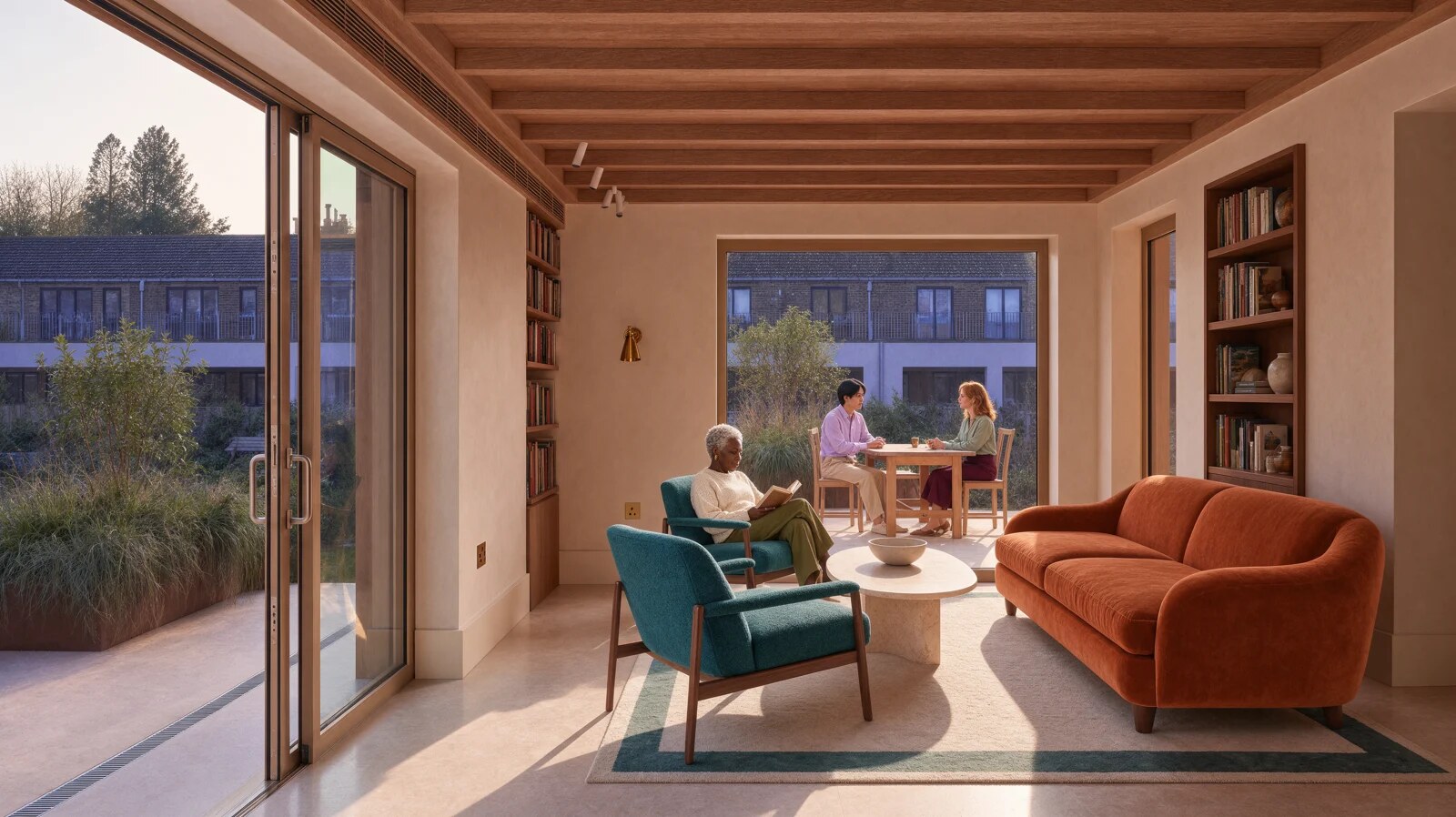
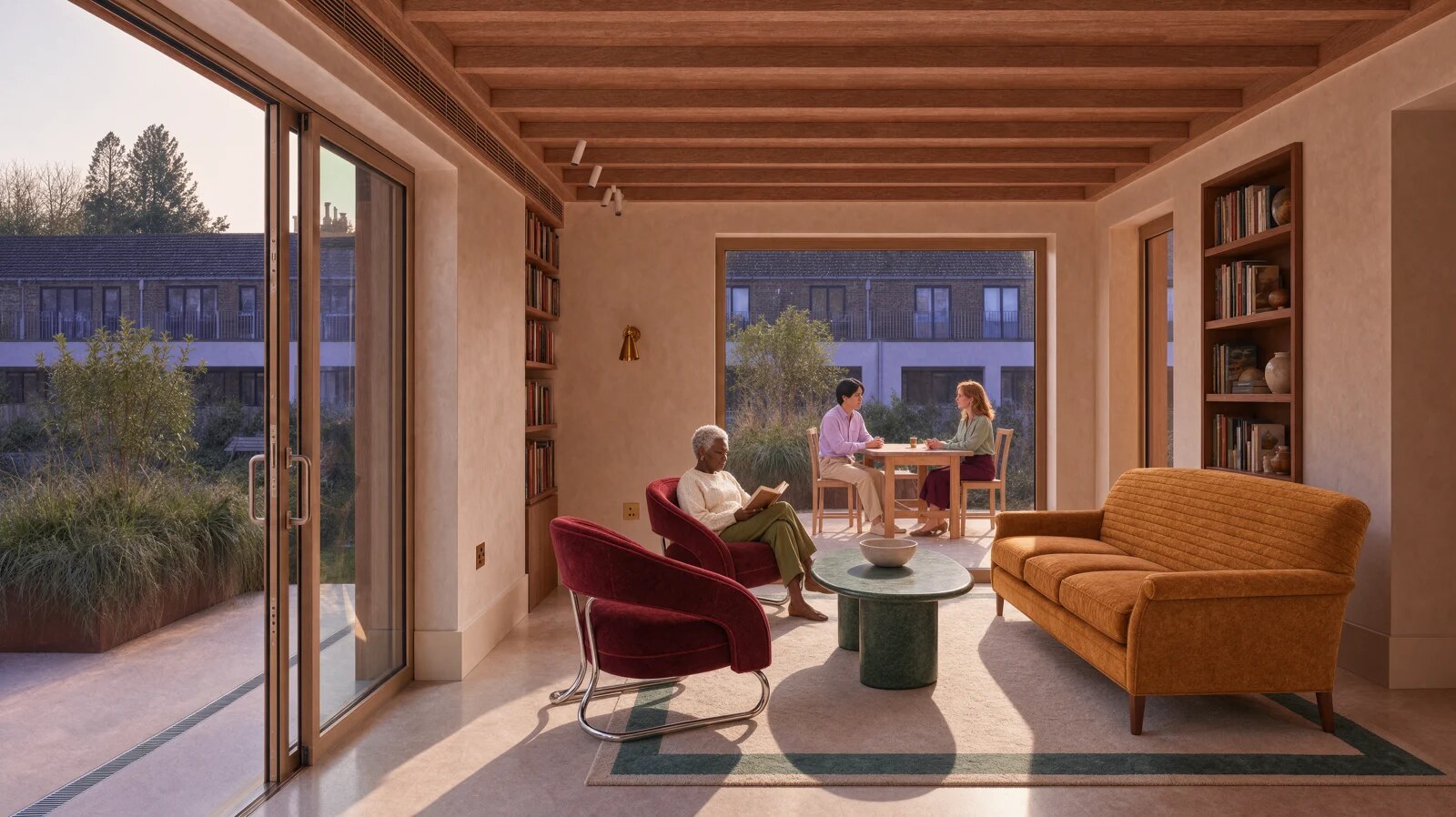
- Restaurants and interiors: the official before/after demo swaps a room's furniture while the rug, the view, and the woman reading in the corner stay untouched.
- Architecture: try materials and light on a building before anything is built.
The most convincing validation came from Pixelcut, which put early checkpoints of Krea 3 in front of its real users. Co-founder and CEO Dominique Yahyavi's verdict is worth quoting directly: "What stood out most was the lighting. The product shots look like they were lit by a professional photographer, not generated by AI. Most of our customers are small businesses that can't afford a studio shoot for every product. K3 gives them that same beautiful, studio-quality lighting while staying true to the original product." When a tool survives contact with actual store owners before launch, it stops being a demo and becomes a working substitute for a studio session.
See it for yourself: the official before and after
Pricing and plans: what you actually pay
Two official routes, straight from Krea's pricing page:
- Platform subscription at krea.ai: a free plan to try the platform; Basic with 5,000 units per month at $9 monthly or $5/month billed yearly; Pro with 20,000 units at $35 monthly or $21 yearly; Max with 60,000 units. Every plan includes a commercial license for generated content — a decisive detail for client work.
- Pay-per-image via the API: $0.06 at 2K, $0.03 at 1K — the route for development teams and bulk catalog operations.
Payment is by international card, the platform is fully cloud-based, and nothing needs special hardware. To place it in your wider stack: if your work is editing full design files, Figma's new design agent is the better fit; if your team edits collaboratively on a canvas, Krea's Multiplayer Nodes feature from October matters more. For bulk product imagery, Krea 3 is the natural candidate.
What 8-second edits actually do to your throughput
Speed means nothing until you convert it into output. Take a realistic job: refreshing 100 product photos with a new background for a seasonal sale. Using the official per-edit timings, and ignoring prompt-writing and review time:
- Krea 3: 100 edits × 8 seconds = roughly 13.5 minutes of processing.
- Nearest rival: 100 × 33 seconds = about 55 minutes.
- Most expensive option: 100 × 90 seconds = a full 150 minutes of waiting.
The gap between 13 and 150 minutes is the gap between "campaign done before the meeting" and "the team finishes it day after tomorrow." For freelancers it cuts deeper: short turnaround times let you accept rush revision work at premium rates, because a day of production collapses into an hour of review. And the money side compounds in parallel — those same 100 images cost $6 on Krea 3 versus $22 on the priciest option, and the gap scales linearly with volume.
One question decides whether this tool is for you: do you produce many structurally similar images? If yes, speed and price work together in your favor. If your work is a handful of radically different hero images, the equation becomes about quality, not throughput — and a different tool may win.
A working workflow, from raw photo to deliverable
The model doesn't operate in a vacuum; input quality caps output quality. A practical sequence grounded in the launch material:
- Start from the best source image you have. Krea 3 outputs at native 2K, so a reasonably lit, sharp input gives the model clean material. The official example starts from a phone snapshot that becomes a studio shot — but even that snapshot needs decent light and an intact label.
- Use the six reference slots deliberately. Official assets show multiple reference angles for a single product. Pass your official product photos as references so the model commits to the real shape instead of guessing it.
- One specific edit request at a time. Krea 3's entire value proposition is "change only what was asked" — stacking five instructions into one sentence fights the model's core strength.
- Review commercial details first: label, logo, on-pack text. These are the elements the model is built to preserve, and they're also what your client checks before signing off.
- Keep your version chain. Surgical edits mean you can step back one change without redoing everything — invaluable on projects where client feedback reverses direction mid-week.
And because Krea shipped Multiplayer Nodes on October 22 — real-time collaborative editing on the same canvas — teams can now run the whole pipeline in one place: Krea 3 for the image surgery, live collaboration to review the results, without download-upload loops between tools.
Five questions that decide your editing-model choice
The image-editing market is crowded and the marketing sounds identical. Five practical questions — Krea 3 used as the example, but they fit any rival — settle the decision faster than any demo video:
- How many images do you actually process monthly? At dozens, the gap between $0.06 and $0.135 is noise; at tens of thousands, the official table does the talking — $6,000 versus $13,500 a month per 100,000 edits.
- What kind of edits? Background and scene swaps with the product preserved = Krea 3's declared specialty. Complex Arabic typography overlays or full relayouts = test first; these aren't the showcased launch cases.
- Platform or API? Non-technical teams get moving fastest on a krea.ai subscription; if you're building a product or an automation, the API and serving partners (fal, OpenRouter, Replicate, and others) give you per-image pricing and flexibility.
- What's the commercial license? Krea includes it explicitly on every plan. Verify this line in any tool before selling output to a client.
- What's your fallback? Never marry one model: keep a second editor (Nano Banana Pro, for instance) for the requests the first one fumbles. Real comparisons run on your images, not on vendor tables.
Editing versus generation: a distinction that matters more than you think
Most of the AI-image noise concerns generation: type a prompt, receive a picture from nothing. But the heart of commercial image work — catalogs, product ads, restaurant shots — is editing: you own a valuable real asset and want to change only what surrounds it. Krea 3 was designed from the ground up for that case, which is why its launch post keeps repeating phrases like "leaves alone what you didn't ask it to touch" and "your product stays your product." The difference isn't merely technical; it's contractual. In generation you pay to invent; in editing you pay to protect. Protecting the original label, the logo, the same model's face across a shoot — those are editing's promises, and notably they're the same philosophy that pushed Figma to train a model that edits its own files rather than producing flattened substitutes. 2026 is shaping up as the year of "respect the original" in image tooling — which, for creators, means tools that value what you already own instead of asking you to start from zero every time.
Honest limits, in Krea's own words
The "what's next" section of the launch post is its most credible part, because it admits what hasn't been achieved yet:
- Krea 3 is not real time yet. The team's fastest internal setup finishes an edit in about 4 to 5 seconds, and they want it lower. The under-8-seconds figure is the dominant average, not a guaranteed ceiling on every request.
- It edits; it does not generate. Every capability presumes an input image. If you need something from nothing, you are at the wrong door.
- The benchmarks are Krea's own. Measured on Krea's platform, under its conditions (no image references, list prices). The methodology is disclosed, which deserves credit — but rivals are entitled to their own counter-benchmarks.
- Instructions are text-only for now. Krea says it is building training data for non-verbal instructions — circling an area, writing the instruction on the image — but that is future work, not a shipping feature.
- No official language-support statement. Instructions are plain text, so non-English requests often work, but for high-precision edits, test your phrasing before betting a deadline on it.
Frequently asked questions
How much does Krea 3 cost?
Via the API: $0.06 per image at 2K and $0.03 at 1K. On krea.ai: a free plan exists; Basic starts at $5/month billed yearly ($9 monthly), Pro at $21 yearly ($35 monthly), and Max with 60,000 units.
Is Krea free to use?
There is a free plan for trying the platform, but serious catalog-editing volume needs a paid plan or the pay-per-image API.
Can I use Krea 3 images commercially?
Yes — every plan includes a commercial license for generated content, and Pixelcut tested it with real small-business users before launch.
How is Krea 3 different from Nano Banana Pro?
By Krea's published measurement: faster (under 8 seconds vs 33) and cheaper ($0.06 vs $0.135) at 2K. The test is Krea's own under its conditions, so run a sample of your images on both before committing.
Does it accept non-English prompts?
There is no official language list. Prompts are plain text, so simple non-English instructions generally work; for precision-critical edits, English phrasing is the safer default.
The bottom line
If product imagery is part of your income, Krea 3 makes a strong case: speed that roughly doubles daily output, pricing that cuts the editing bill nearly in half against its nearest rival, and consistency on the commercial details — labels, logos, faces — that has been this category's weak point for years. And if your work starts with words rather than pixels, begin at the natural starting point: draft product descriptions, campaign copy, and prompts in both languages through ARWriter, then hand them to the editing model for visual execution. The full chain has never been shorter — and the tools that connect its ends are the ones winning 2026.