

On November 5, 2026, Instagram made the move content creators had been waiting for all year: Edits, its video editing app, is now on desktop. The first version is available for macOS only, it is completely free, and it turns Edits from a convenient phone app into a full professional editor that competes with tools many creators currently pay monthly subscriptions for.
The announcement came through the official Edits blog post, written by Brett Westervelt, who leads the Edits app at Instagram. He positioned the tool as free and customizable by you. The same post revealed that in just over a year, 50 million people have adopted Edits since the mobile app debuted, and coverage at Social Media Today called the desktop release potentially the app's most significant update yet.
This guide breaks down exactly what shipped, why it changes the economics of short-form video production, an honest comparison against the alternatives, and the limitations you should know before rebuilding your workflow around it.
What exactly launched?
The new product is the Edits desktop app for Mac, downloadable now from the official download page. The essentials:
- Completely free at launch, with no paid tier or premium plan announced.
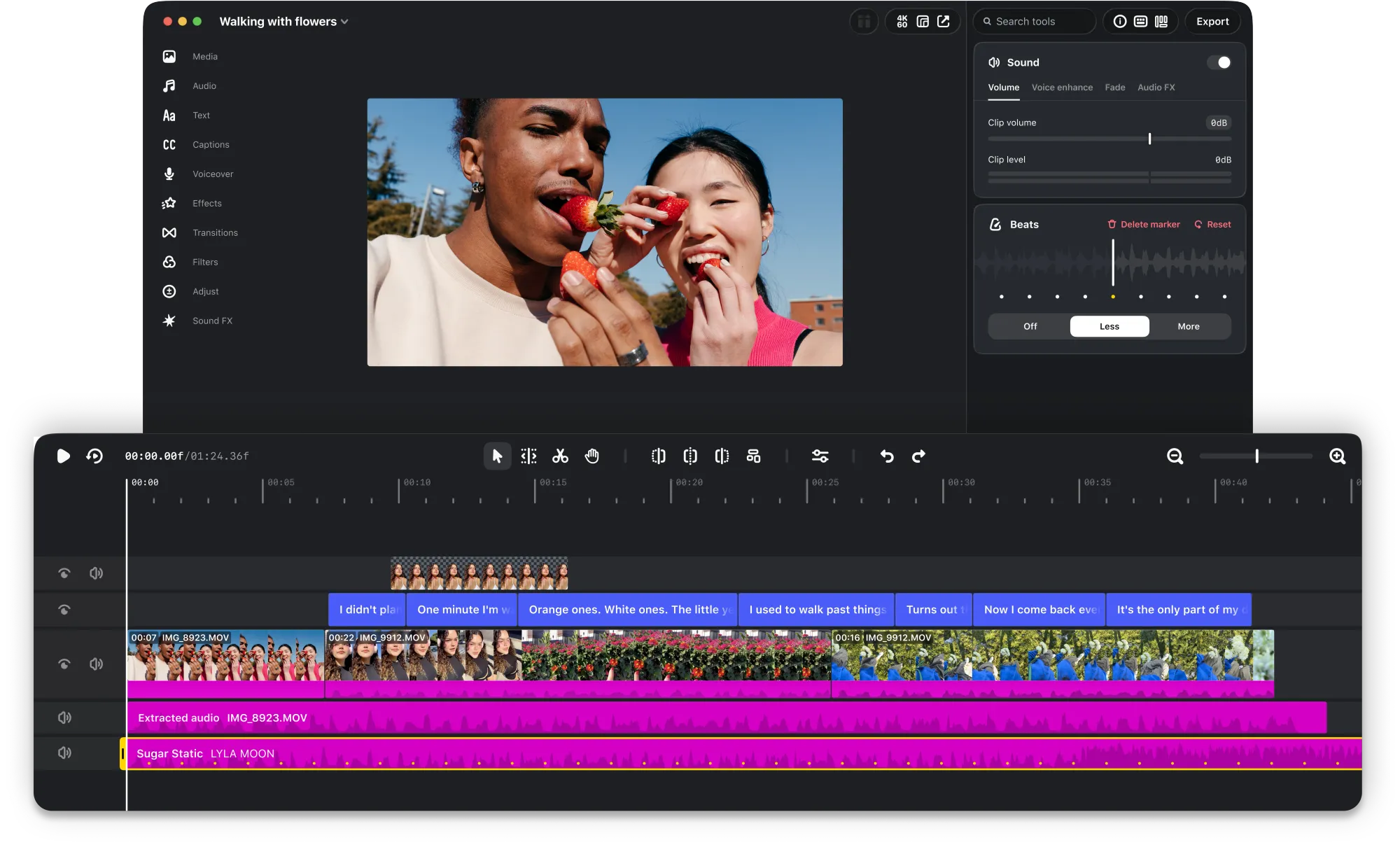
- Full multi-track timeline with keyframes for dynamic transitions.
- Precise audio waveforms for beat-accurate cuts.
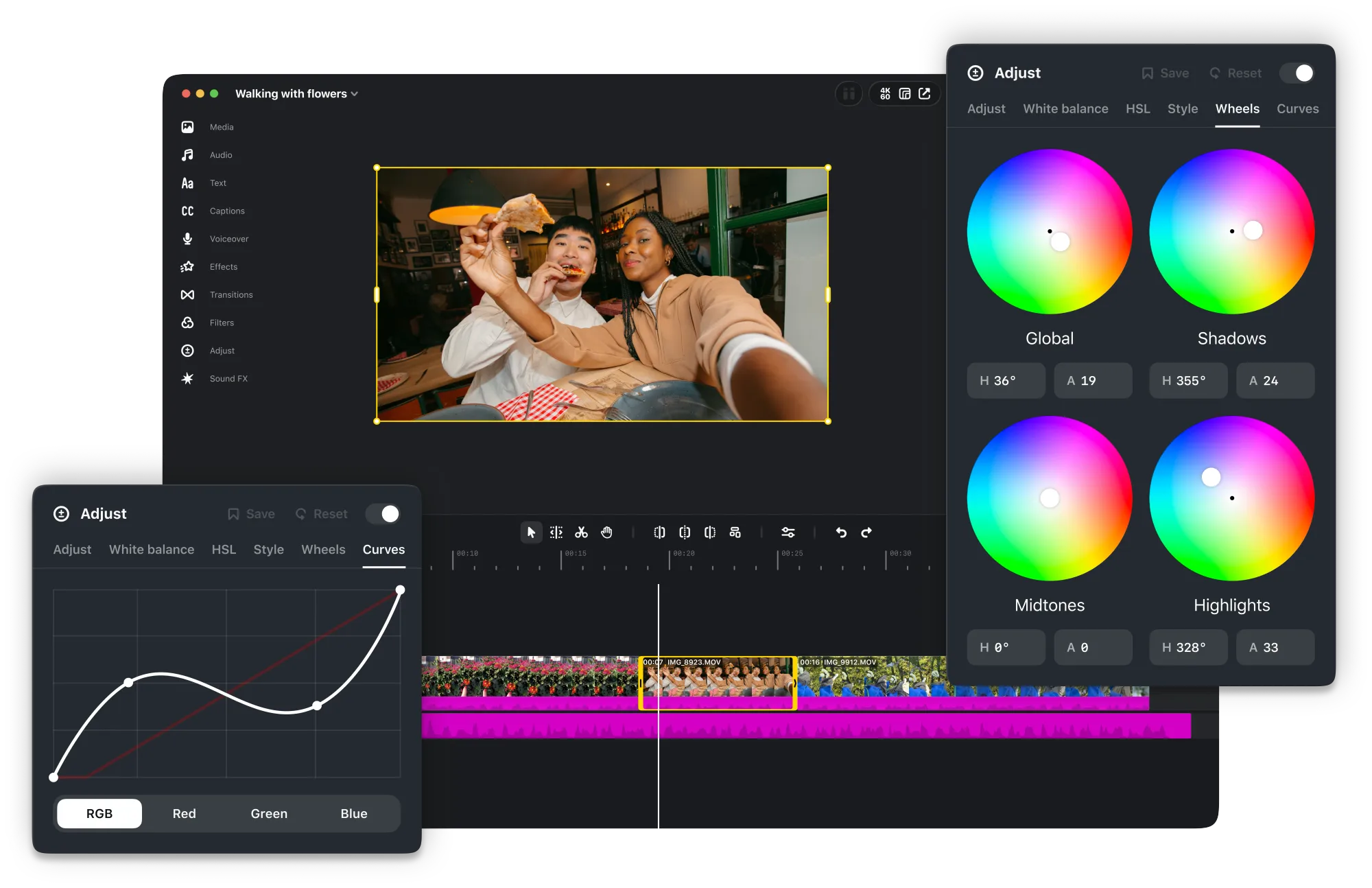
- Professional color grading: color wheels, log conversions, and curves, plus the ability to import your own LUTs and font files.
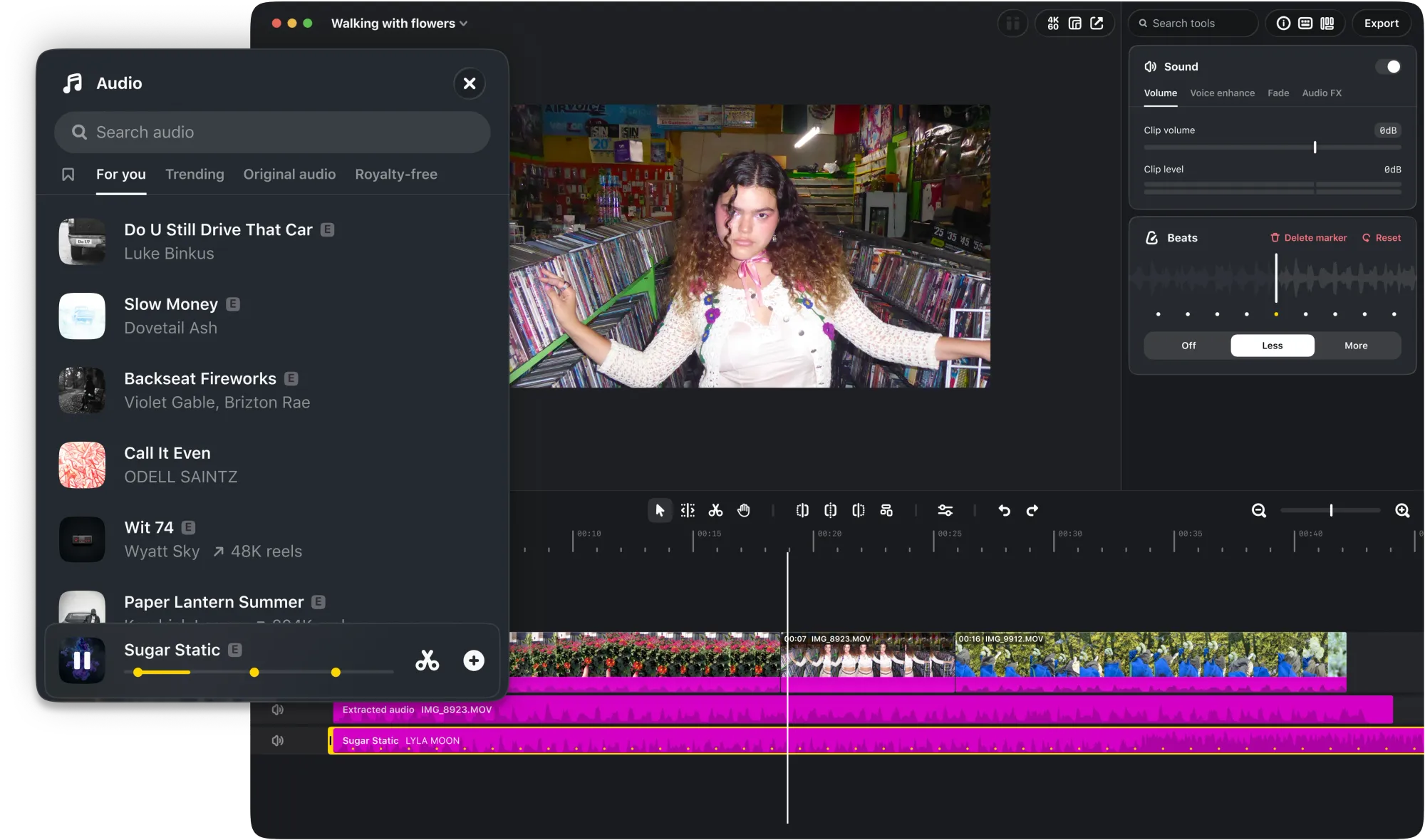
- Licensed and royalty-free audio libraries from Instagram, alongside hundreds of sound and video effects.
- Unlimited automatic captions supporting multiple languages.
- Watermark-free 4K export in multiple aspect ratios, horizontal and vertical.
- Customizable keyboard shortcuts, including carrying your shortcuts over from another editor.
- Direct publishing to Instagram with tagging, location, and trial reels.
AI agent connectivity via MCP
One detail deserves a headline of its own: the app lets you enable MCP in settings to connect external AI agents to your editing workflow. In practice, that means you can build a production pipeline where one agent drafts scripts and variations, another prepares assets, and you make the final creative calls on a big screen.
This fits a broader 2026 shift: handing repetitive production tasks to AI agents while keeping humans on creative judgment. If that working style is new to you, our playbook on delegating to AI agents in marketing and content teams covers the same principles that apply inside this new digital edit bay.
What this means for you as a creator
The real story is not the feature list. It is the new economics. Until last month, a creator who wanted a multi-track timeline, proper color grading, and watermark-free 4K export had two realistic options: pay a monthly subscription for Adobe Premiere Pro, or climb DaVinci Resolve's long learning curve. There is now a third option that costs nothing, was designed from the ground up for reels and short-form thinking, and plugs directly into the platform where the content lives.
Filmmaker Alex Cissé, one of the early testers, summed it up in the official announcement: what desktop changes is space — a bigger screen and more precise controls, while keeping the Instagram music library, profile sync, and direct upload.
Three groups will feel the difference immediately:
- Daily reels creators: audio and text styles from the mobile app sync over, so your visual identity is already waiting on desktop when you sign in.
- Small teams and brands: editing costs approach zero, which quietly rewrites production budgets for growing businesses.
- AI-forward operators: the MCP gateway makes Edits the first mainstream video editor to build external agent connectivity into its core design.
And if scripting is the part of video production you want AI to own, a structured prompt library like the one in ARWriter's prompt library saves hours of manual drafting before you ever open the editor.
Quick comparison: Edits Desktop vs the alternatives
| Criteria | Edits Desktop | CapCut Desktop | Adobe Premiere Pro | DaVinci Resolve |
|---|---|---|---|---|
| Price | Free for now | Free with paid plan for advanced features | Monthly subscription | Free with paid Studio edition |
| Watermark | None on 4K export | None on basic export | None | None |
| Color grading | Wheels, curves, log, custom LUTs | Simplified but solid | Deepest toolset on the market | Industry reference |
| Licensed music library | Yes, from Instagram directly | Large in-app library | Via Adobe Stock | No |
| Direct Instagram publishing | Yes, with tagging, location, trial reels | Manual export | Manual export | Manual export |
| External AI agent connection | Yes, via MCP | Internal AI features | Internal via Firefly | Limited internal tools |
The takeaway: Edits Desktop is not replacing Premiere in a film studio. But for most social media creators it covers roughly 90% of real-world needs at zero cost, with a workflow that already thinks the way they do.
Honest limitations
- Mac only for now: the official post makes no mention of a Windows release date, so Windows users are outside this conversation today.
- Version one: the team promises weekly updates, but any editor in its first release needs time to match the polish of rivals with years of maturity.
- Instagram by design: direct publishing and the licensed music libraries exist to serve Instagram. If your strategy spans TikTok and YouTube, you will still export and upload manually elsewhere.
- Meta account dependency: style sync and libraries require signing in, which ties your core editing tool to your Meta ecosystem account.
That last point deserves a moment of thought from every creator: the deeper a single platform's tools sink into your workflow, the higher the cost of ever leaving. We explored this multi-platform logic in our coverage of Instagram's new guide to labeling AI-generated content — and the golden rule has not changed: create in your own tools, publish wherever your audience lives.
A suggested workflow that combines the best of both worlds
If you want to try the new version practically this week, here is a simple path:
- Idea and script: draft the video script with a dedicated writing assistant instead of starting from a blank page.
- Edit: open Edits Desktop, import your footage, and use the multi-track timeline with the styles synced from your phone.
- Final pass: apply color grading and add automatic captions in your audience's languages.
- Publish and measure: publish directly to Instagram, then export the same vertical cut for other platforms.
Frequently asked questions
Is Edits Desktop really free?
Yes. The official November 5, 2026 announcement describes the tool as free, and no paid plan has been announced for the desktop version as of publication.
Does Edits Desktop work on Windows?
No. The first version is macOS only, and the announcement gave no Windows release date. What was confirmed is ongoing work on seamless cross-device editing between phone and desktop.
Does exporting add a watermark?
No. 4K export is watermark-free and available in multiple horizontal and vertical aspect ratios, according to the official app pages.
What is MCP in Edits useful for?
It lets you connect external AI agents to the editing process, so an agent can handle repetitive work — like generating multiple copy variants to test against your video — while you keep the final creative decision.
Do I need an Instagram account to use the editor?
The app is part of Instagram's ecosystem, and sync features like audio and text styles plus the licensed music libraries are tied to signing in with your account.
Bottom line
The Edits Desktop launch on November 5, 2026 compresses a message into one sentence: Instagram wants to be the complete production hub for short-form video, from idea to publish, at a price of zero. The professional features are there, AI integration is designed in from day one, and updates are promised weekly. Windows remains the missing chapter and Meta lock-in is the honest caveat — but for any Mac-based creator currently paying monthly for an editor whose full power they barely touch, this month is a very good time to redo the math.


