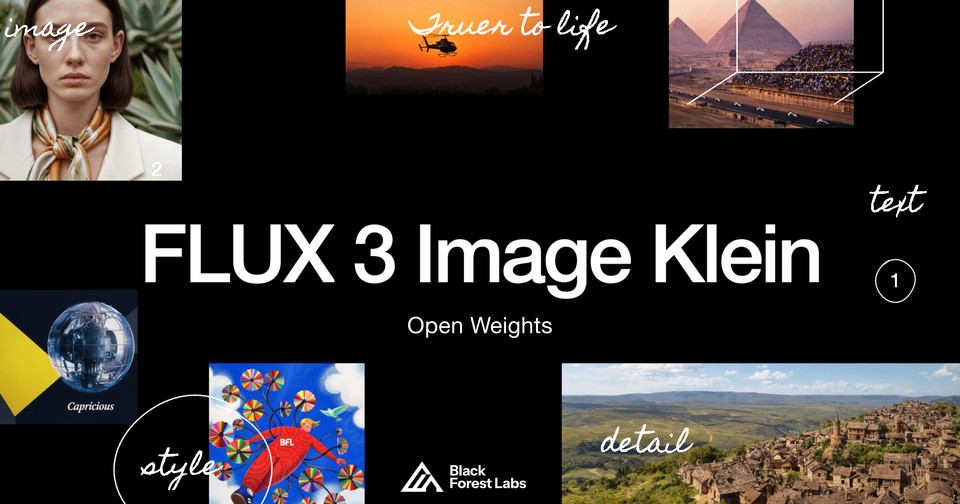
On October 15, 2026, Black Forest Labs released FLUX 3 Image Klein, the open-weights edition of its FLUX 3 image family — and buried inside the announcement is the number that matters most for independent creators: the model runs on as little as 8 GB of VRAM. That single figure moves studio-grade image generation from cloud subscriptions and per-image credits onto the mid-range graphics cards that thousands of freelancers, store owners, and small agencies already own.
This guide breaks down what Klein actually delivers, what the license really allows, how fast it runs on real-world hardware, and where the honest limitations are — straight from the company's official announcement and model card, not from leaked specs or forum chatter. We covered the flagship FLUX 3 Image model in depth in our earlier FLUX 3 pixel-editing review; Klein is a different beast with a different audience, so it deserves its own treatment.
What exactly is FLUX 3 Image Klein?
Black Forest Labs is the company behind the FLUX family, one of the most widely adopted image-generation lineages outside the big closed labs. The main FLUX 3 Image model ships as a hosted API. Klein — German for "small" — is the open-weights sibling: a 5.6-billion-parameter image transformer whose files you can download from Hugging Face and run on your own machine. It is the second open release in the FLUX 3 family, following FLUX 3 Action.
The practical difference is ownership. Until now, getting FLUX-quality output meant a recurring cloud bill or per-image API pricing. Klein introduces a third path: download once, run locally, generate without meters.
The official numbers: size, speed, and memory
From the official announcement and the model card on Hugging Face:
- Parameters: 5.6 B. Weighing in at 11.2 GB in BF16, or 5.6 GB in FP8. The separate text encoder is a Qwen3-VL-4B model under Apache-2.0.
- Minimum viable hardware: 8 GB of VRAM via the INT8 build, in ComfyUI or Diffusers. Peak memory at 1024×1024 on a B200 (prompt upsampler off) is 31 GB in BF16, 26 GB in FP8, and 25 GB in NVFP4.
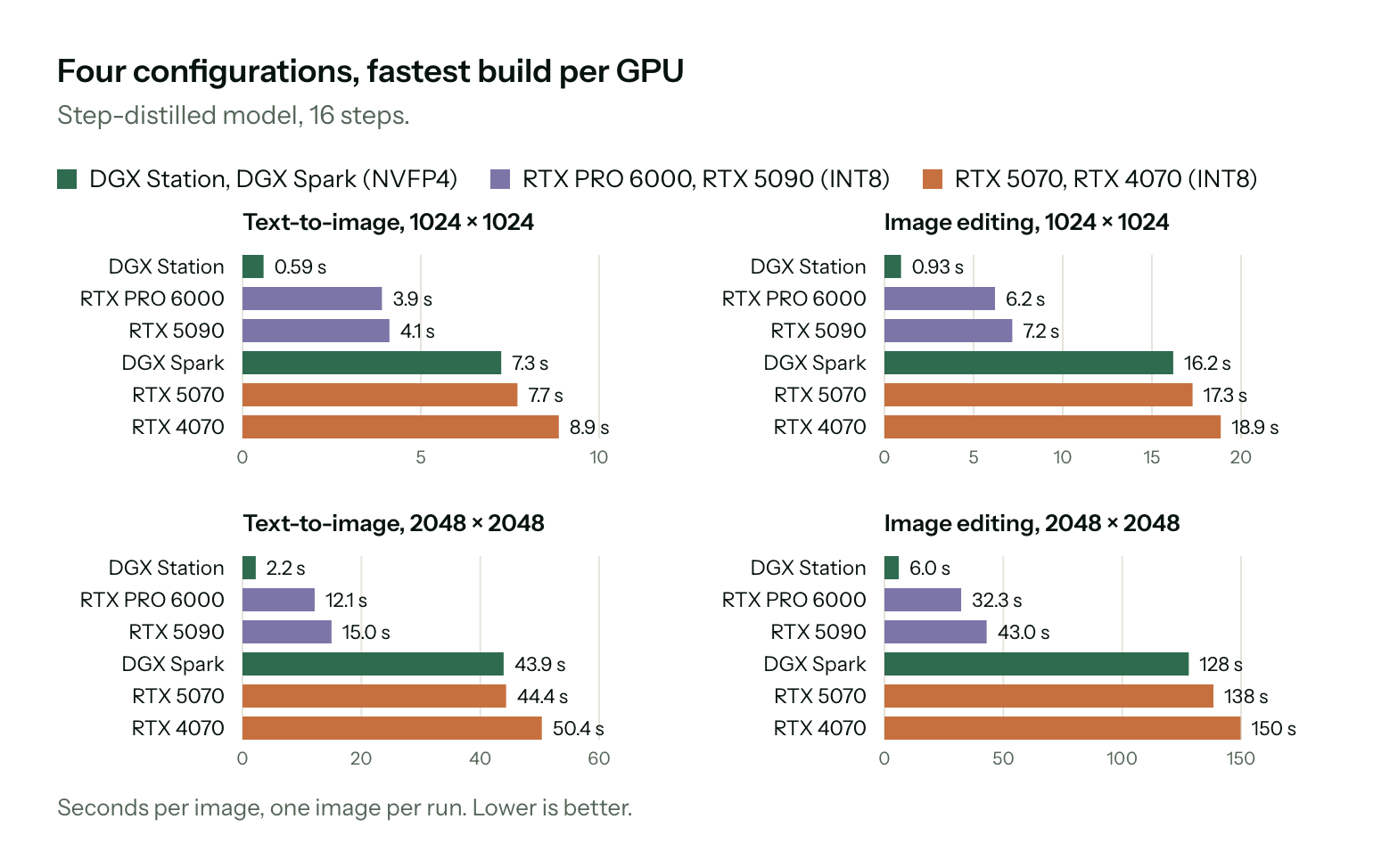
- Speed: about 4 seconds for a 1-megapixel image on an RTX 5090, under 9 seconds on an RTX 4070 (distilled, INT8), and under 0.6 seconds on a GB300 data-center GPU.
- Quality: +91 Elo in text-to-image and +70 Elo in editing over the previous open FLUX.2 Klein (9 B), with 38% fewer parameters. Internally, BFL ranks it first ahead of Qwen-Image 2.1 (7 B), Krea 2 (12.9 B), Ideogram V4.5, and FLUX.2 [pro].
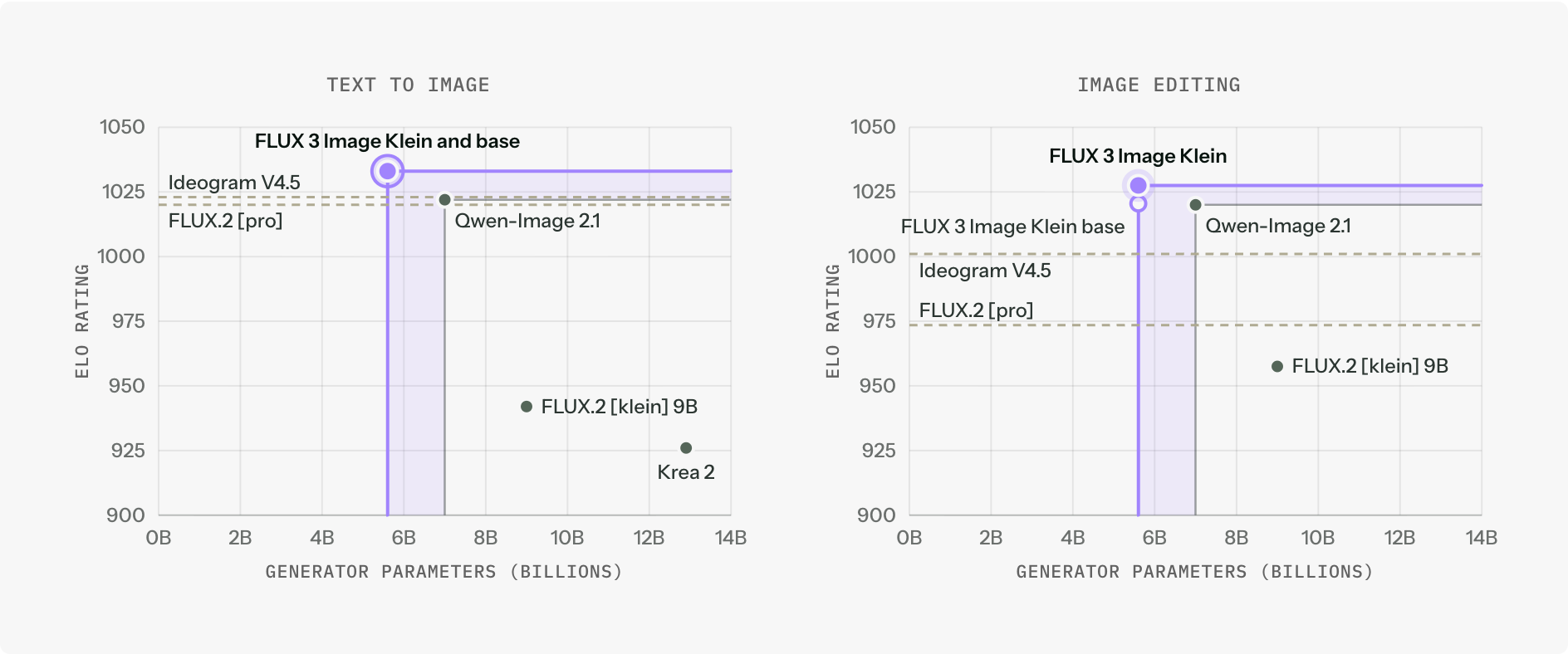
One honesty checkpoint: those comparisons are internal evaluations published by BFL itself. They are consistent with early community reactions, but independent benchmark results typically lag a release by weeks. Treat the rankings as a strong signal, not a verdict.
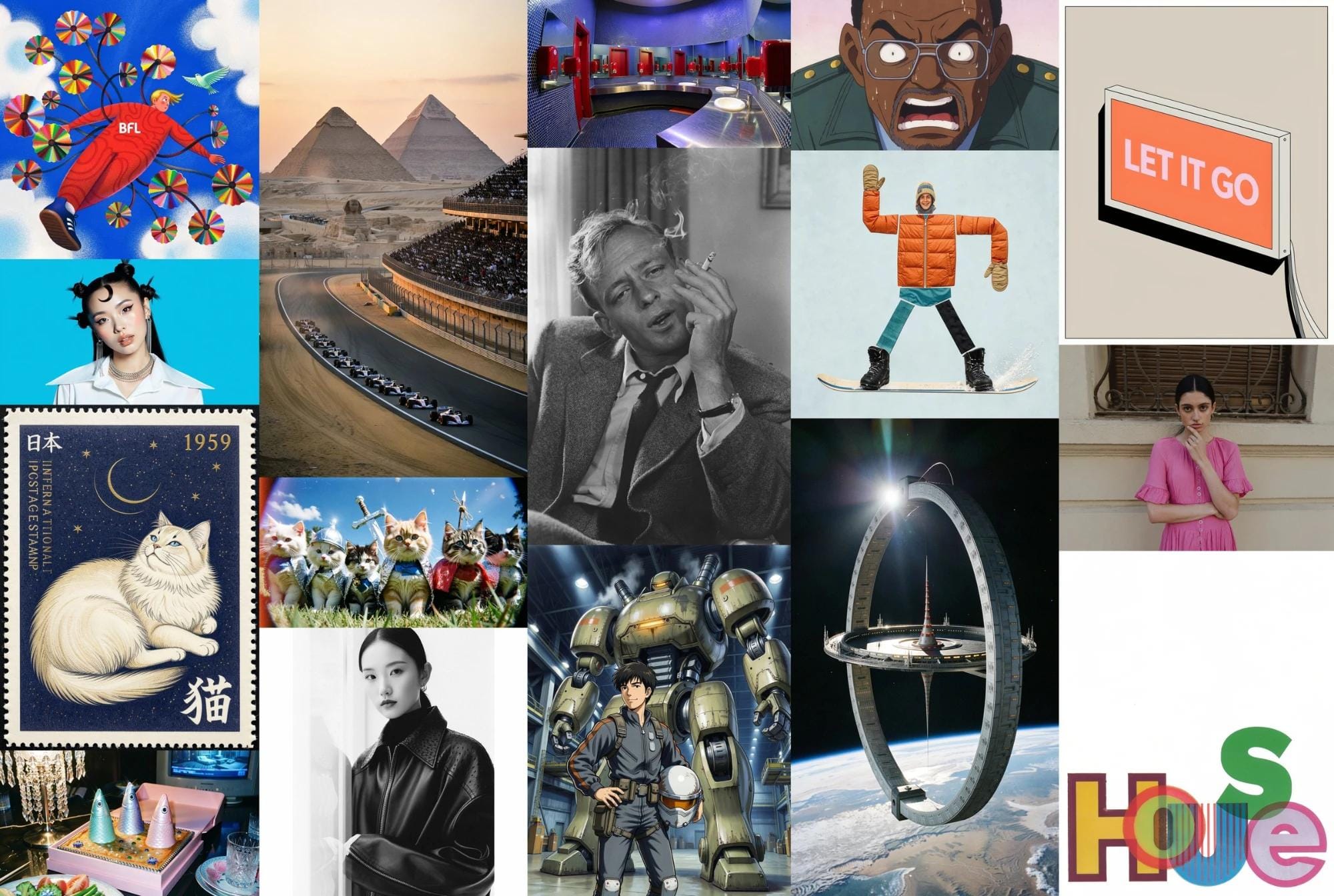
The four capabilities that matter for working creators
Text-to-image with long, structured prompts
The core function: describe a scene in detail and get a rendered image, with 1024×1024 as the default resolution. The FLUX 3 family is built to parse long prompts that specify subject, setting, lighting, lens, and style in one pass — which is precisely how professionals work.
Bounding-box editing without masks
Klein inherits the family's signature layout control: append a JSON list of boxes (on a 0–1000 grid) and the model places, recolors, moves, replaces, or removes elements inside those regions. Boxes act as guidance rather than hard masks, so results blend more naturally than traditional mask-based inpainting.
Up to ten reference images in one call
This is the e-commerce workhorse. Feed the model up to ten reference images — product, model, background, lighting sample — and compose them into a single output. Product photography variations that used to require a studio day become a batch job.
Text rendering inside images
The model renders legible text inside generated images — headlines, banners, label mockups. As with every current image model, English text is the safest bet; test Arabic strings carefully before shipping them to a paying client.
Three ways to start using it today
1. Run it locally (free). Download from the FLUX 3 Image Klein repository. Day-one support covers ComfyUI, Hugging Face Diffusers, TensorRT-LLM, SGLang Diffusion, and vLLM-Omni. Two checkpoints are available: the distilled build (16 steps, no classifier-free guidance, built for speed) and the base build (50 steps, guidance 3.5, built for LoRA fine-tuning).
2. Use the official API. BFL's own API serves the distilled model with prompt upsampling and pixel restoration included, at a listed price of $0.009 per 1,000 images. Median API latency at 1 MP: 4.54 s for text-to-image, 7.18 s for editing. Adding a LoRA costs about 5% extra generation time.
3. Try it first. An official Hugging Face Space and the BFL Playground let you test output quality before downloading 11 GB of weights.
There are no region locks on any of these routes — downloads and API access work globally.
The license, translated into plain terms
Klein ships under the FLUX Kommunity License, which is source-available but not a classic open-source license like MIT. What it actually says:
- Allowed: all non-commercial use, plus commercial use by individuals and companies with less than US$5 M in annual revenue.
- Requires a paid commercial license: organizations above that threshold, via BFL's licensing page — or they can simply use the hosted API instead.
- Prohibited: military applications, surveillance, biometric processing, unlawful imagery, and using outputs to train competing image models.
For context, that revenue ceiling covers essentially every freelancer, solo store owner, and small-to-mid agency in the creator economy. For that group, "free for commercial work" is literally true here.
What this changes for your workflow
- Your image budget can approach zero. If you currently pay a monthly subscription mainly to produce social-media visuals, and your GPU has 8 GB+ of VRAM, the economics now favor local generation — especially for high-volume, lower-stakes assets.
- Unpublished work stays on your machine. Client concepts, unreleased product shots, and campaign drafts never leave your hardware. That matters when contracts include confidentiality clauses.
- Deep customization becomes practical. The base checkpoint is explicitly built for fine-tuning, with LoRA training paths through Ostris AI Toolkit and NVIDIA NeMo AutoModel. An agency can train Klein on a brand's visual identity and serve it internally.
- Prompt quality becomes the bottleneck. The model card is blunt: short prompts produce generic output, and BFL recommends running its dedicated prompt upsampler (a separate 9 B model). The winners with open models are the people who can specify a scene precisely — subject, environment, light, composition, style, constraints. If you want a systematic way to build that skill, ARWriter's image prompt library gives you structured, detailed prompts you can adapt, and the full toolset turns rough ideas into production-ready descriptions.
A concrete local workflow, from idea to published image
If you decide to try Klein this week, this sequence saves hours of trial and error:
- Draft the scene in your own language first. Describe what you want as if briefing a professional photographer: subject, environment, camera angle, lighting, mood, visual style. One page of preparation prevents dozens of regeneration cycles later.
- Rebuild it as a detailed English prompt. Not a literal translation — a technical re-write. Photography vocabulary (soft lighting, shallow depth of field, overhead angle, editorial style) is what the model parses precisely. If that vocabulary is new to you, a structured prompt library gives you editable templates instead of a blank page.
- Start with the distilled checkpoint for iteration. Sixteen steps, no classifier-free guidance, seconds per image. Once the composition locks in, render finals on the base checkpoint at fifty steps.
- Edit with boxes instead of regenerating. The beginner reflex is to re-roll the entire image when one detail is wrong. The professional move: drop a bounding box around the offending element and change only that — faster, cheaper, and the rest of the scene stays untouched.
- Log your winning prompts. Every prompt that produced a great image is a reusable asset. Annotate it with the context where it worked, and within a month you own a private library that compounds.
Who should switch today — and who should wait
- E-commerce owners producing dozens of product images monthly: local generation pays for itself almost immediately, especially with the ten-reference-image capability.
- Freelance designers delivering banners and visual identities: the sub-$5 M commercial license covers you, and LoRA training lets you hold a custom identity per client.
- Bloggers and occasional image makers: if volumes are small and your GPU is weak, the near-free API is simpler than maintaining a local stack.
- Anyone without a qualifying GPU: wait, or stay on the official API until your next hardware upgrade — the license is not going anywhere.
Quick comparison: Klein versus your current setup
| Criterion | FLUX 3 Klein, local | Cloud subscription tools | FLUX official API |
|---|---|---|---|
| Cost | Free (Kommunity license) | Monthly recurring | $0.009 per 1,000 images |
| Hardware needed | 8 GB+ VRAM GPU | None | None |
| Privacy | Everything stays local | Assets cross third-party servers | Requests cross BFL servers |
| Usage limits | Your hardware's throughput | Plan quotas and throttles | Whatever you pay for |
| Customization | Full LoRA fine-tuning | Limited to in-app options | Supported via training tools |
The rule of thumb: high volume, deep customization, or sensitive material → local. Zero-setup speed and maximum polish → cloud.
Honest limitations, before you commit
- The prompt upsampler is heavy. It adds roughly 28 GB of memory on an 80 GB GPU when enabled. Without it — or without writing long, deliberate prompts yourself — quality drops noticeably. 8 GB gets the model running; craftsmanship gets it performing.
- English prompts remain the sweet spot. There is no official documentation of Arabic prompt performance. The practical workflow that works: draft the concept in your language, expand it into a detailed English prompt, then generate.
- Headline benchmarks are first-party. BFL's Elo claims are self-published; wait for independent leaderboards before betting a client deliverable on a specific margin.
- The download is real. 11.2 GB (BF16) or 5.6 GB (FP8) — plan disk space and bandwidth, and expect laptop GPUs to trail the desktop timings above.
- It outputs images, not layouts. Klein generates and edits pictures; it will not assemble a multi-panel carousel or write your copy. The surrounding workflow — ideation, copy, and structure — is still yours, and that is exactly where a writing platform earns its keep.
Frequently asked questions
Is FLUX 3 Klein really free?
Downloading and running it is free for personal, non-commercial use, and for commercial use by individuals and companies earning under $5 M per year under the FLUX Kommunity License. Larger organizations need a commercial license or the official API.
Will it run on my current PC?
If your graphics card has at least 8 GB of VRAM — RTX 3060, RTX 4060, or newer — the INT8 build in ComfyUI or Diffusers will run it. Expect a 1 MP image in under 9 seconds on an RTX 4070 with the distilled checkpoint.
Can I use the images in ads and client work?
Yes, if your annual revenue is below $5 M, commercial output is licensed. Avoid the prohibited categories (surveillance, biometric processing, and the rest of the license's section 4).
How is Klein different from the flagship FLUX 3 Image?
The flagship is a closed, API-first model aimed at maximum quality with zero infrastructure. Klein is the smaller open-weights sibling you host yourself. Our full FLUX 3 Image explainer covers the flagship in detail.
Can I prompt in Arabic?
You can try, but documented results are strongest with long, detailed English prompts. A reliable pattern: outline the idea in Arabic, expand it into a structured English prompt, generate, iterate. Building those structured prompts is faster with a dedicated image prompt library.
The bottom line
FLUX 3 Klein changes the cost equation of AI imagery: near-flagship quality on consumer hardware, a license that makes commercial use free for almost the entire creator economy, and an API fallback priced at fractions of a cent per thousand images. The constraint has quietly shifted from "can I afford the tool?" to "can I describe the image?" — and that is a skills problem, not a budget problem.
Start where the leverage is: build a set of detailed, reusable prompts for the visuals you make every week, then point Klein at them. Your GPU handles the rest.
Official sources: Black Forest Labs announcement · FLUX 3 Image Klein model card · Diffusers integration post.