Grok Imagine 2.0: xAI's Image Generator Now Rivals OpenAI for Content Creators
On August 7, 2026, xAI — Elon Musk's artificial intelligence company — released Grok Imagine 2.0, the second generation of its AI image generation and editing model. Now live as the default Quality Mode on grok.com/imagine and the Grok iOS and Android apps, this update shifts the focus from one-shot image generation to precise, iterative editing — the exact workflow that content creators, marketers, and e-commerce store owners need.
The headline feature isn't raw image quality (though that's impressive). It's the ability to fix one element of an AI-generated image without destroying the rest. If you've ever spent an hour regenerating the same prompt because one detail was off — a weird hand, garbled text, the wrong color — Grok Imagine 2.0 eliminates that frustration.
Key Features for Content Creators
What sets Grok Imagine 2.0 apart isn't the number of features but their type. These are tools built for someone producing visual content daily — not a casual user generating a fun image and moving on.
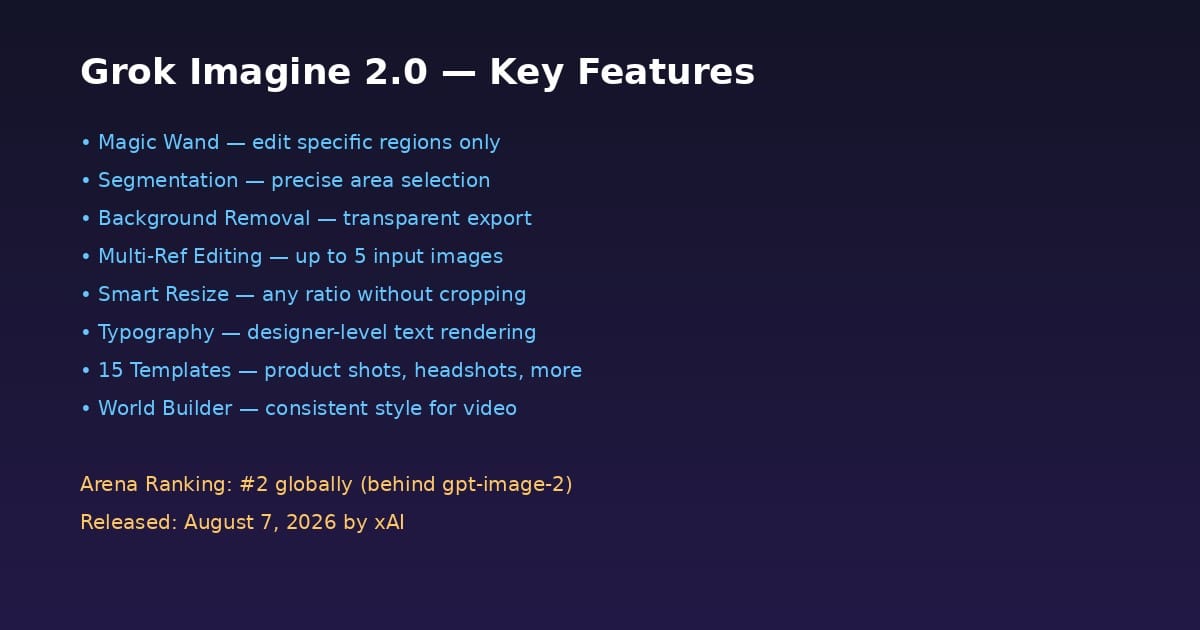
1. Magic Wand Tool
This feature alone deserves attention. Imagine you've generated a product image for your e-commerce store, but the shadow looks unnatural. Instead of regenerating dozens of times hoping for a better result, you select the shadow area with the Magic Wand, type a simple instruction like "soft natural shadow on white floor," and only that region changes. The rest of the image stays untouched.
Critically, the original image isn't replaced — you can make multiple incremental edits to the same image, each targeting a different area, until you reach the perfect result.
2. Segmentation
The segmentation tool lets you select a specific area with high precision — change the color of a person's shirt without affecting the background scene, for example. The tool automatically identifies objects and separates them from their surroundings, saving minutes of manual masking in traditional editing software.
3. Background Removal
A core need for every e-commerce store owner: export your product with a transparent background ready for any design. The tool separates the subject from the background in a single click, producing a clean cutout ready for store listings, social media ads, or composite designs.
4. Multi-Reference Editing
The tool accepts up to five reference images in a single generation. Why does this matter? Imagine you want a product image that combines a color from one photo, a composition from another, and a camera angle from a third. This kind of compositing used to require a professional designer in Photoshop — now it happens with a single text prompt.
5. Smart Resize
The classic problem: you have a square image for Instagram and need the same visual as a horizontal banner for your website. Traditional cropping throws away part of the image. Smart Resize doesn't crop — it recomposes the image at the new ratio, filling in the frame with details consistent with the original scene. From a narrow 1:2 banner to a wide 16:9 screen, the result looks like it was originally shot at that size.
6. Typography and Layout Planning
One of the biggest weaknesses of AI image generators has always been garbled text. Grok Imagine 2.0 plans typography and layout "the way a designer would," keeping text sharp and clear even at small sizes, and arranging multiple elements coherently within the frame. This makes the tool suitable for infographics, posters, and social media graphics that need readable text.
7. Fifteen Built-in Templates
The tool ships with 15 templates covering common workflows: photo editing, product shots, professional headshots, icons, game assets, e-commerce listings, and more. Instead of starting from scratch, you pick the relevant template and customize it — dramatically accelerating production for anyone working on repetitive projects.
8. Build a World for Video
For visual storytellers, this is a strategic feature: create a character with a specific appearance, then generate scenes of that character in different locations, from multiple angles, while maintaining a consistent visual style across every image. This opens the door to producing visually coherent content for a story or brand identity, where every image feels like it belongs to the same world.
Global Ranking and Performance
According to xAI, Grok Imagine 2.0 ranks second globally on both the Text-to-Image Arena and Image Edit Arena leaderboards (as of August 7, 2026), trailing only gpt-image-2 from OpenAI, which holds the top spot with a record Elo lead. The models are listed on Arena under the name SpaceXAI.
Does this mean Grok Imagine 2.0 is always the best choice? Not necessarily. The ranking measures overall performance across thousands of evaluations, but a content creator's needs may differ. The precise editing tools (Magic Wand, Segmentation, Smart Resize) may give Grok a practical advantage over gpt-image-2 in day-to-day production workflows, even if raw image quality is comparable.
What This Means for You as a Content Creator
If you produce visual content daily — whether for an e-commerce store, social media account, blog, or design service — Grok Imagine 2.0 reshapes the time-cost equation in four tangible ways:
First: shorter revision cycles. Previously, if a generated image had a minor flaw (extra finger, weird text, wrong color), you'd regenerate 5-10 times to get an acceptable result. Now you fix the flaw in place. This cuts production time from hours to minutes.
Second: visual consistency. The Build a World feature means you can create a consistent visual identity for your brand or account — same character, same style, across every post. This used to require either a human designer or hours of manual editing.
Third: integrated workflow. With background removal, smart resize, and built-in templates, you move from "generate an image" to "produce a ready-to-publish visual asset" in a few steps. No need to open Photoshop or Canva to post-process what the tool generated.
Fourth: Arabic language support. One of xAI models' historical strengths is solid Arabic language support. If you write Arabic content, combining Grok's image generation with integrated Arabic writing tools like ARWriter completes the picture: generate text in Arabic, generate matching visuals, all from one ecosystem.
Quick Comparison: Grok Imagine 2.0 vs. Alternatives
| Criteria | Grok Imagine 2.0 | ChatGPT (gpt-image-2) | Midjourney | Canva AI |
|---|---|---|---|---|
| Raw image quality | Excellent (ranked #2 globally) | Highest rated | Excellent for artistic work | Good for quick use |
| Precision editing tools | Strongest (magic wand, segmentation, smart resize) | Limited | Not available (separate) | Traditional Canva tools |
| Built-in templates | 15 specialized templates | None | None | Thousands (but not AI-native) |
| Background removal | Built-in | Limited | Not available | Available as separate tool |
| Arabic text support | Good (xAI models) | Moderate | Weak | Good |
| Price for full access | X Premium ~AED 29/mo | ChatGPT Plus $20/mo | $10-60/mo | $12.99-119.99/mo |
| API access | Coming soon (not yet available) | Available | Not available | Available (limited) |
The takeaway: Grok Imagine 2.0 leads in editing and workflow, while ChatGPT leads in raw image quality, and Midjourney leads in artistic style. The right choice depends on what you need most: polished output or production control.
Pricing and Availability in the Gulf Region
Grok Imagine 2.0 is available now at grok.com/imagine and on the Grok iOS and Android apps. Full access requires an X (formerly Twitter) subscription, with UAE and Gulf pricing at:
- X Premium: AED 29/month (AED 309/year)
- X Premium+: AED 146/month (AED 1,450/year)
There's also a free tier on grok.com that allows a limited number of test generations — enough to evaluate the tool before committing to a subscription.
For comparison, if you're already using ARWriter's content tools for Arabic writing (starting at $4.99 for the Plus plan), adding an X Premium subscription at a similar price point gives you a complete ecosystem: Arabic text from ARWriter + professional visuals from Grok Imagine.
As for the API — needed by anyone who wants to automate image generation within their apps or websites — xAI has announced it's coming soon, but without specific pricing yet. This means the tool is currently a consumer product, not a developer-ready platform for integration.
Honest Limitations and Drawbacks
Despite the impressive features, there are real constraints you should know before building your workflow around this tool:
- API not yet available. If you want to automate image generation within scripts or applications, you'll need to wait. There's no specific launch timeline.
- X subscription required. Full access is gated behind an X Premium or Premium+ subscription. This means paying for an additional platform you might not use for other purposes.
- No guarantee of perfect consistency. Despite improved typography and layout, you may still occasionally encounter errors in text or fine details. AI isn't perfect yet.
- Fast-moving competition. OpenAI holds the top spot and may release an update that shifts the landscape. Investing exclusively in one tool may not be wise long-term.
- Geographic availability. While grok.com is accessible from most countries, there may be restrictions in some regions. Test the free tier first to confirm.
- Commercial usage rights. Review xAI's terms of service regarding commercial use of generated images, especially for products and brand identity materials.
Frequently Asked Questions
Is Grok Imagine 2.0 free?
There's a limited free tier on grok.com that allows a small number of test generations. For full access to all features including the Magic Wand and multi-reference editing, you need an X Premium subscription at AED 29/month in the UAE.
Does Grok Imagine 2.0 support Arabic text inside images?
The tool supports generating text within images better than previous versions, and Arabic language support is generally a strength of xAI models. However, Arabic text inside images may not always be perfect — experiment and regenerate when needed.
How does Grok Imagine 2.0 compare to Midjourney?
Grok Imagine 2.0 excels in precision editing tools and practical production workflow (templates, background removal, smart resize), while Midjourney excels in artistic style and aesthetics. For daily commercial use and product imagery, Grok is more practical. For creative and artistic work, Midjourney may be the better choice.
Can I use Grok Imagine 2.0 images commercially?
Review xAI and X's terms of service regarding commercial use of generated images. Generally, most AI platforms allow commercial use under certain conditions, but it's important to verify before using images in brand identity or sellable products.
What's the difference between Grok Imagine 2.0 and Grok Imagine Video?
Grok Imagine 2.0 is a static image generation and editing tool, while Grok Imagine Video (released July 2026) is a separate tool for video generation. Both are from xAI but serve different purposes.
How to Get Started with Grok Imagine 2.0
Getting started is straightforward and requires no technical expertise. Open grok.com/imagine in your browser or download the Grok app on your phone. If you have an X Premium or Premium+ subscription, all features are immediately available. Without a subscription, you can use the free tier for a limited number of test generations.
Here's a practical workflow to get started:
- Start with a template — rather than writing from scratch, choose one of the fifteen built-in templates (product shots, headshots, etc.). This gives the tool clear context about what you want.
- Write a detailed prompt — the more details (angle, lighting, colors, style), the more precise the result. Mention elements you want and those you don't.
- Refine with Magic Wand — after the first generation, use the Magic Wand to fix any unsatisfying detail instead of regenerating from scratch.
- Try Multi-Ref — if you have reference images for the style you want, upload them (up to 5) to guide generation more precisely.
- Export at the right size — use Smart Resize to generate multiple versions at different aspect ratios (square for Instagram, horizontal for web, vertical for stories) from a single image.
Practical tip: save the prompts that give the best results. Like any AI tool, learning from experience is the key to consistently professional output. Keep a folder of successful prompts and reuse them with minor adjustments per project.
The Broader Context: The Grok Ecosystem and xAI's Strategy
Grok Imagine 2.0 doesn't exist in isolation. It's part of an integrated Grok ecosystem that includes text chat, video generation (Grok Imagine Video), and voice tools. xAI is investing heavily in building a comprehensive AI platform to compete with OpenAI, Google, and Anthropic.
What this means for content creators: if you're already using Grok for chat and research, adding image production within the same platform eliminates the need to jump between tools. You write your content in Grok, generate matching visuals in Grok Imagine, and everything lives in one place.
The strategic challenge xAI faces is the speed of competition. OpenAI evolves rapidly, and Google Gemini improves constantly. What distinguishes xAI is integration with the X platform (formerly Twitter) — giving Grok real-time data that competitors don't have. But the long-term question is whether this integration is enough to maintain a competitive edge in a market that shifts weekly.
Conclusion: Is It Worth Trying?
Grok Imagine 2.0 represents a meaningful shift in AI image generation tools — not because of image quality alone (which is excellent but not the world's best), but because of the integrated editing workflow that shortens the path from idea to publish-ready asset.
For content creators working daily with images — whether for e-commerce, social media, or design services — the tool is worth evaluating via the free tier first, then assessing whether the editing features justify an X Premium subscription.
And if you're looking for an integrated platform that writes and designs your content, ARWriter complements Grok Imagine with professional Arabic writing tools starting at $4.99 for the Plus plan. Good Arabic text and good visuals are the complete equation for content your audience notices.